How to Run a Design Pattern Library Review in 6 Steps

Saloni Kohli
Created on Aug 14, 2026
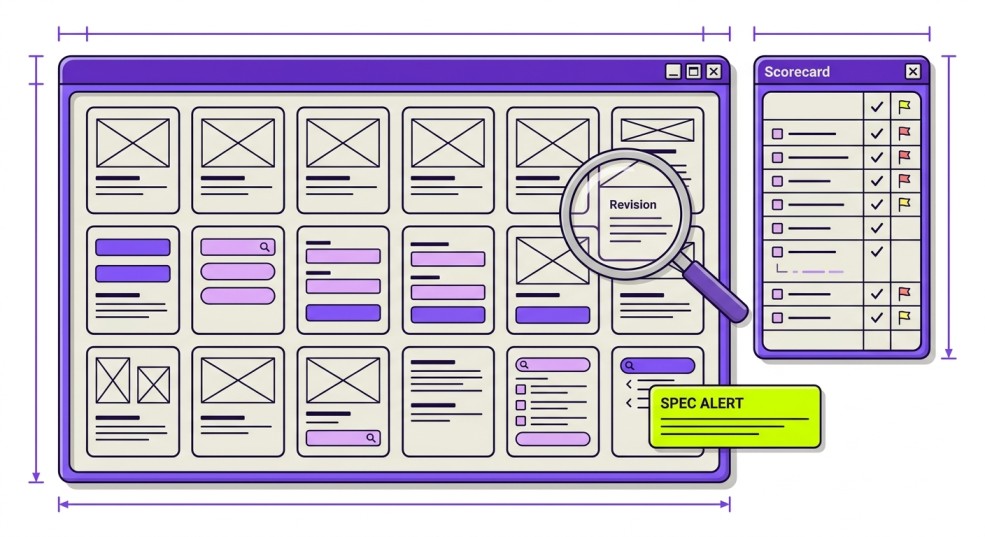
A design pattern library review is a structured, recurring evaluation of an existing pattern library. It reviews every documented pattern to confirm it's still consistent, accessible, well documented, and actively used before deciding whether to keep, improve, merge, or retire it.
As products evolve, new variations appear, documentation falls behind, and the library gradually stops reflecting what's actually being built.
A structured, recurring review brings the library back in sync with what you're actually shipping.
This guide walks through a practical six-step process, a reusable scorecard, the metrics to track, and the issues these reviews tend to uncover.
What is a design pattern library review?
A design pattern library review is a periodic check of every documented pattern in your library to confirm it's still consistent, accessible, actively used, and correctly documented.
By the end of the review, every pattern should have a clear outcome: keep, revise, merge, or deprecate.
For context, a pattern library is a documented set of reusable UX solutions, like search, forms, checkout flows, onboarding, and empty states, built from multiple components working together to solve common user tasks.
Good pattern documentation should explain when to use it, how it behaves in different states, accessibility considerations, and implementation guidance. Those are the things you'll evaluate during a review, not just whether the interface looks polished.
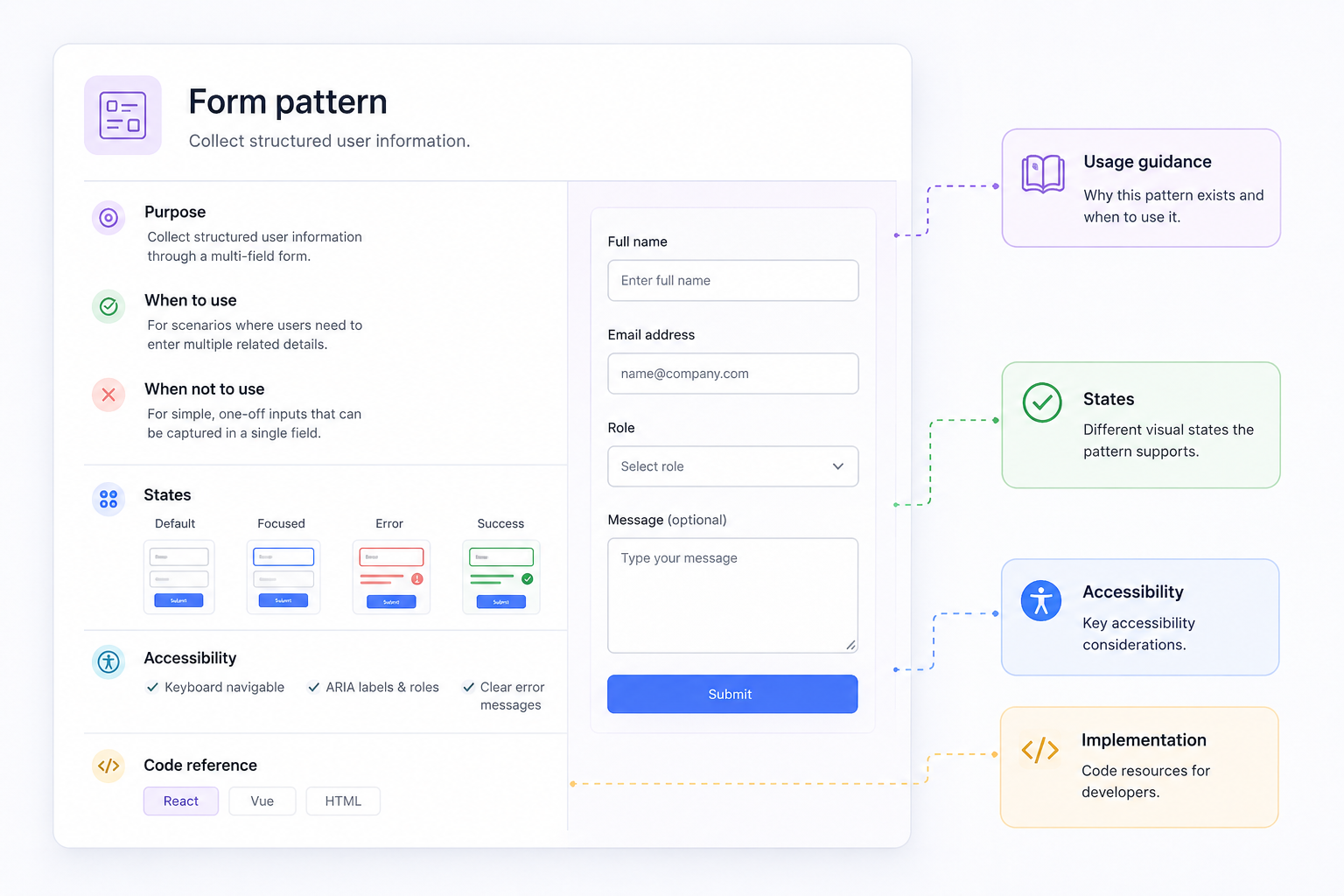
This is also what distinguishes a scalable pattern library from a component library. A review looks at how patterns behave, how they're documented, and whether they still solve the right problem, not just whether individual UI components look correct.
A good example is Shopify Polaris, where every documented pattern includes usage guidance, behavior, accessibility considerations, and implementation details alongside the UI itself.
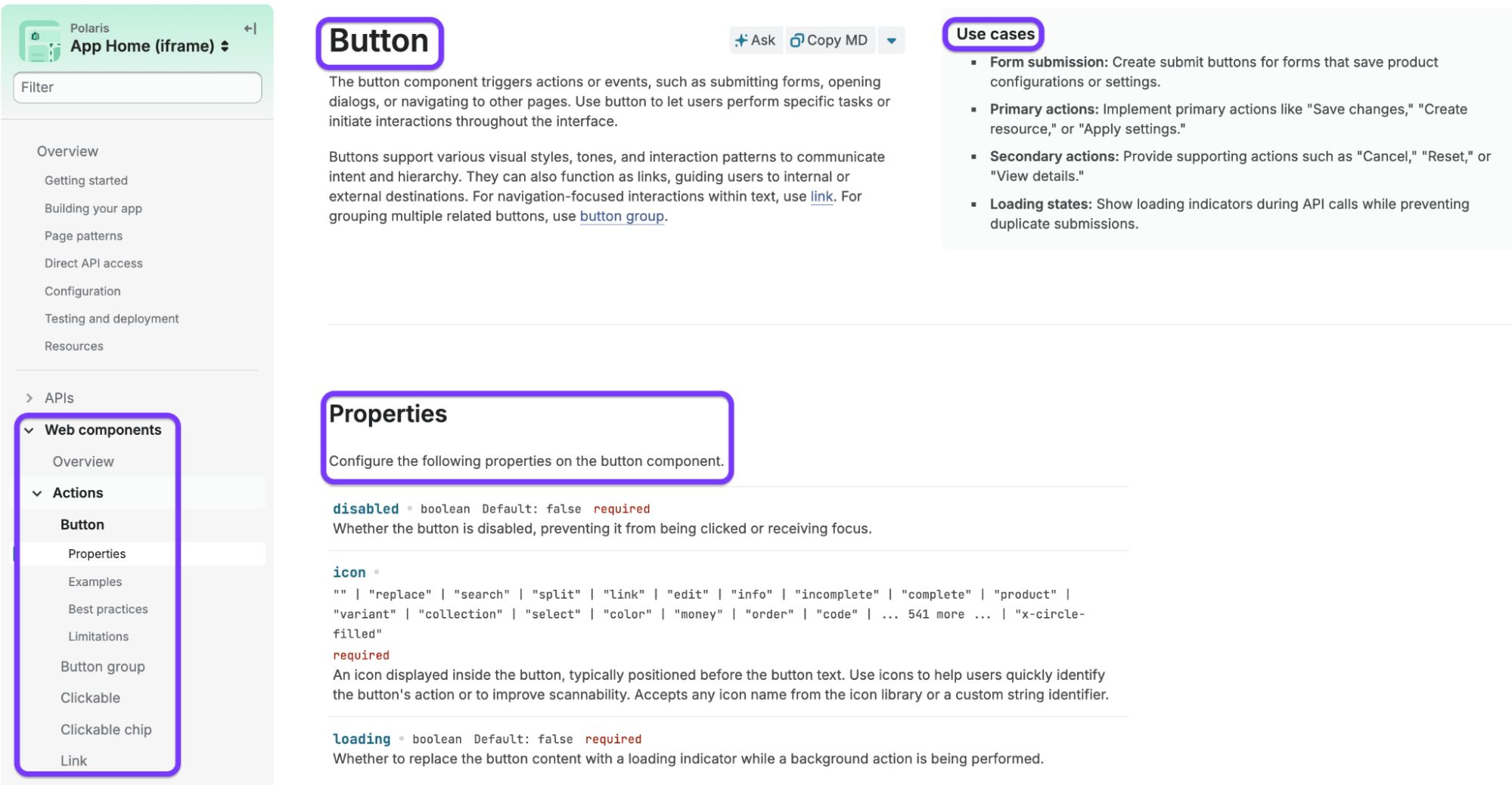
That's the standard a pattern library review should measure against.
Design system vs. pattern library: what's the difference?
A pattern library documents reusable interaction patterns and the guidance for using them consistently across a product. A design system is the broader framework that brings together design principles, tokens, existing components, patterns, documentation, and governance to keep teams building in a consistent way.
The confusion usually comes from another closely related term: component library. While people often use all three interchangeably, they each solve a different problem.
Here’s a quick breakdown of all three and how they differ:
|
Component library |
Pattern library |
Design system |
|
|
What it contains |
Individual UI building blocks like buttons, inputs, checkboxes, cards, and icons |
Groups of components combined into reusable interaction patterns, along with guidance, states, accessibility notes, and usage examples |
Design foundations, tokens, components, patterns, documentation, contribution guidelines, and governance |
|
The question it answers |
What does this UI element look like and how should I build it? |
How should these components work together to solve a user task? |
How should teams design and build products consistently? |
|
Who uses it most |
Designers and developers implementing interfaces |
Product designers, UX designers, content designers, and developers building user flows |
Entire product organizations, including design, engineering, product, and design system teams |
The biggest difference between all three is the level of abstraction:
-
A component library documents individual pieces of the interface.
-
A pattern library explains how those pieces come together to solve recurring user problems, whether that's completing a form, searching for content, signing up for an account, or recovering from an error.
-
A design system sits above both, providing the foundations, rules, and governance that keep everything aligned.
That's why a design pattern library review focuses on patterns instead of individual components. A button might still meet every visual guideline, but the form it belongs to could be inconsistent, poorly documented, inaccessible, or no longer reflect how the product works today.
The GOV.UK Design System is a good example of this separation in practice.
Rather than grouping everything together, it organizes Styles, Components, and Patterns as distinct sections.
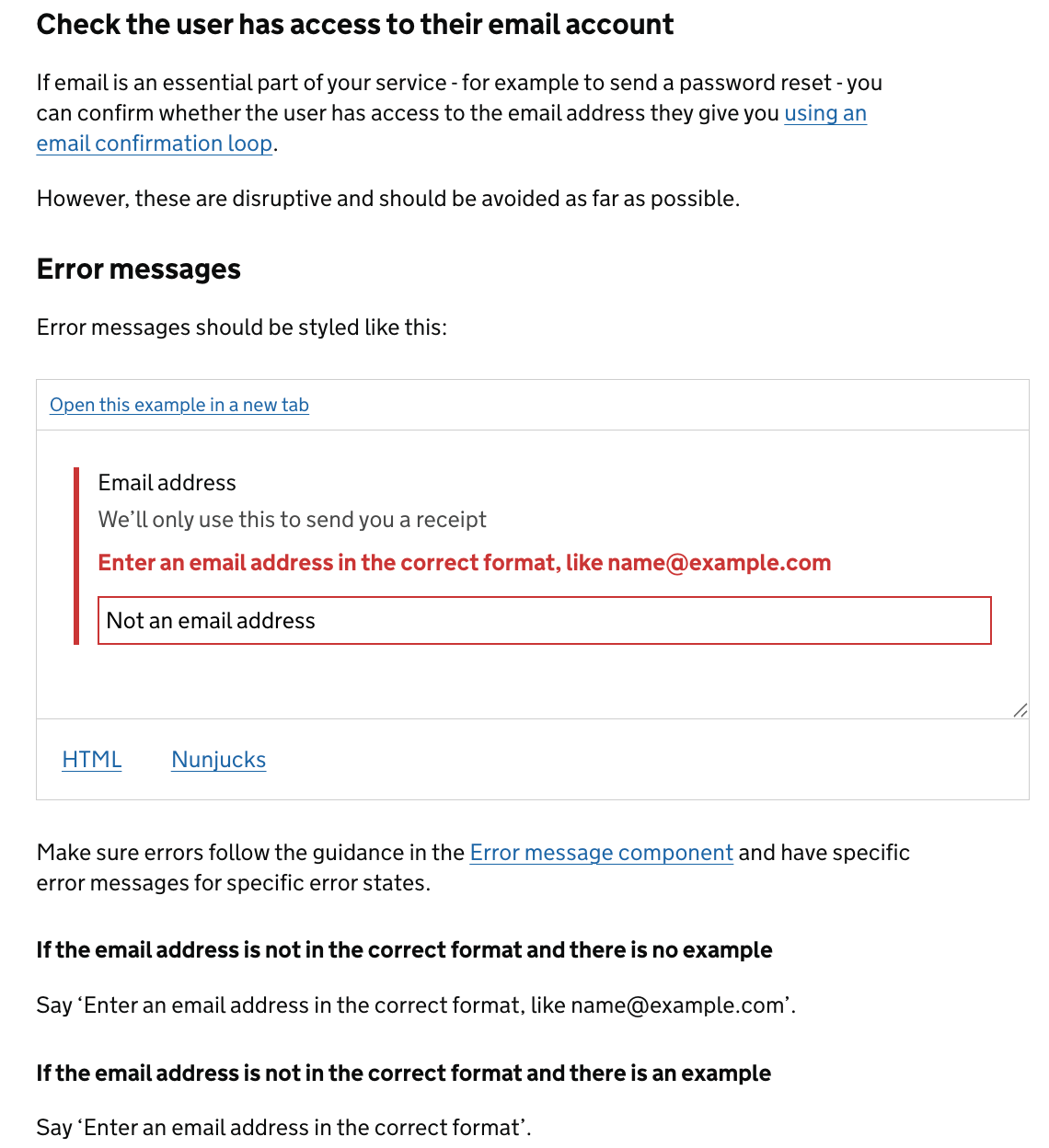
Its pattern documentation goes well beyond UI by explaining when a pattern should be used, how it works, accessibility considerations, validation guidance, and common implementation details.
For example, the Email addresses pattern includes usage guidance, error states, validation recommendations, accessibility advice, and implementation examples, not just the input field itself.
In practice, the boundaries aren't always this neat.
Some teams fold patterns into their component library, while others treat them as part of their design system documentation. But before you begin a review, make sure everyone agrees on what's actually in scope.
That's the first step toward a review that produces clear, actionable decisions instead of debating terminology.
Why do pattern libraries drift without regular reviews?
Without regular reviews, pattern libraries drift because products evolve faster than the library structure itself.
New features get shipped, teams solve similar problems in slightly different ways, and standards (especially accessibility requirements) continue to change. Over time, the "source of truth" quietly stops being true.
The signs usually appear gradually:
-
Duplicate or near-identical patterns start solving the same problem in different ways.
-
Competing variants of the same interaction emerge because different teams create their own solutions instead of reusing existing ones.
-
Outdated patterns continue to circulate long after the product has moved on.
-
Documentation falls out of sync with what's actually shipping, making it harder for designers and developers to know which pattern to trust.
-
Accessibility debt accumulates, with older patterns that no longer meet current standards or newer requirements.
According to Deque, 67% of accessibility issues originate in design, which means problems introduced into an unreviewed pattern library can be repeated across every product and screen that reuses those patterns.
Catching them during a review is far less expensive than fixing them after implementation.
But the payoff isn't just a cleaner library. You also get faster product work.
Netguru's Silk design system showed that maintaining a well-audited, consistent component library helped teams save 3-6 days during the design phase, while a full rebranding was completed in about three working days.
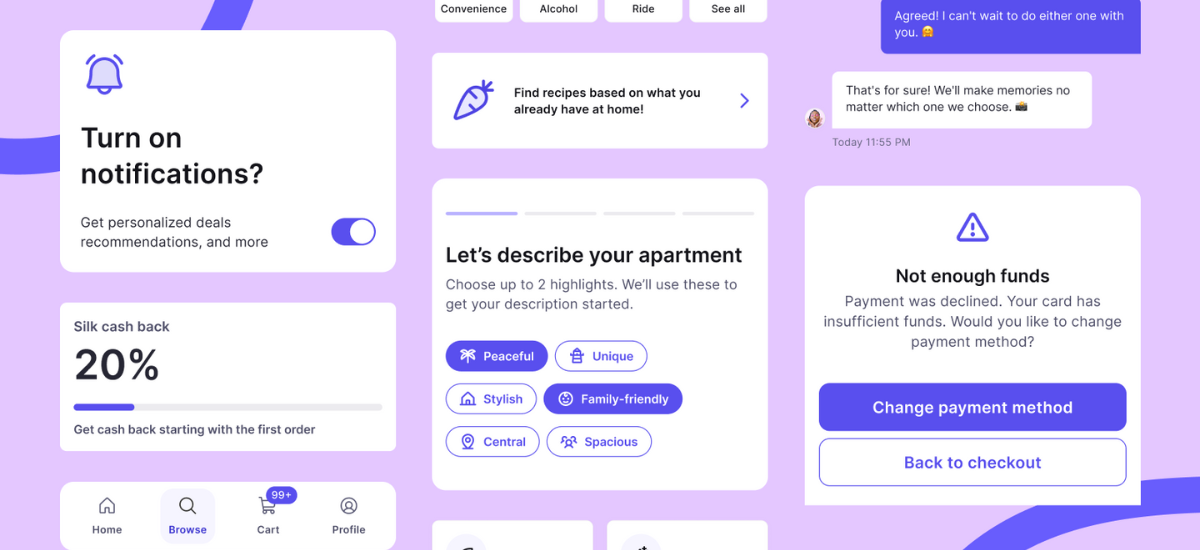
A healthy library reduces rework because teams spend less time deciding what to build and more time building it.
How often should you review your own pattern library?
There's no single correct review cadence, but most teams should run two review loops in parallel: a continuous review as new patterns are added, and a deeper, scheduled review of the entire library every quarter, or at least twice a year.
More importantly, don't rely on the calendar alone.
A review is also worth scheduling when you ship a rebrand, migrate to a new platform, adopt updated accessibility standards such as a new WCAG release, onboard multiple teams, or start hearing the same question repeatedly:
"Which pattern should I use?"
The two review loops serve different purposes:
-
Continuous review: Evaluate every new or updated pattern before it's added to the library.
-
Periodic review: Assess the health of the entire library, looking for duplication, outdated patterns, documentation gaps, and inconsistencies.
Keeping both loops in place prevents small issues from turning into larger cleanup projects later.
How to run a design pattern library review: a 6-step process
A design pattern library review works best when you follow a structured process rather than evaluating patterns one at a time.
You should start by defining the scope, then inventory and assess every pattern, validate accessibility, identify redundant or outdated patterns using usage data, and prioritize what needs to happen next.
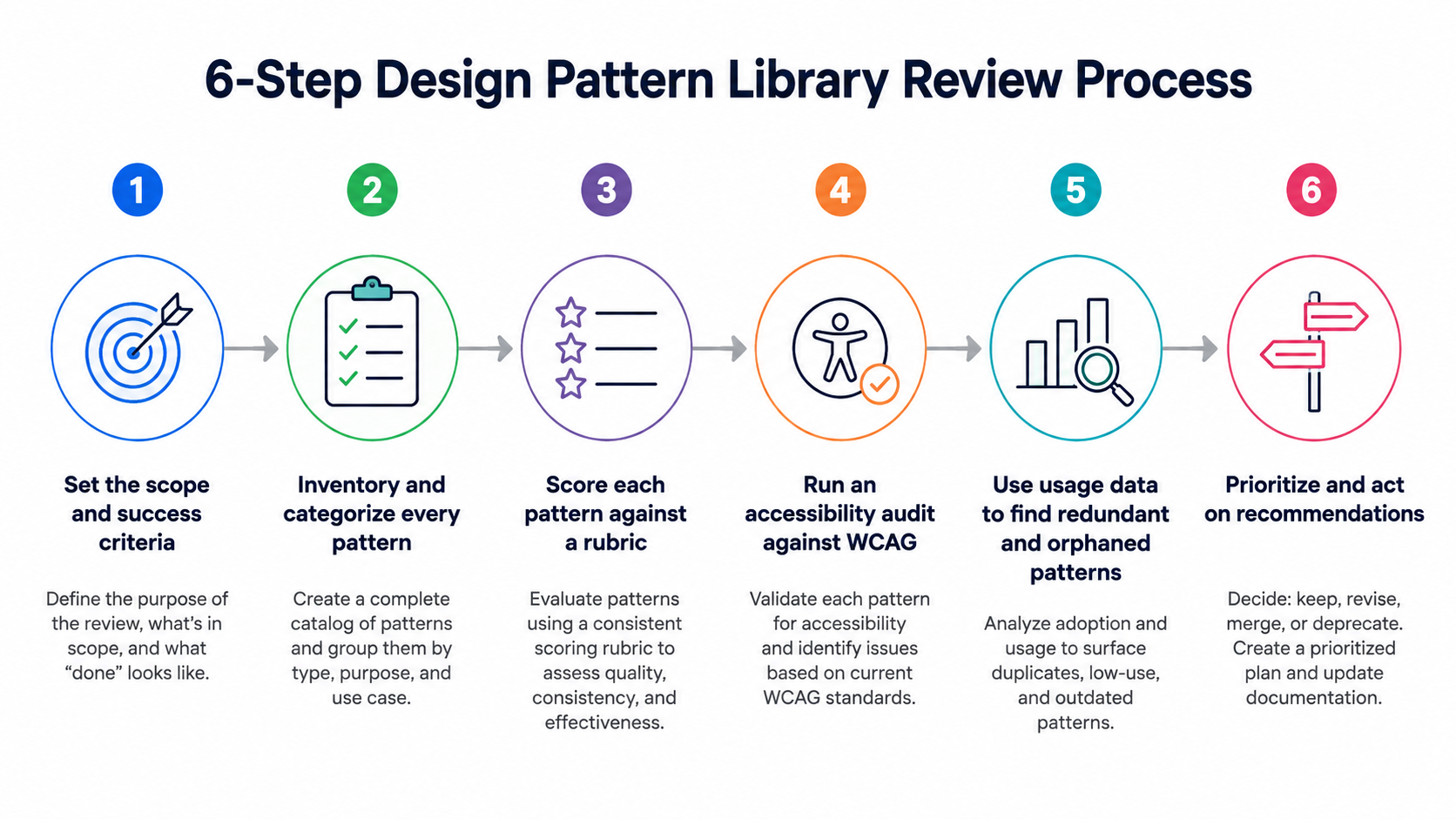
That’s how you get a ranked list of keep, revise, merge, and deprecate decisions, backed by updated documentation where needed. Each step builds on the previous one, so it's worth completing them in order before moving on.
1. Set the scope and success criteria
Before reviewing a single pattern, decide what you're reviewing and why. A review without a clearly defined scope can quickly turn into an open-ended cleanup project.
Start by defining the objective:
-
Are you trying to improve design consistency across products?
-
Reduce duplicate patterns?
-
Strengthen accessibility?
-
Or speed up designer-to-developer handoffs?
Your goals will determine what you prioritize during the review and how you'll measure success.
Next, define what's in scope. Depending on the size of your library, you might review:
-
The entire pattern library
-
A specific category, such as forms, navigation, or search
-
One product instead of the whole design system
-
A single platform, such as web, iOS, or Android
It also helps to write down what "done" looks like before you begin.
For example, every reviewed pattern might need an owner, updated documentation, accessibility validation, and a clear recommendation to keep, revise, merge, or deprecate.
Having these success criteria upfront keeps the review focused and makes it easier for everyone involved to reach consistent decisions.
This approach isn't unique to pattern libraries.
Defining objectives and scope is widely considered the first step of any effective design system audit because it gives the team a shared understanding of what they're evaluating before they start assessing individual patterns.
If your organization maintains separate web and mobile pattern libraries, avoid reviewing them as one.
While they may share the same brand foundations and design tokens, each platform has its own interaction patterns, implementation constraints, and documentation.
Futurice recommends auditing each platform individually while maintaining shared foundations separately, making it much easier to identify platform-specific inconsistencies without mixing them together.
2. Inventory and categorize every pattern
Before you can evaluate a design system, you need to know exactly what you're working with.
That means pulling every reusable UI pattern across your product into one place, not just the "official" components in Figma, but what's actually shipped.
If the design files are outdated or incomplete, capture screenshots directly from the live product. Buttons, inputs, modals, navigation, cards, tables, empty states, notifications, filters, and everything else.
Include every variation you find, even if two versions look almost identical.
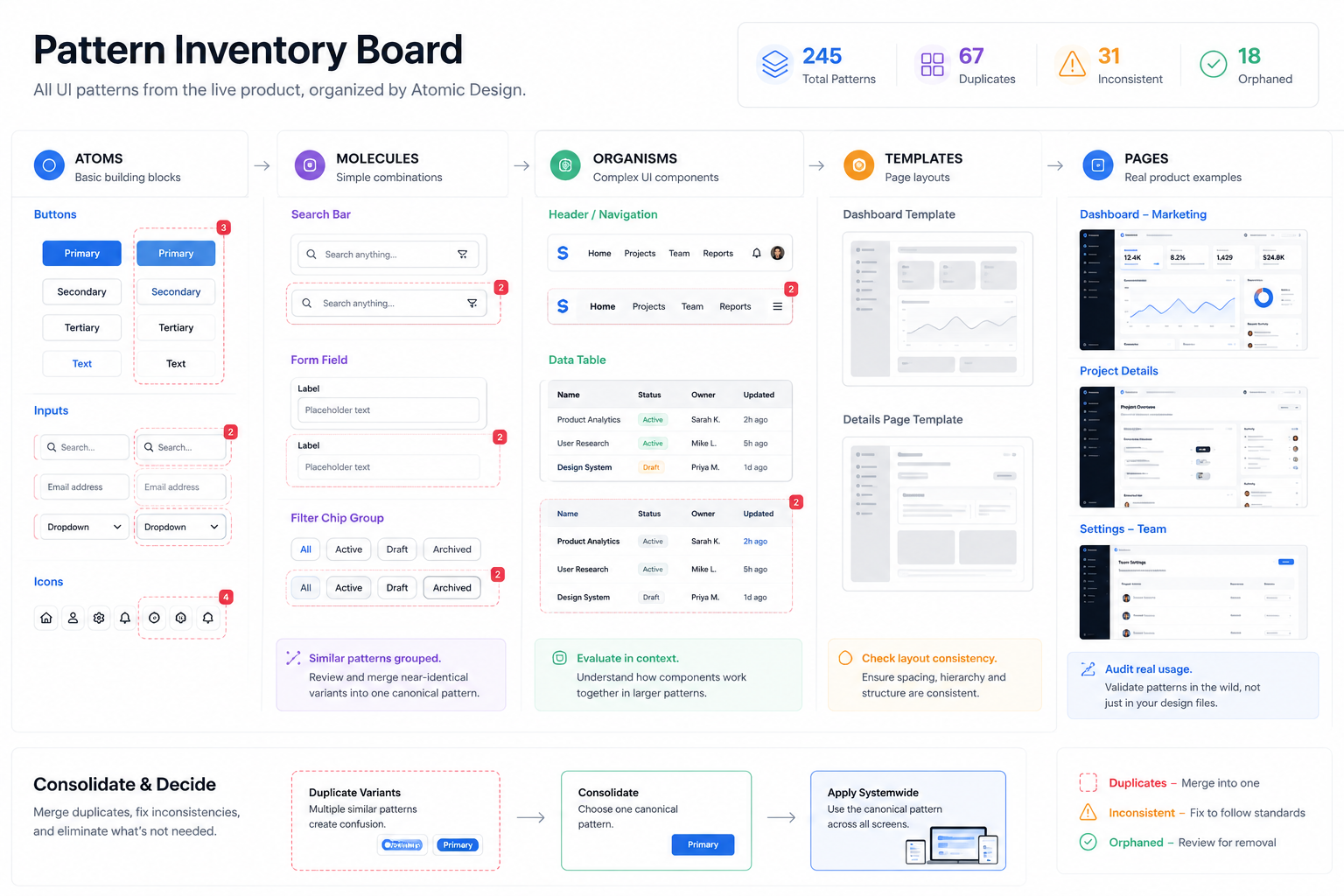
This is the most time-consuming step of the audit, but it's also the one that determines whether the rest of the audit will be useful.
Most design system problems don't become obvious until similar components sit side by side. Duplicate patterns, inconsistent spacing, slightly different border radii, conflicting interaction states, and one-off exceptions are much easier to spot when they're viewed together instead of scattered across dozens of screens.
Once you've collected everything, organize it using atomic design principles.
Start with atoms (buttons, inputs, icons, typography), group them into molecules (search bars, form fields, cards), then organisms (headers, sidebars, tables), followed by templates and complete pages.
This structure helps you evaluate not just individual components, but how they combine to form larger interfaces. When the atom changes, you can immediately understand which molecules and organisms are affected.
One useful technique comes from Futurice's pattern library playbook.
They audit mature products by placing screenshots of every pattern onto a large canvas, grouping similar components together, and gradually merging near-identical variants into a single canonical version.
Seeing every pattern in one workspace makes inconsistencies difficult to ignore and helps teams agree on what should stay, what should be consolidated, and what should be retired.
3. Score each pattern against the review rubric
Once you've inventoried every pattern, the next step is to evaluate them using the same criteria. Scoring patterns consistently makes the review repeatable, removes subjective decision-making, and makes it much easier to compare results across future reviews.
Rather than relying on gut feel, score every pattern against a simple rubric. For example, on a 1-3 scale across five key areas:
-
Consistency: Does the pattern follow the library's visual and interaction standards?
-
Accessibility: Does it meet your accessibility requirements?
-
Usage: Is it still used across the product, or has it been replaced by newer patterns?
-
Documentation: Are usage guidelines, variants, states, and examples complete and up to date?
-
Design-code parity: Does the documented pattern accurately match what's implemented in the product?
Here’s a sample rubric you can use:
|
Pattern |
Consistency |
Accessibility |
Usage |
Documentation |
Design-code parity |
Decision |
|
Search |
3 |
3 |
3 |
2 |
3 |
Keep & update docs |
|
Checkout form |
2 |
1 |
3 |
2 |
2 |
Revise |
|
Empty state |
3 |
3 |
1 |
3 |
3 |
Deprecate |
|
Filter drawer |
2 |
2 |
2 |
1 |
2 |
Merge |
Patterns that consistently score below your threshold shouldn't automatically be removed. Instead, flag them for the appropriate action (revise, merge, or deprecate) and record the reason so the decision can be easily revisited later.
To speed this up, you can use UX Pilot's automated design review to analyze existing screens before scoring them manually.
It automatically highlights common issues such as low color contrast, inconsistent spacing, missing interactive states, and layout problems, giving reviewers a faster starting point for evaluating consistency and accessibility.
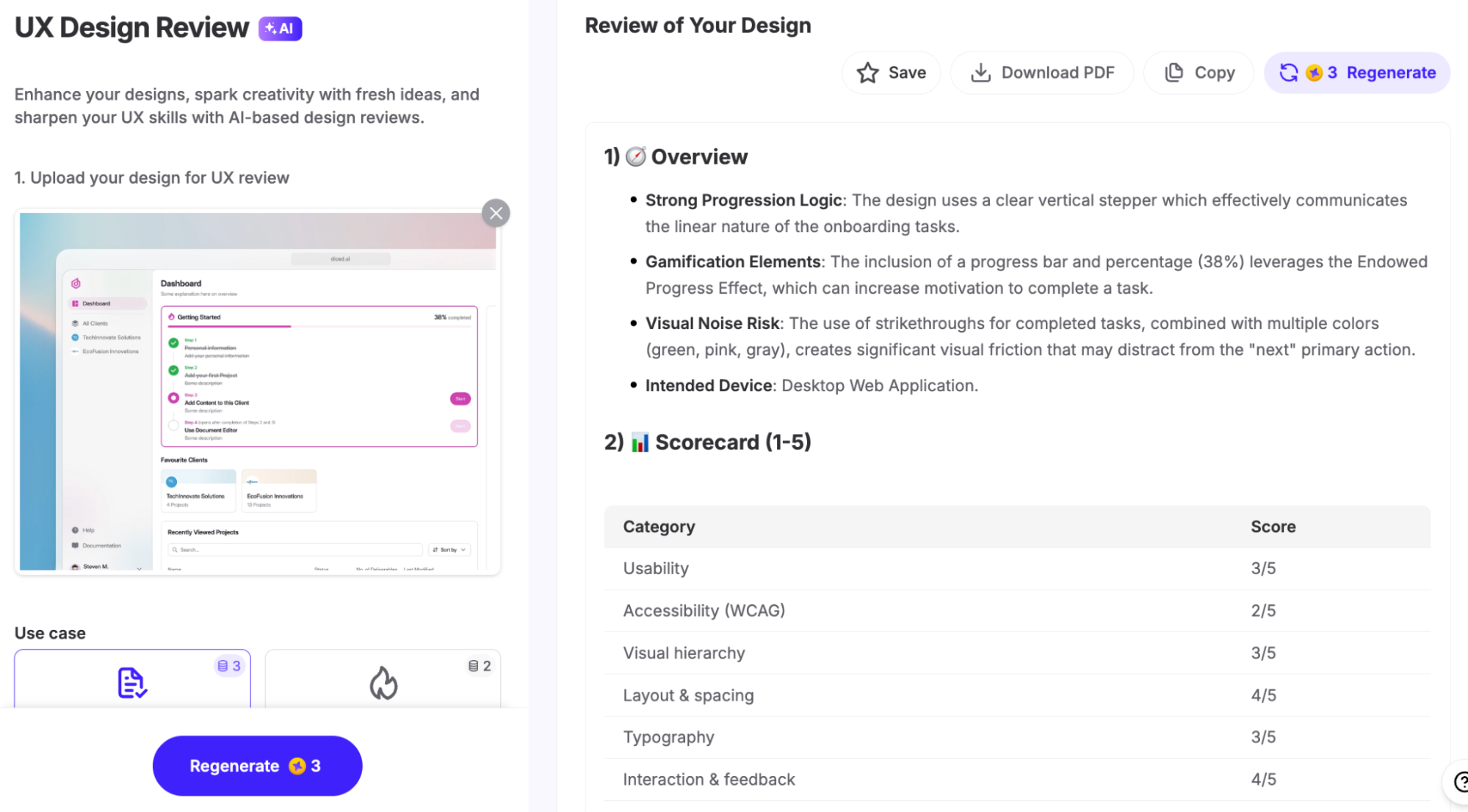
Remember, the goal isn't to replace human judgment, but to surface the obvious issues first so reviewers can spend more time on the decisions that require context.
4. Run an accessibility audit against WCAG
Every pattern in your library should be reviewed against the relevant WCAG 2.2 success criteria.
Start with the fundamentals that affect almost every interface: color contrast, visible focus states, target size, keyboard operability, and meaningful text alternatives.
Since patterns are reused throughout a product, fixing accessibility issues at the pattern level automatically improves every screen that uses them.
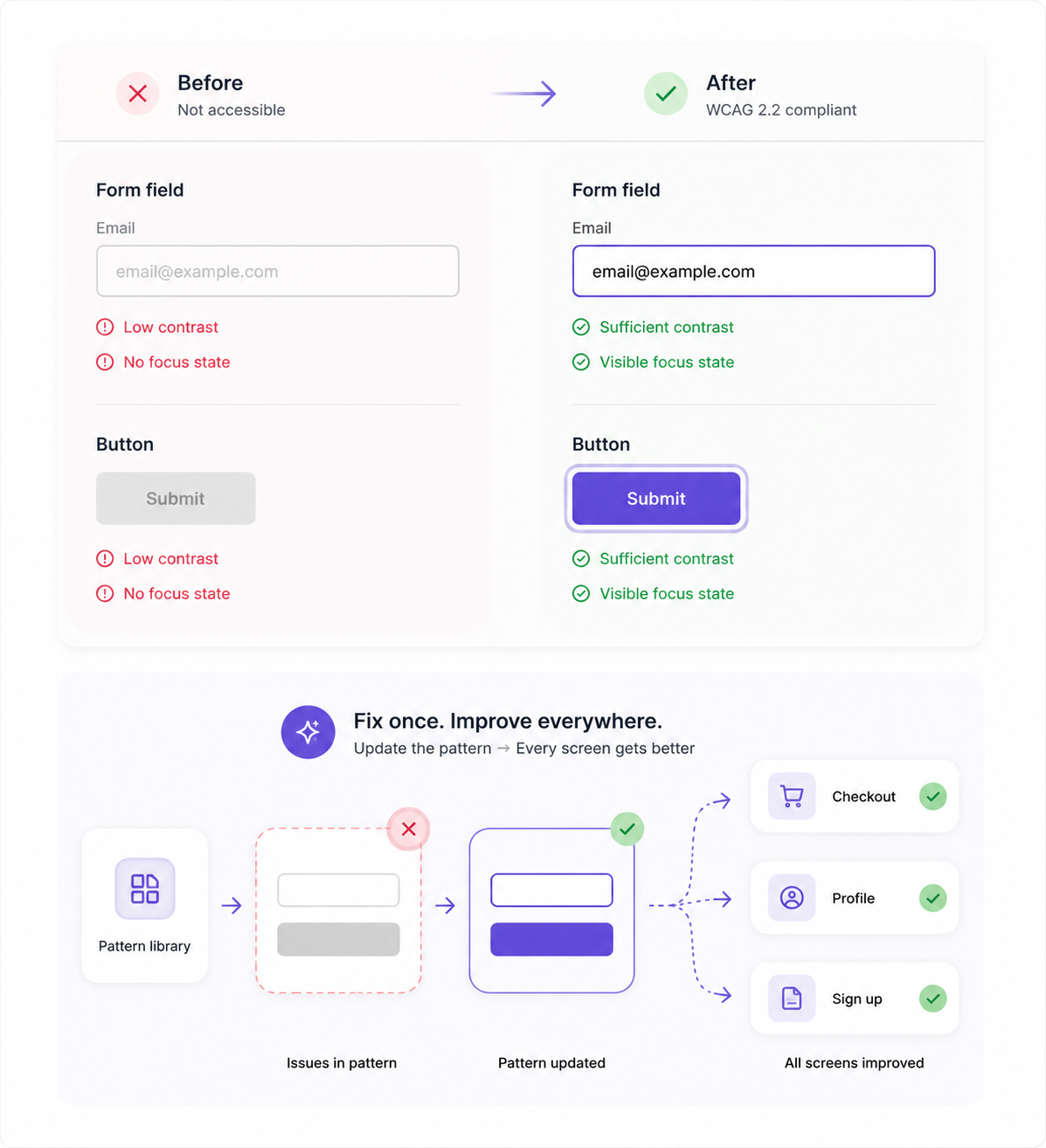
As noted earlier, most accessibility issues originate during the design phase. Addressing them in your pattern library helps prevent those same issues from being repeated every time designers or developers reuse a pattern.
To speed this up, automated design tools can quickly identify issues such as insufficient contrast, missing focus indicators, or interactive elements that don't meet size requirements.
But they don't tell the whole story.
According to Deque, automated testing identifies roughly 57% of accessibility issues by volume, which means manual testing is still needed to evaluate keyboard navigation, screen reader behavior, interaction flows, and the overall website user experience.
Automated AI tools find the obvious issues, while human review provides the context needed to catch the rest.
5. Use usage data to find redundant and orphaned patterns
By now, you know how good each pattern is. The next question is whether it still deserves a place in your library.
Bring in real usage and adoption data to understand which patterns are actively reused, which have near-identical variants, and which are rarely (or never) used. This helps separate living patterns from dead weight instead of relying on personal preferences.
Start with the patterns that have the biggest impact.
A navigation pattern or form used across hundreds of screens deserves attention before a niche pattern used in one workflow. Netguru recommends prioritizing reviews by both usage frequency and business impact, so your effort goes where it will improve the product the most.
Two issues usually stand out:
-
Redundant patterns: Multiple patterns or variants that solve the same problem with only minor differences.
-
Orphaned patterns: Patterns that exist in the library but are no longer used, or patterns that are live in the product but never made it into the library.
For every pattern, make a clear decision: keep, merge, or deprecate. Let the data drive that decision. Not familiarity, team preferences, or the effort that went into creating the pattern.
6. Prioritize findings and update the library
Once you've identified what needs to change, rank every finding by impact and effort, then work through the keep, fix, merge, and deprecate decisions until your documentation reflects what's actually shipping.
Document each decision as you go. Record the issue, its severity, expected impact, recommended action, and the person responsible for completing it.
Assigning ownership turns the review into an actionable plan instead of a list that gets forgotten.
This is also where governance comes in.
Clear contribution guidelines and a review-and-approval workflow help ensure new patterns meet the same standards before they're added to the library, reducing the chance of drift between reviews.
Finally, don't wait until the library feels outdated again.
Schedule your next review before closing the current one. That simple habit turns a one-time cleanup into a sustainable process and keeps your pattern library aligned with the product over time.
What to include in a pattern library review scorecard
A pattern library review scorecard is a fixed set of criteria you use to evaluate every pattern, making the review objective, repeatable, and easy to compare over time.
Instead of relying on gut feeling, each pattern receives a score (for example, 1-3) across the same six criteria:
-
Consistency
-
Accessibility
-
Usage and adoption
-
Documentation quality
-
Design-code parity
-
Behavioral effectiveness
This helps maintain measurable scores you can track between reviews, prioritize improvements from, and confidently share with stakeholders.
You can use the scorecard below as a starting point and adapt the scoring thresholds to fit your own design system:
|
Criterion |
What to evaluate |
Score (1-3) |
|
Consistency |
Spacing, naming, states, visual and interaction consistency |
|
|
Accessibility |
WCAG 2.2 compliance (contrast, focus, keyboard, target size) |
|
|
Usage and adoption |
Reuse across products and teams |
|
|
Documentation quality |
Completeness and accuracy of guidance |
|
|
Design-code parity |
Alignment between design files and implementation |
|
|
Behavioral effectiveness |
How well the pattern supports the user's task |
1. Consistency
Review how consistently the pattern is used across your product.
Check its spacing, naming, interaction states, behavior, and visual treatment, and look for near-identical variants that should be consolidated into a single pattern. Consistency is a core usability principle because users shouldn't have to relearn the same interaction in different parts of your product.
2. Accessibility
Score each pattern against WCAG 2.2, including color contrast, visible focus states, keyboard operability, and target size. Any pattern that falls short should become a high-priority fix because, as discussed earlier, accessibility issues introduced at the pattern level are repeated everywhere that pattern is reused.
3. Usage and adoption
Measure how widely the pattern is actually used across your products and design and engineering teams. Low adoption isn't always a sign that a pattern is bad. It can indicate a redundant pattern, poor discoverability, or incomplete documentation.
Either way, it deserves a clear decision instead of being left in the library indefinitely.
4. Documentation quality
Every pattern should include clear usage guidelines, supported variants, states, do's and don'ts, accessibility notes, and implementation references where appropriate. If designers and developers can't understand when or how to use a pattern, they're more likely to create new ones instead.
5. Design-code parity
Compare the documented pattern with what's actually implemented in production.
Differences between the two are a common source of inconsistency, leading to situations where the design file looks correct but the shipped experience doesn't. Reviewing both sides together helps keep your pattern library and product in sync.
6. Behavioral effectiveness
Finally, evaluate whether the pattern actually helps users complete their task.
Does it draw attention to the right elements, support the intended workflow, and reduce friction, or does it simply look visually consistent?
This is what separates a pattern library from a component library. You're evaluating how the interface behaves, not just how individual UI elements look.
One way to pressure-test an important pattern before approving it is to run a representative screen through UX Pilot's predictive heatmaps.
Upload a screen that uses the pattern (maybe a signup form or checkout flow) and within seconds you'll get an AI-generated review highlighting usability, accessibility, layout, spacing, and visual hierarchy issues, along with a predictive heatmap showing where users are most likely to focus.
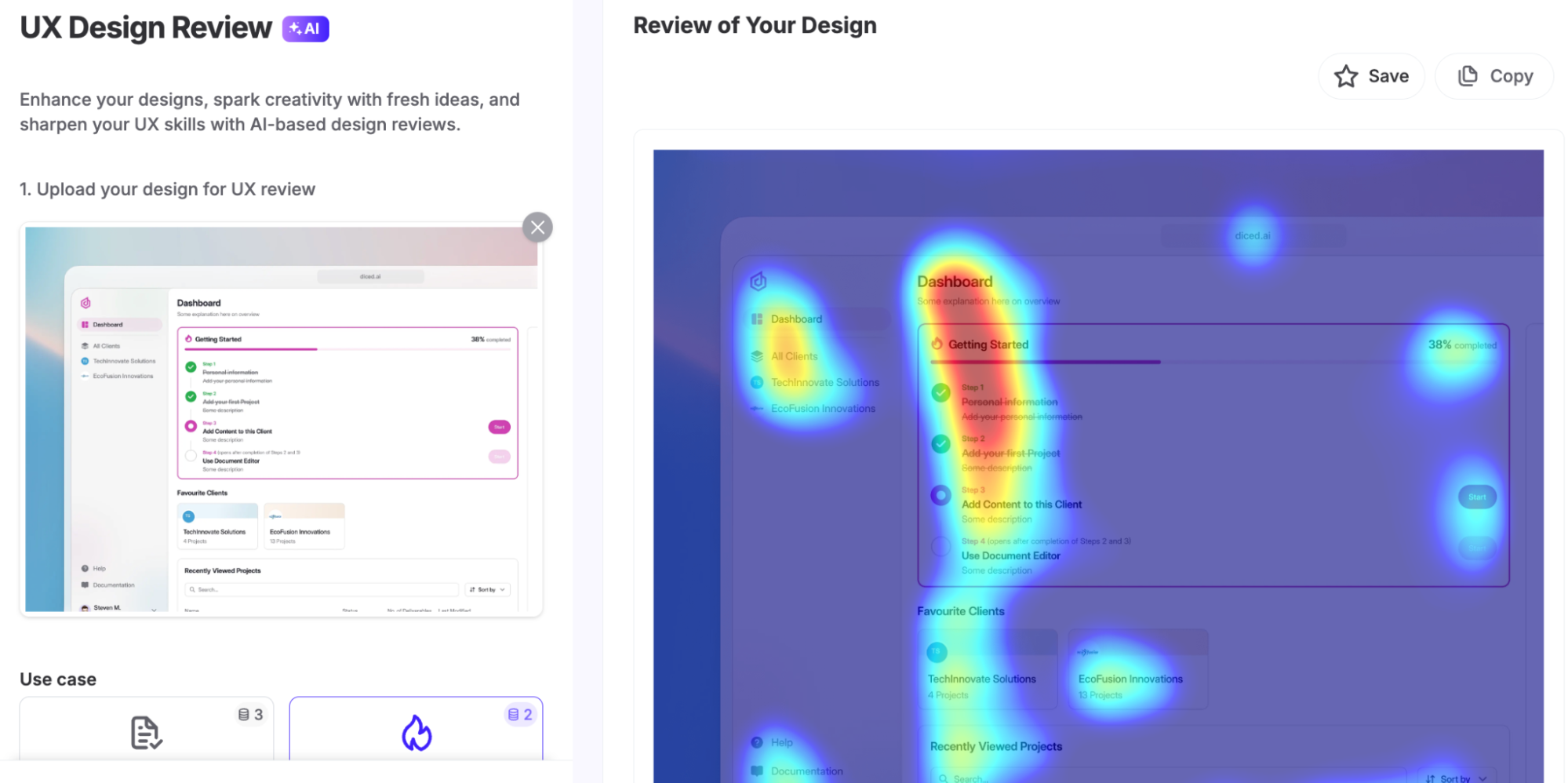
That makes it much easier to catch buried CTAs, competing visual elements, or weak hierarchy before the pattern becomes part of your shared library. It's a useful pre-signoff check, but it should complement, not completely replace, usability testing with real users.
Metrics that show whether your pattern library review is working
A review is only working if the numbers move in the right direction over time, not just once. Track a small set of health metrics after every review so progress is easy to spot, new problems surface early, and stakeholders can see the process is delivering value. These are the six worth watching:
|
Metric |
What it measures |
|
Adoption rate |
Percentage of screens or teams using approved library patterns instead of creating new ones. |
|
Consistency score |
Average score from your review rubric, tracked over time. |
|
Accessibility pass rate |
Percentage of patterns that meet WCAG 2.2 requirements. |
|
Documentation coverage |
Percentage of patterns with complete, up-to-date documentation. |
|
Onboarding time |
How long it takes new designers or developers to become productive with the library. |
|
Redundant or orphaned patterns retired |
Number of duplicate, unused, or undocumented patterns removed or consolidated during each review. |
But don't focus too much on individual numbers. The real goal is to identify trends.
A healthy pattern library sees adoption, consistency, accessibility, and documentation coverage improve over time, while the number of redundant and orphaned patterns steadily declines.
Those trends are a much better indicator of library health than any single review in isolation.
Common problems a pattern library review uncovers
No matter how mature your design system is, over time, patterns drift, documentation falls behind, teams solve the same problem in different ways, and design and code gradually move out of sync.
None of these mean your library went wrong. They're a natural result of a product evolving over time. The purpose of a review is to identify those issues early, decide what to keep, fix, merge, or retire, and keep your pattern library aligned with the product it supports.
1. Inconsistent pattern usage across teams
Even with a shared library, different teams often adapt patterns to fit their own workflows. Over time, the same interaction starts behaving differently across products.
Fix: Identify the best implementation, make it the canonical pattern, and clearly document when it should be used so designers and developers have one obvious choice.
2. Redundant and near-duplicate variants
Small differences in spacing, color, sizing, or behavior can multiply into several versions of what is essentially the same pattern.
Fix: Merge similar variants into a single pattern and retire the rest. Aiimi recommends breaking mature products down into their smallest components during a retrospective audit, making it much easier to spot inconsistencies and consolidate overlapping patterns.
3. Orphaned patterns
Some patterns remain in the library long after they've stopped being used, while others exist in the live product but were never documented in the first place.
Fix: Deprecate unused patterns and document the ones that exist only in production so your library reflects reality.
4. Accessibility debt
Accessibility issues such as poor contrast, missing focus states, or incomplete keyboard support often get repeated across multiple patterns before anyone notices.
Fix: Resolve issues at the pattern level. As discussed earlier, updating one accessible pattern improves every screen that reuses it.
5. Design-code mismatch
Over time, the implemented pattern no longer matches the documented design, creating inconsistencies between what designers specify and what users actually experience.
Fix: Reconcile the design and coded versions during every review, and establish a workflow where changes to one are reflected in the other before they're considered complete.
6. Stale documentation
A pattern is only as useful as its documentation. If the guidance describes an older version than the one in production, teams will quickly lose trust in the library.
Fix: Update usage guidelines, supported states, examples, and code references as part of every review. Treat documentation updates as a required step before any pattern change is merged into the library.
Make pattern library reviews a repeatable habit
Remember that a design pattern library review isn't a one-off cleanup. It's a recurring, rubric-driven habit that keeps your library a genuine single source of truth. Regular reviews catch drift before it spreads, keeping patterns, documentation, and implementation aligned.
To get started:
-
Schedule your first review.
-
Review your highest-usage patterns first.
-
Score every pattern using the same review scorecard.
-
Put a lightweight governance process in place so new patterns are reviewed before they're added.
Start small and stay consistent. A repeatable review process is what keeps a pattern library healthy over the long term.
