

AI design tools are evolving fast, but few manage to bridge creativity, usability, and speed the way UX Pilot does. Built for designers, founders, and marketers who want to move from idea to polished user interface quickly, it has become one of the most complete no-code design platforms on the market.
Still, every workflow is unique, and you may be curious about how other AI-powered tools compare.
In this guide, I tested 7 popular UX Pilot alternatives using the same design prompt — from web and app-specific builders like Relume and Banani to experimental AI assistants like Google Stitch and Lovable.
Do you need a UX Pilot alternative?
UX Pilot is great for anyone who wants to go from an idea to a visually complete design fast. It takes basic prompts and uses them to create high-fidelity layouts, and gives you the flexibility to tweak and refine every screen before exporting to Figma or code. For most UX designers or product teams testing app concepts, that’s really all you need.
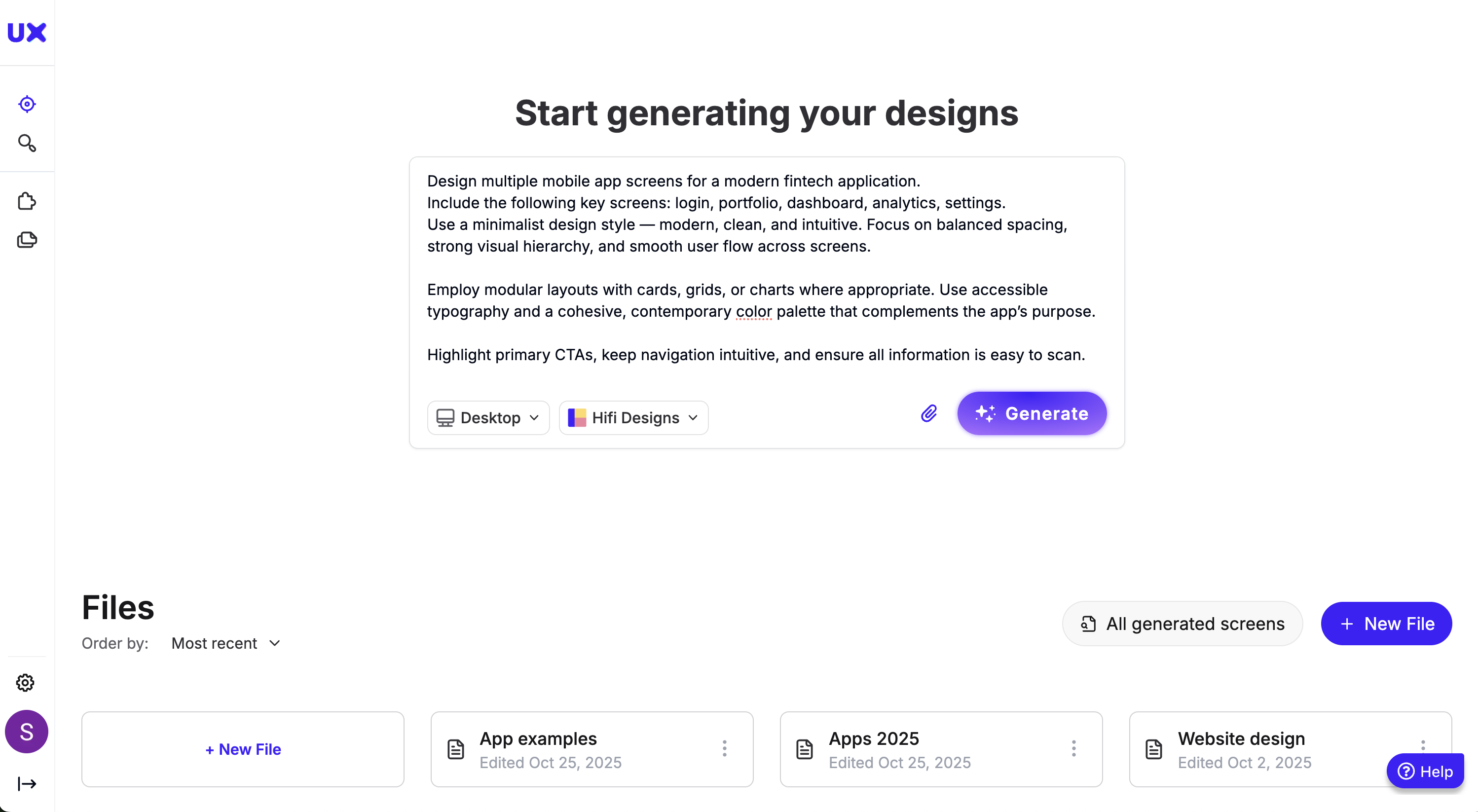
However, it makes sense to explore other tools if your needs extend beyond design into functionality or advanced workflows.
For example, if you want interactive prototypes or working apps, platforms like Lovable are better suited since they generate functional outputs.
Or, if your focus is early ideation (like mapping site structures), options like Figma can help you visualize direction before committing to design. But it doesn't have one or the other. UX Pilot can go hand in hand with these tools, since both cater to different needs.
For example, I generated 4 app screens with the single prompt I entered above.
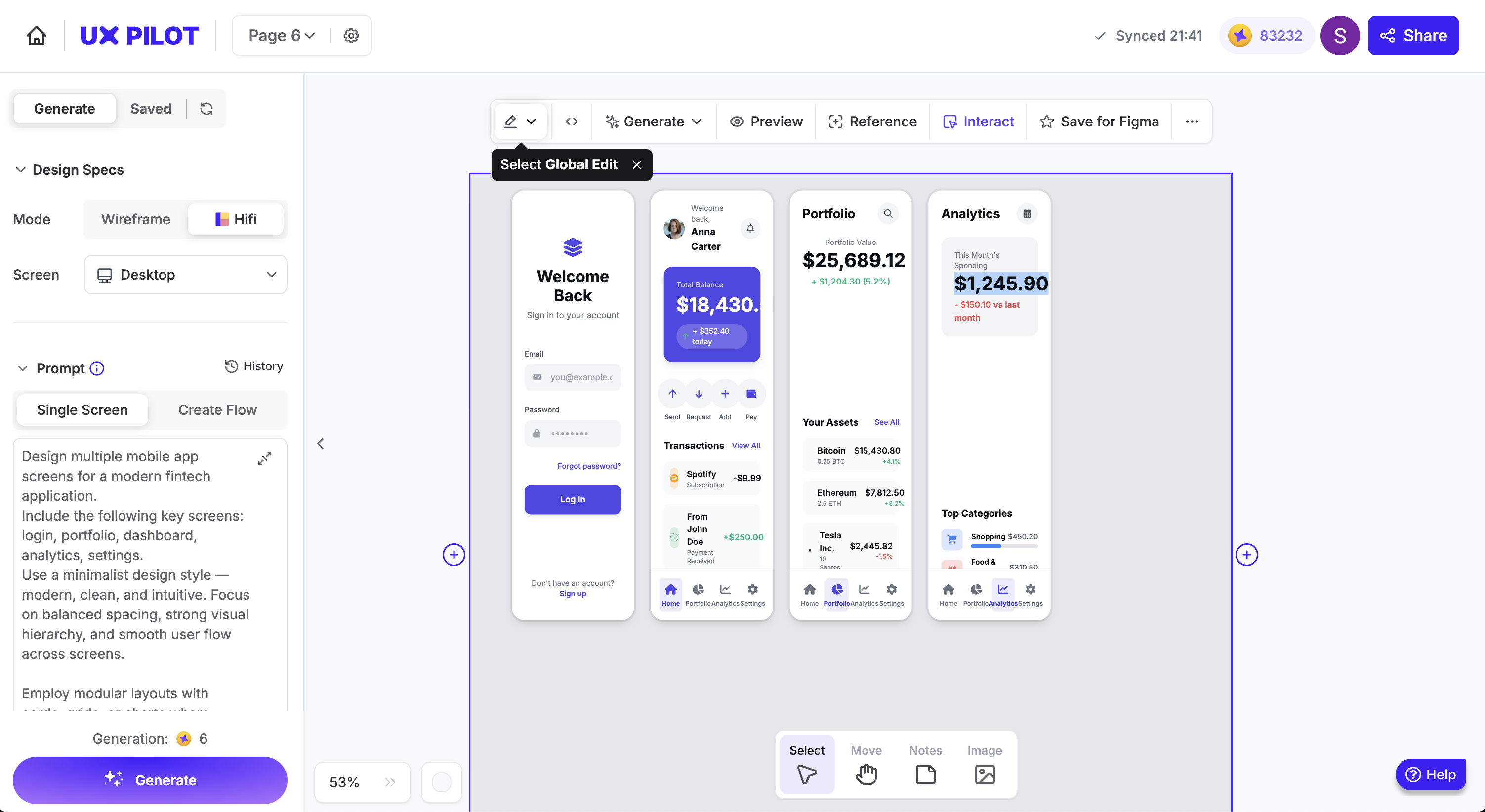
If you want a platform to help go from ideas to a wireframe to a high-fidelity design for mobile apps or websites, UX Pilot should fulfill the bulk of your needs.
Here's a quick comparison of UX Pilot versus other ux design tools at the time of writing this.
| Feature | UX Pilot | Figma | Uizard | Relume | Banani | Google Stitch | Lovable | Visily |
|---|---|---|---|---|---|---|---|---|
| AI-Powered Design Generation | ✅ | ⚠️ (plugins only) | ✅ | ✅ | ✅ | ✅ | ✅ | ✅ |
| Upload Sketches/Screenshots to Wireframe | ✅ | ❌ | ✅ | ⚠️ | ✅ | ❌ | ❌ | ✅ |
| Screenflow Generation / User Journey Mapping | ✅ | ⚠️ | ⚠️ | ❌ | ✅ | ✅ | ⚠️ | ⚠️ |
| Chat-Based Design Interaction | ✅ | ❌ | ⚠️ | ❌ | ❌ | ✅ | ✅ | ❌ |
| Brand Guideline Integration | ✅ | ⚠️ (manual setup) | ⚠️ | ⚠️ | ⚠️ | ❌ | ⚠️ | ⚠️ |
| Code Export (HTML/CSS/React) | ✅ | ⚠️ (via plugins) | ⚠️ | ⚠️ | ⚠️ | ✅ | ✅ | ❌ |
| Figma Export / Sync | ✅ | ✅ | ⚠️ | ✅ | ✅ | ✅ | ⚠️ | ✅ |
| Collaboration & Feedback Tools | ✅ | ✅ | ⚠️ | ✅ | ⚠️ | ⚠️ | ⚠️ | ✅ |
| Ease of Use (No-Code Friendly) | ✅ | ⚠️ | ✅ | ✅ | ✅ | ⚠️ | ✅ | ✅ |
| Learning from Real UI Examples | ✅ | ❌ | ⚠️ | ❌ | ⚠️ | ⚠️ | ⚠️ | ❌ |
| All-in-One Workflow (Idea → Figma → Code) | ✅ | ❌ | ⚠️ | ⚠️ | ⚠️ | ⚠️ | ⚠️ | ⚠️ |
How to choose an alternative to UX Pilot?
I followed a hands-on process to test each tool under the same conditions, when considering any UX Pilot alternatives for this article. I performed the same design task using each tool — generating a mobile app layout for a budgeting app — to ensure that comparisons were fair, consistent, and based on real output rather than what the tools claimed.
Here are the main factors I scored these tools on.
Design accuracy and output quality
Each tool’s ability to interpret instructions and produce logical, visually appealing layouts was closely analyzed. I noted whether the generated results aligned with real-world UI standards and hierarchy.
UX design workflow
I carefully looked at each platform to see whether it covered the full design journey—from initial ideas all the way to prototypes or coding—or if it focused on smaller parts of the design workflow like creating sitemaps or low-fidelity wireframes.
Learning curve
User experience was measured by how intuitively each tool handled my prompts, edits, and iterations without requiring manual intervention or technical expertise.
Integration and code export
I compared how easily designs could be exported to tools like Figma, Webflow, or HTML, as well as compatibility with existing team workflows.
Each tool was evaluated on these capabilities. The goal wasn’t just to see which tool performs best, but to understand why UX Pilot often eliminates the need for an alternative altogether, offering the depth, logic, and flexibility that most AI design tools are still catching up to.
Here are the 7 alternatives I found for UX Pilot.
1. Galileo AI (now Google Stitch)
Google Stitch has a similar interface to UX Pilot: a chat window where you can enter your prompt and options to generate designs for both desktop and mobile apps.
It offers two modes: Standard and Experimental. The main difference lies in the Gemini models they use (2.5 Flash for Standard and 2.5 Pro for Experimental). Standard mode is faster at generating designs, but the trade-off is that you can’t add reference images like you can in Experimental.
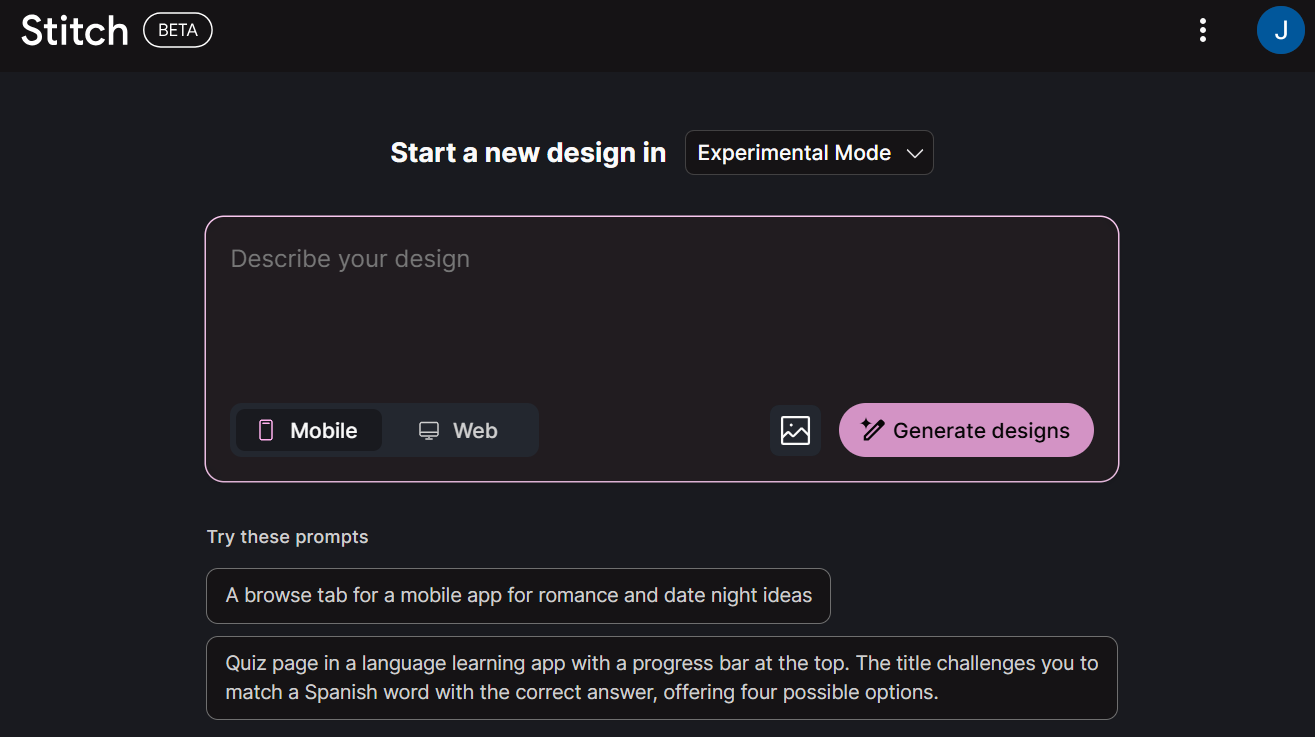
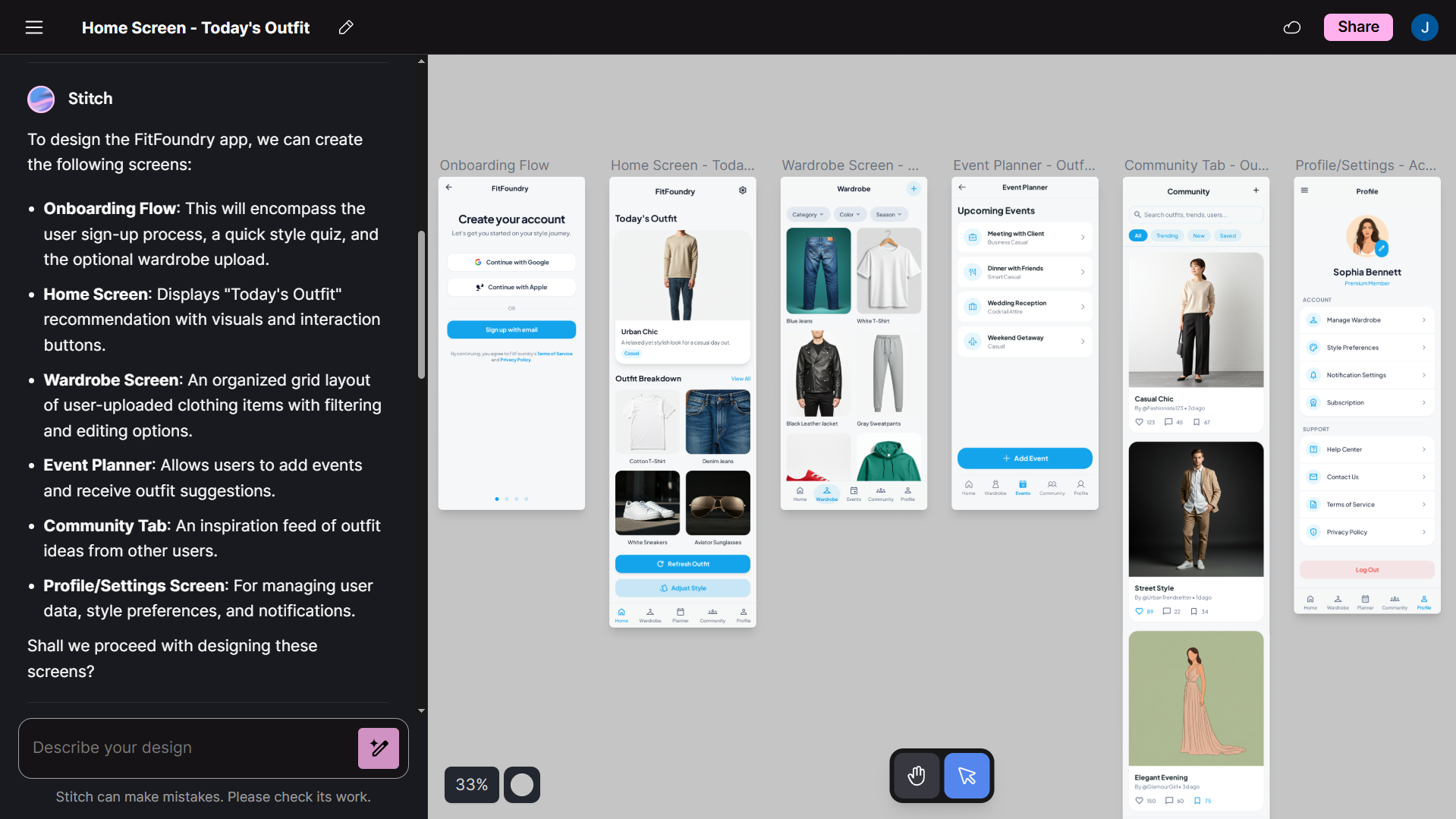
To test it out, I gave its Experimental mode an ambitious task: develop a high-fidelity design for an outfit recommendation platform. This would have six individual pages, with specific instructions on what would go on each page.
From the birds-eye, it understood the concept and generated all six screens: signup, home, wardrobe, event planner, community, and profile.
Stitch also maintained strong component consistency and showed great layout intelligence. The “outfit of the day” was displayed front and center, with additional outfit recommendations presented in smaller image cards below. The color scheme was a consistent blue/white throughout the app, even though I hadn't explicitly specified one.
But it didn’t quite do everything I asked.
For example, I included a quick style quiz in the prompt that users would fill out after signing up to help gauge their preference — a very necessary step for what the app is going for. This was missing in the final design workflow.
There are a few other general drawbacks that you might notice compared to UX Pilot. With the Experimental mode, you don't have the option to export designs to Figma. You can with Standard, but the output on that is obviously not as great.
I also noticed that Stitch struggled with concept development. I asked both Standard and Experimental modes to create wireframes, but neither managed to do so, instead defaulting to high fidelity designs.
Pros:
-
Maintained strong component consistency and layout intelligence
-
Follows instructions and executes designs even for more complex projects
Cons:
-
Failed to include crucial, requested elements from the prompt
-
Experimental mode lacks Figma export
2. Figma
Figma's First Draft feature is one of the newest additions to its AI toolkit and among its more advanced features, allowing you to generate wireframes or hi-fi designs straight from a prompt. The interface works much like UX Pilot’s: a simple chat box where you describe what you’re building, and Figma takes it from there.
You can guide it to create specific layouts, page types, or even multiple screens for the entire app. I put it through the test, and Figma managed to create a cohesive selection of screens with consistent typography, spacing, and color palettes.
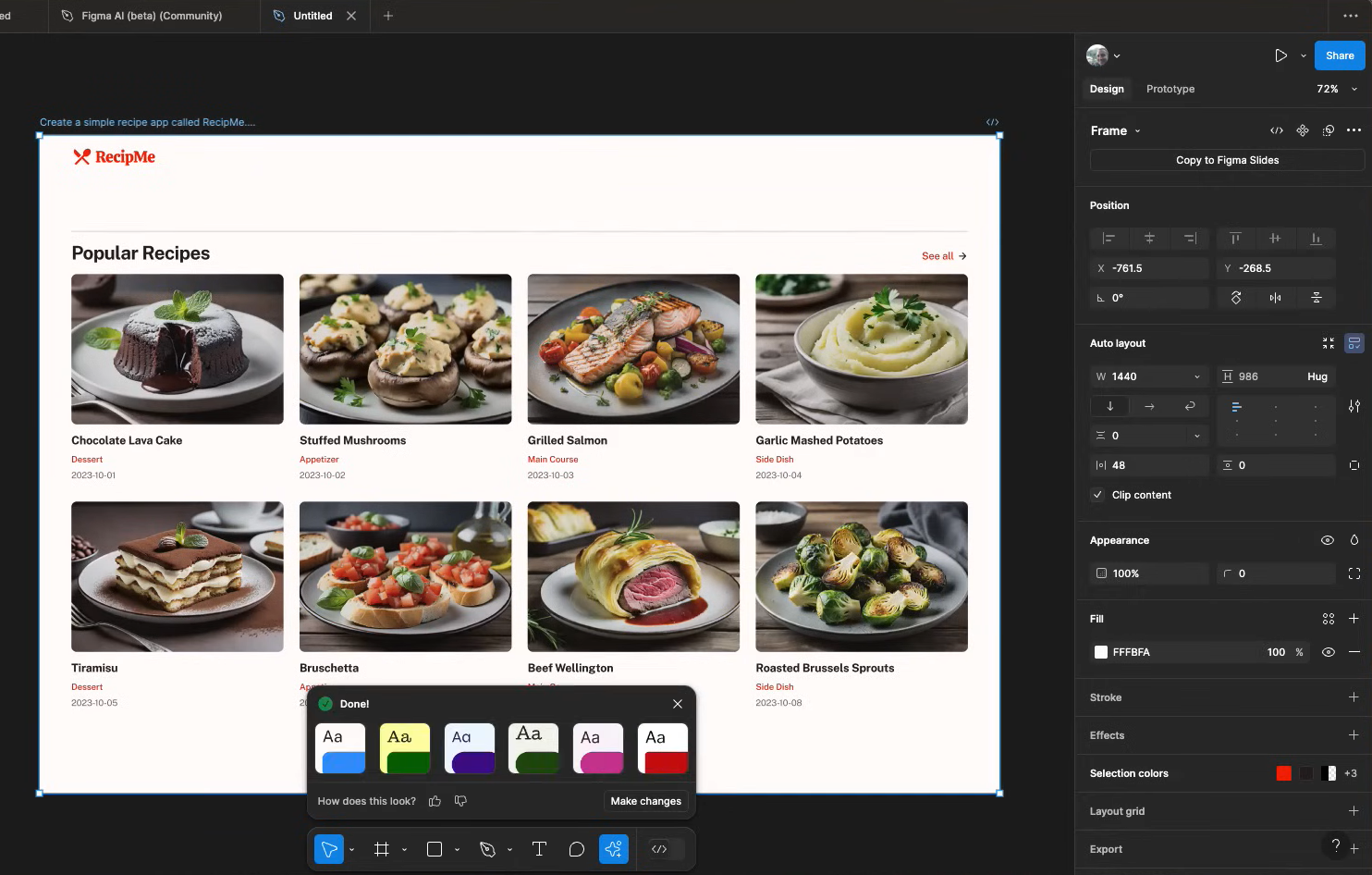
That said, First Draft works best when paired with Figma’s broader design ecosystem, which means it’s less of a standalone AI design generator and more of an assistive layer for existing workflows.
If you’re already comfortable in Figma and want AI to speed up your initial layout work, it’s a solid pick. But if you’re looking for something that builds complete, multi-screen app designs from a single prompt, it’s not quite there yet.
Compared to UX Pilot, Figma’s First Draft focuses more on accelerating parts of the design process rather than automating the full flow. UX Pilot is still stronger for generating cohesive, end-to-end app designs.
And you can always export them to Figma using the plugin, so not much friction there either.
Pros:
-
Quickly generates website or app layouts within Figma
-
Maintains a consistent color scheme and other on-page elements across screens
Cons:
-
Generated designs often require significant manual cleanup
-
Works best as an add-on, not as a full standalone AI design platform
3. Banani
Banani is another alternative that lets users generate wireframes for their mobile or web apps.
Enter your prompt with clear guidelines for the app you want to build, choose theme colors and fonts from the left sidebar, and let the tool take a minute or so to generate its designs.
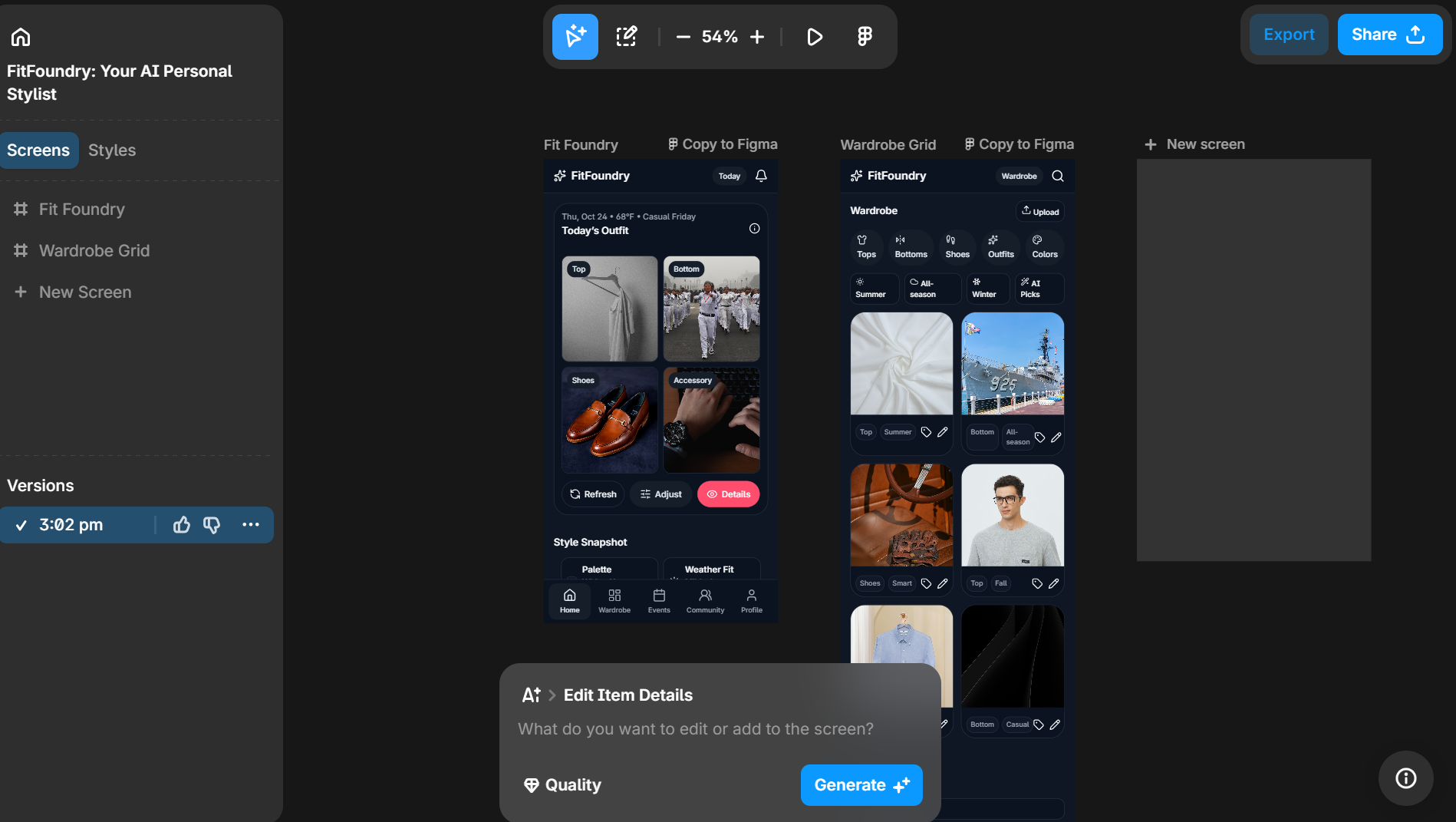
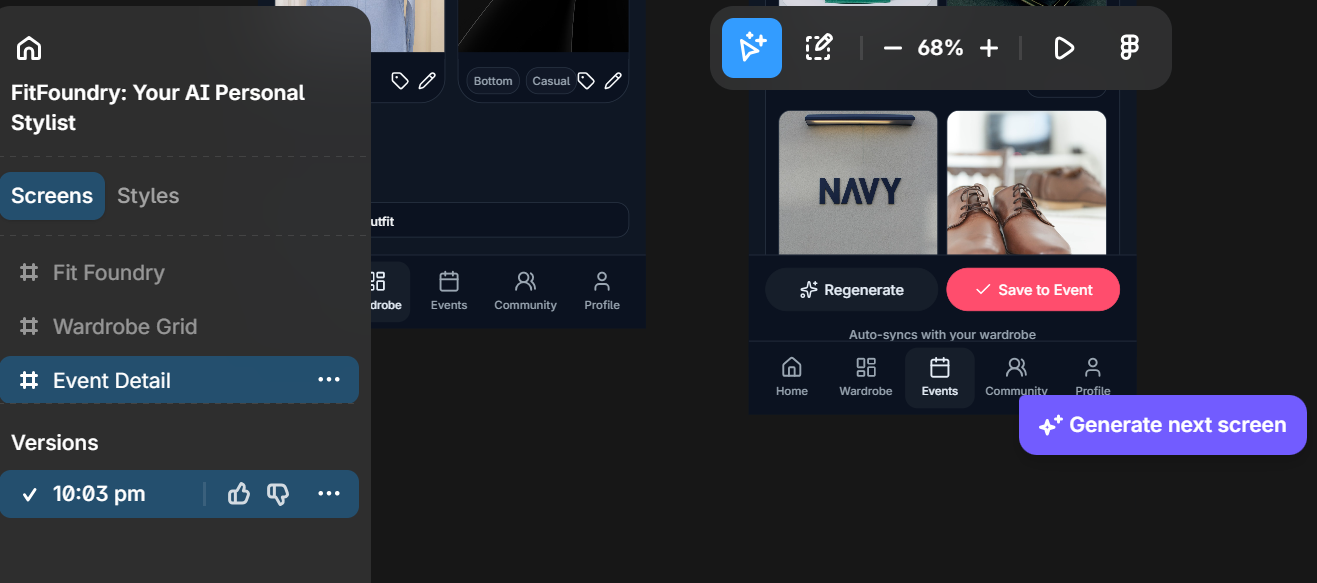
Now, among the things I liked: the clearly displayed breakdown of different screens on the sidebar. You can duplicate, export, or delete any screen directly from here, which is a bit more intuitive than what you usually get.
Banani also understood the concept reasonably well. It generated the five main screens, though, like Google Stitch, it didn’t include the signup page or the onboarding quiz I’d requested as the first steps in my prompt. Otherwise, it followed the instructions to a tee.
A big change from UX Pilot is that Banani only generates wireframes, not high-fidelity designs. So if you're looking for more than a basic overview of your app, Banani won't be the right fit.
Another hitch you'll notice if you're used to UX Pilot's interface is that Banani doesn't generate all the screens in one go. It created the first, then I had to manually nudge it on to generate the rest.
Pros:
-
Manage the different screens from the sidebar
-
Choose app styles from the various options available, without explicitly prompting the tool
Cons:
-
Doesn't create all the requested screens in one go
-
Unable to edit the original prompt
4. Relume
Relume does quite a few things; among its key features are creating sitemaps, wireframes, and style guides.
An important point to note is that its core functionality is in building websites, not mobile apps, which is an immediate drawback if you’re looking for an alternative that offers all of UX Pilot’s features.
To put it through its paces, I gave it the same prompt we've been using with the other tools: an outfit rec app (or in this case, a website).
Relume did a good enough job with the home page — though admittedly, that is all I could generate with the limited Free plan. It included a cohesive breakdown of how the app worked, strategically placed CTAs, and added plenty of visuals and social proof.
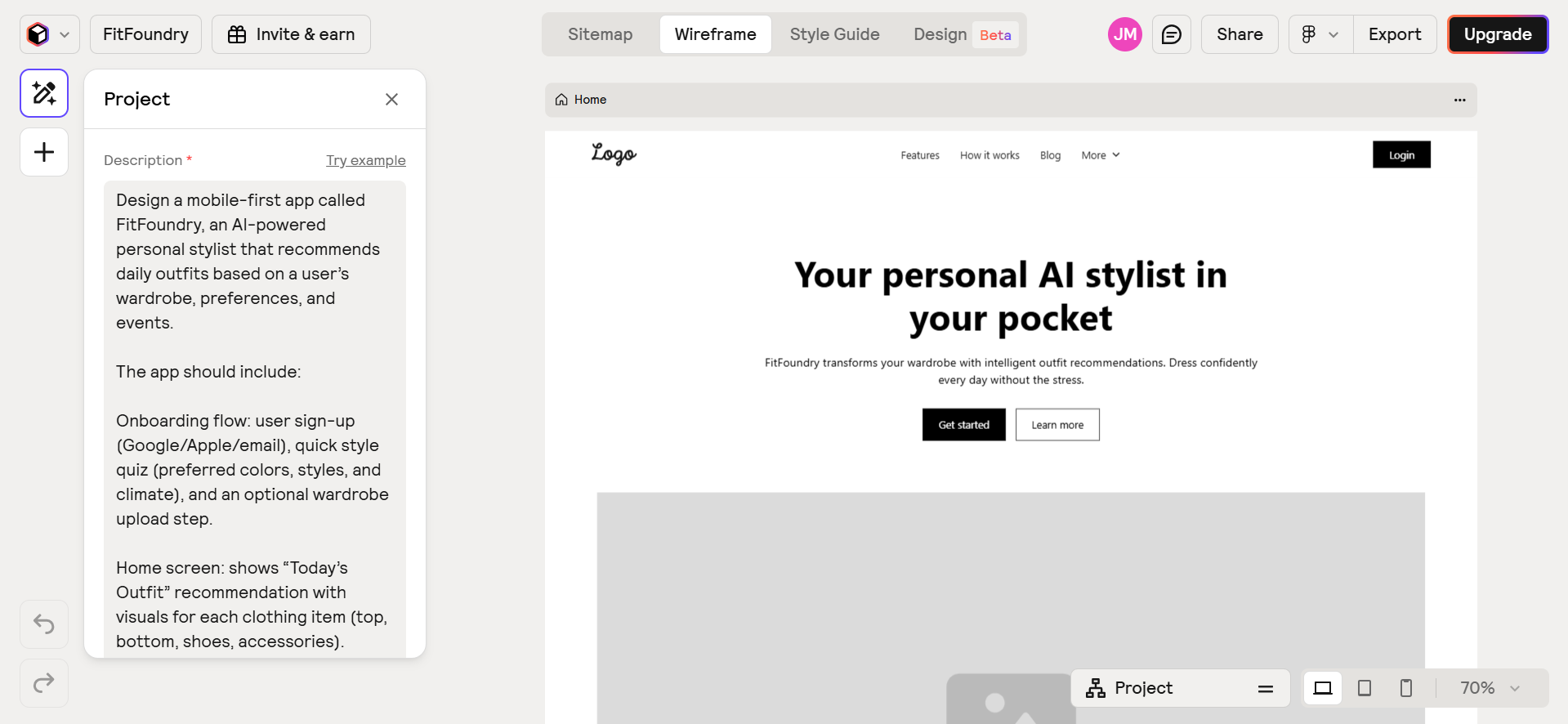
You can also manually add sections anywhere in between, plus select any element already generated and write a prompt to make tweaks to the UI layout as needed.
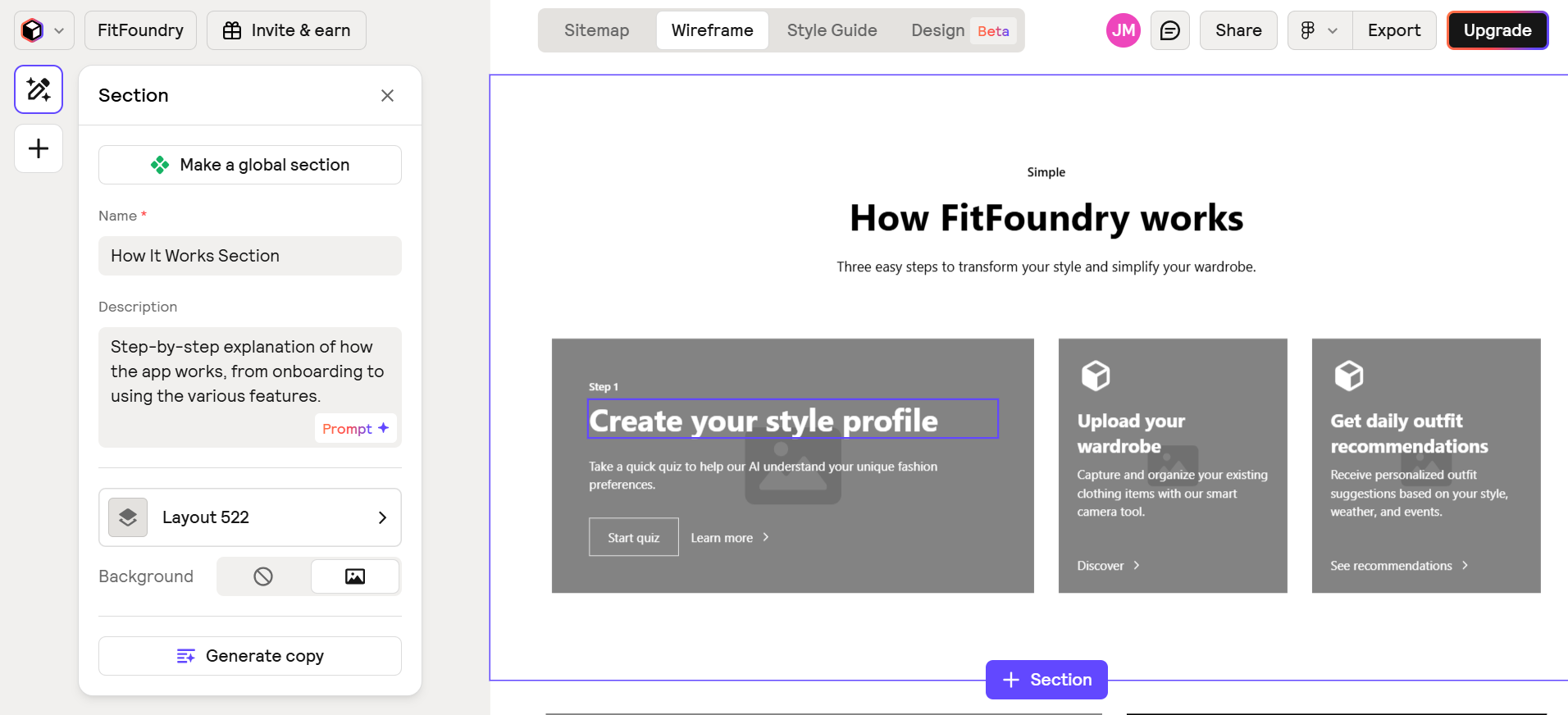
But again, the generated wireframe is for a website. If your needs are different, you won't have much luck with Relume.
So, here’s what I recommend you do instead: use its dedicated sitemap feature to refine your prompt and create reference images that you can then feed into UX Pilot to generate wireframes or hi-fi designs for your app. Essentially, take advantage of what both platforms do best to produce the most ideal output.
Pros:
-
Generates website wireframes with well-placed CTAs, visuals, and social proof
-
Offers useful features like sitemap creation and style guides
Cons:
-
Only builds websites, not apps, limiting its use as a UX Pilot alternative
-
Free plan is extremely limited, only allowing generation of a single home page
5. Uizard
Uizard helps create UI designs and complete mockups for your mobile or web apps.
To start, you can get a head start by choosing one of the pre-made templates from Uizard’s library, or, if you prefer, begin with a blank page, which is what I chose to go with. A change I rather liked: Uizard confirmed if I wanted it to be highly precise to the prompt or leave it some creative freedom. I went with the latter.
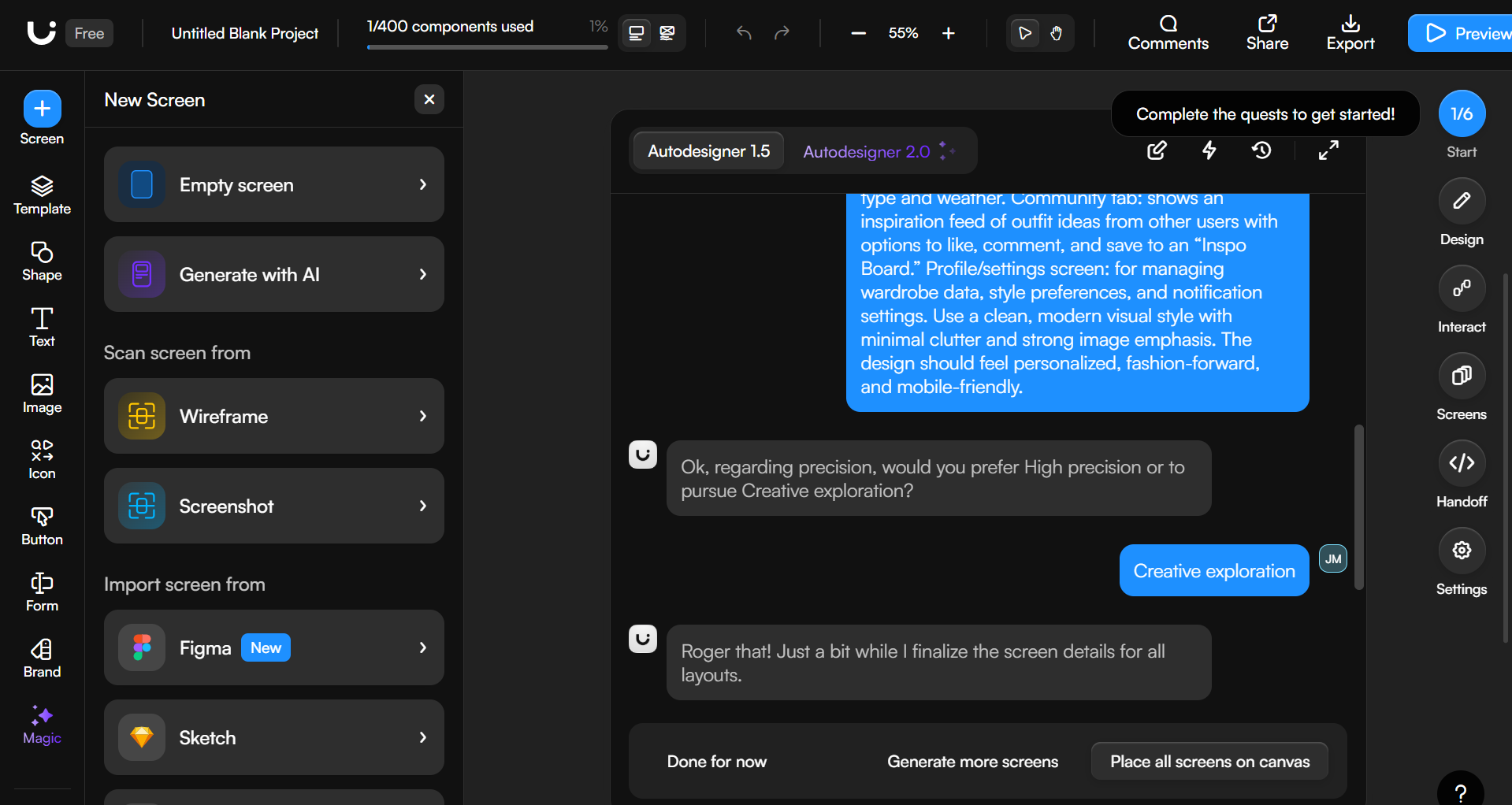
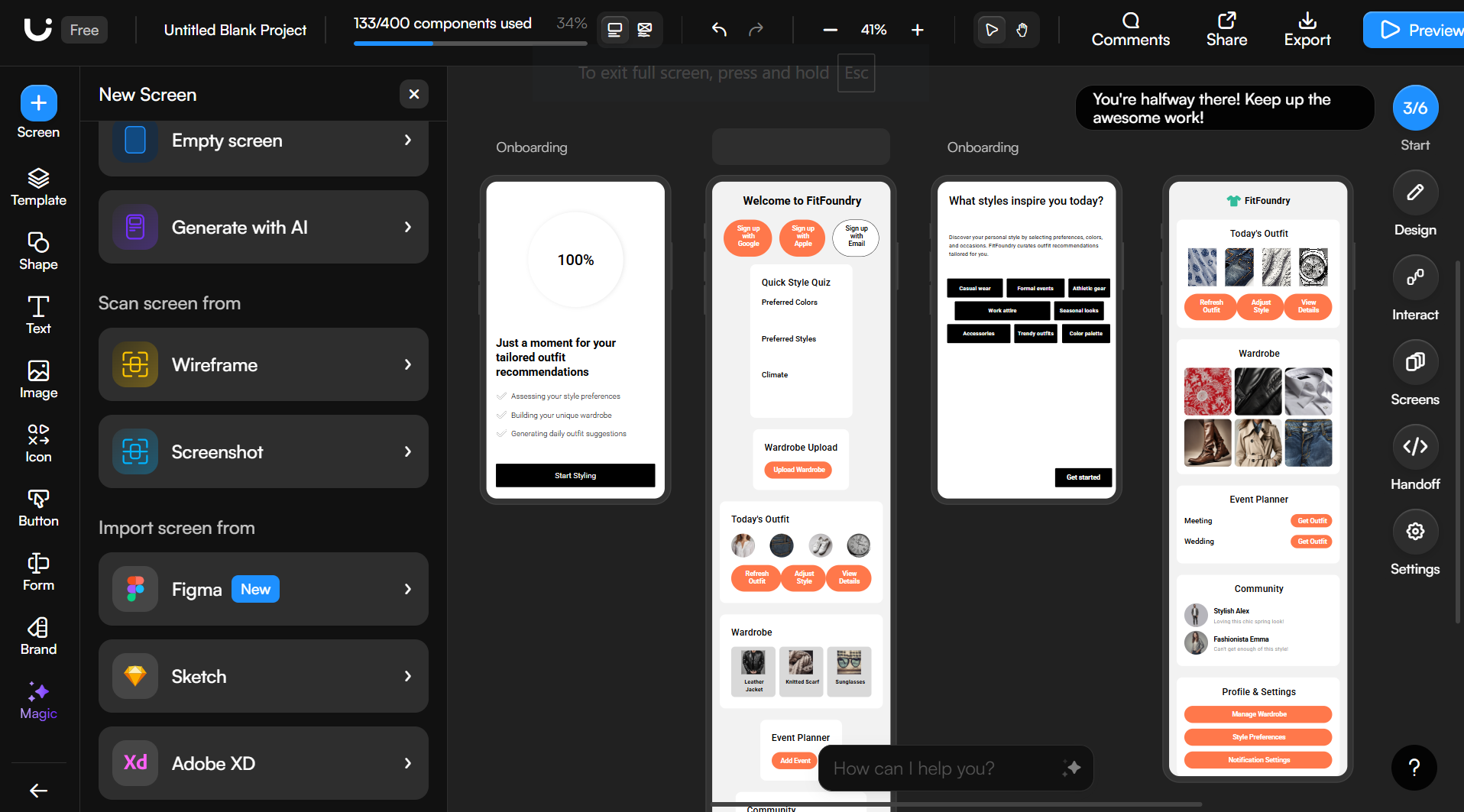
Despite that, the results were a bit lackluster. Three of the four generated screens focused on onboarding the user with the quiz I had specified. The remaining page seemed like a hastily assembled collection of all the other features grouped one after another, even though I had instructed that each be on its own separate page in the prompt.
Beyond that, the app lacked any clear indication of how users were meant to navigate it. There wasn’t any kind of menu, structure, or consistent design system to guide them on what to do next.
Even at a more granular level, some of the buttons had off-center text, the graphics looked too basic, and some sections felt completely out of place. All in all, not exactly something to write home about.
The biggest drawback is that there isn't an option to export to Figma. Which, if you've used UX Pilot, is a big selling point. You'll have to use third-party plugins for the job, which isn't always the smoothest of processes.
Pros:
-
Lets you choose between high precision or creative freedom when generating designs
-
Offers a library of pre-made templates to give you a head start on projects
Cons:
-
Generated screens ignored prompt instructions and lacked clear user flows or navigation
-
No native Figma export option
6. Lovable
Lovable helps create functional apps and interactive prototypes, rather than serving as just a basic UI generator.
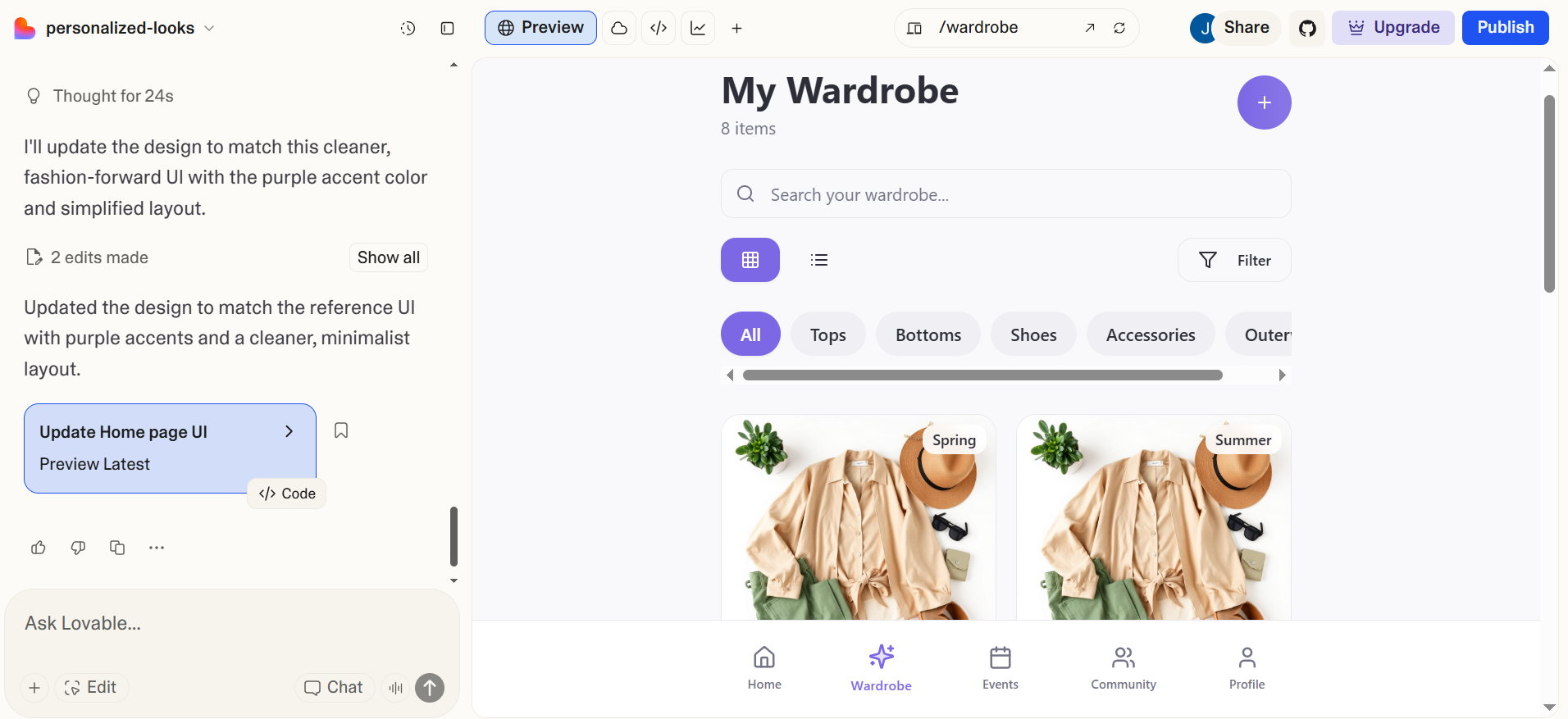
The interface is quite similar to the other platforms we've covered. You get a chat interface where you can fire away with your prompt. I let it try its hand at our outfit rec app — functionality-wise, it did an amazing job.
Lovable understood the concept, adhered to all the provided instructions, and created all six of the specified screens. However, the UI itself felt a bit underwhelming. It structured the different tabs and information as directed, but I struggled to adjust the interface to something that didn’t give off the feel of a generic booking app.
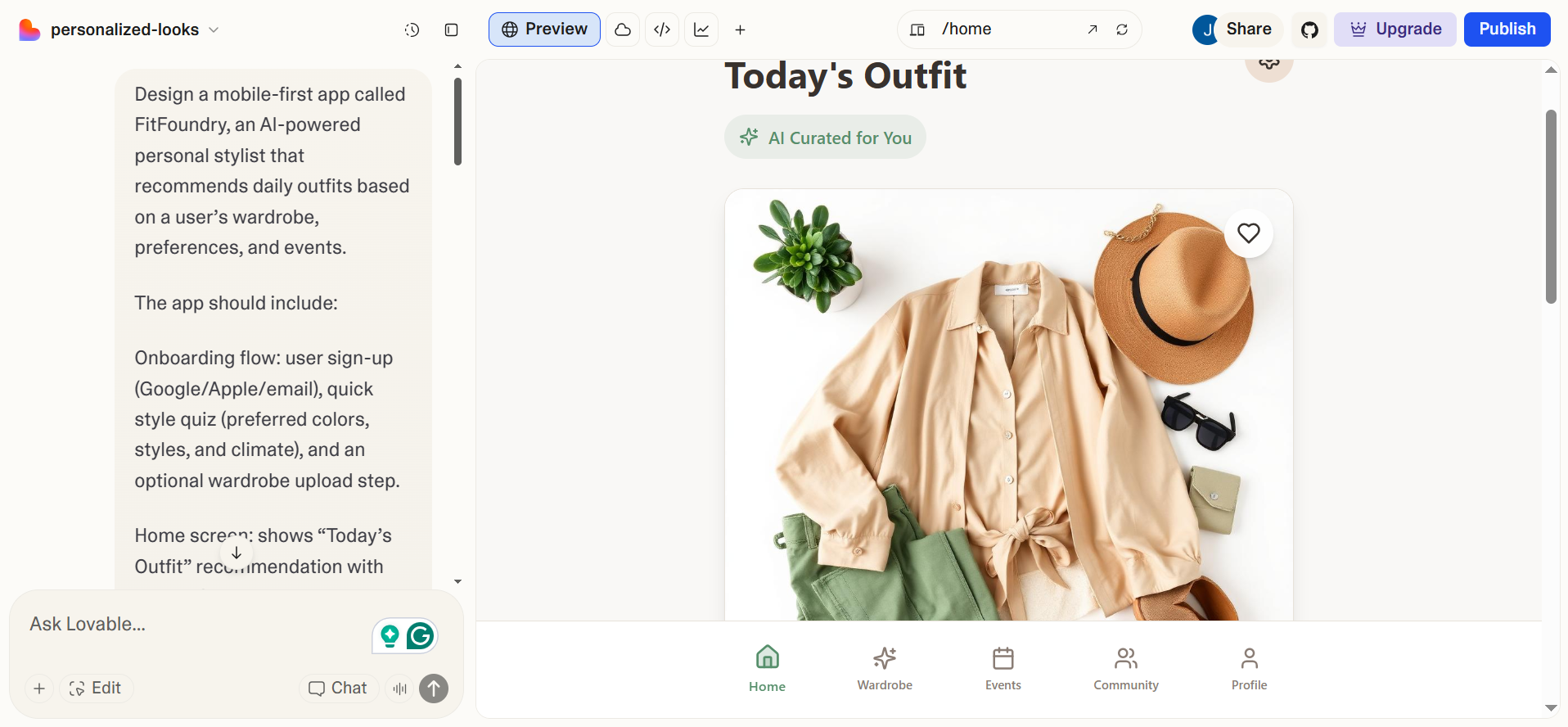
Keep in mind that UX Pilot and Lovable serve different use cases. UX Pilot creates designs while Lovable generates complete app prototypes. Which means they can also both be used in tandem.
Here’s what I did next: I created and refined a design to my liking using UX Pilot’s stronger UX/UI features, then exported the code directly to Lovable for prototyping. The result was a much cleaner interface than the original Lovable version, and I didn’t have to struggle to get it just right.
Pros:
-
Creates fully functional app prototypes with working features, not just static designs
-
Understands prompts well and generates all requested screens with proper structure
Cons:
-
UI design felt generic and underwhelming
-
Difficult to adjust the UI through prompts
7. Visily
Visily is another in the list of design tools that can help generate hi-fi designs for your mobile or web apps.
You can get started with the usual prompt or by using existing wireframes or user flow charts that describe the app's hierarchy. I went with the prompt.
Visily understood what I was going for with the app and generated the six requested screens. However, it did take a bit of coaxing since the tool kept returning errors when generating all screens after the first.
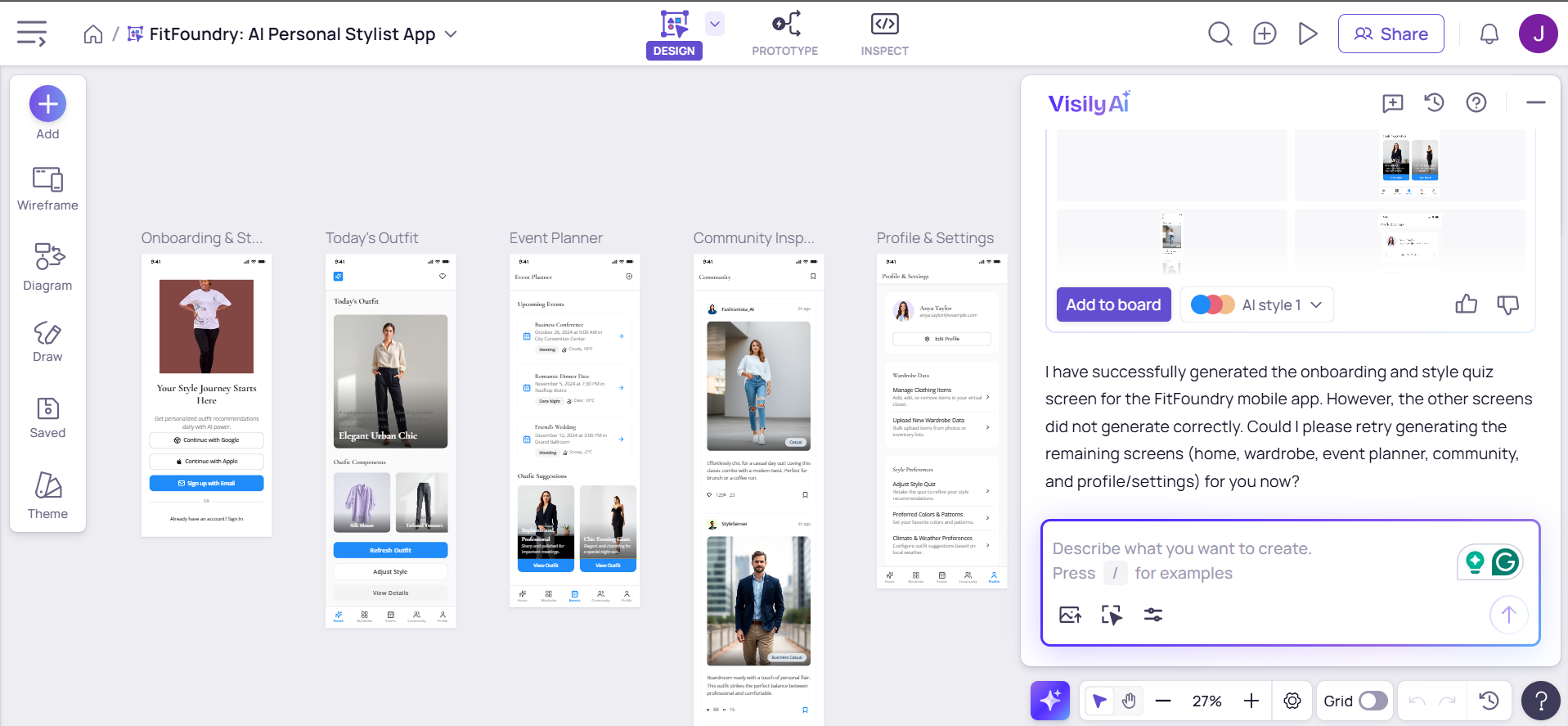
The results were great. It followed a minimalist design with an emphasis on images as requested, plus had a consistent color scheme that carried over all screens.
But unlike UX Pilot, you don't get the option to toggle between lo-fi and high-fidelity mockups. If you only want a basic wireframe for your app and not a complete design, you'll have trouble getting that with Visily.
Pros:
-
Generates clean, visually appealing screens with consistent layout and color use
-
Understands descriptive prompts well and builds complete multi-screen designs
Cons:
-
Cannot switch between lo-fi and hi-fi outputs
-
Ran into errors when generating multiple screens in one go
Conclusion
UX Pilot remains the most complete AI design platform in its category. Unlike tools that specialize in only one stage — from sitemap to prototype — UX Pilot connects every part of the process, from idea to pixel-perfect layout and production-ready code.
You can chat with your design, iterate instantly, and export to Figma or HTML in seconds. Instead of juggling multiple subscriptions and workflows, UX Pilot gives design and product teams everything they need to design, test, and deliver in one place.
You can use UX Pilot to shape and polish your app’s design, then bring in tools like Lovable or Relume to handle the app development.
Together, they can streamline your process from concept to launch. But if your main goal is to bring design ideas to life visually and iterate quickly, UX Pilot alone will more than get the job done.