
Design Operations For Product Teams: 7 Practices That Scale

Khanh Linh Le
Created on Sep 4, 2026
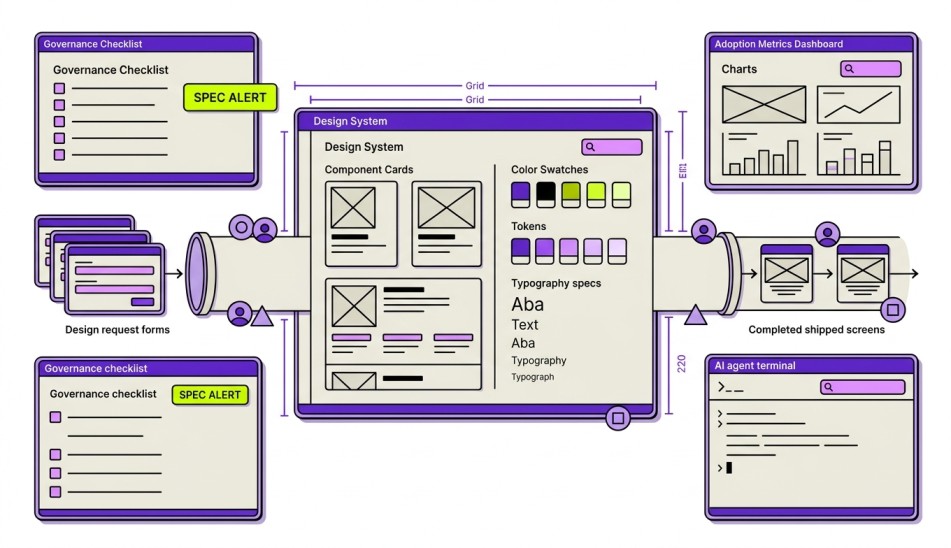
Design Ops refers to the orchestration and optimization of people, processes, and tools to scale design effectively, ensuring alignment across teams and maintaining design quality.
Many team problems don't look like DesignOps problems at first.
They look like developers waiting on design decisions, designers struggling to find research, stakeholders getting different answers from different people, or new team members taking months to figure out how things work.
The good news is that most of these issues are solvable.
In this article, I'll break down the Design Ops function and practices that help product design teams from companies like Uber, Pinterest, and Razorpay collaborate more effectively and scale their design processes without drowning in documentation or bureaucracy.
1. Standardize how design work gets delivered
Best practices for implementing DesignOps include conducting a process audit and creating a centralized design handbook for knowledge sharing across the team.
That's why it's important that you create a standard way for work to enter the team.
For example, at GitLab, their product development process breaks down into design sprints and workflow states that work as quality gates before work moves forward.
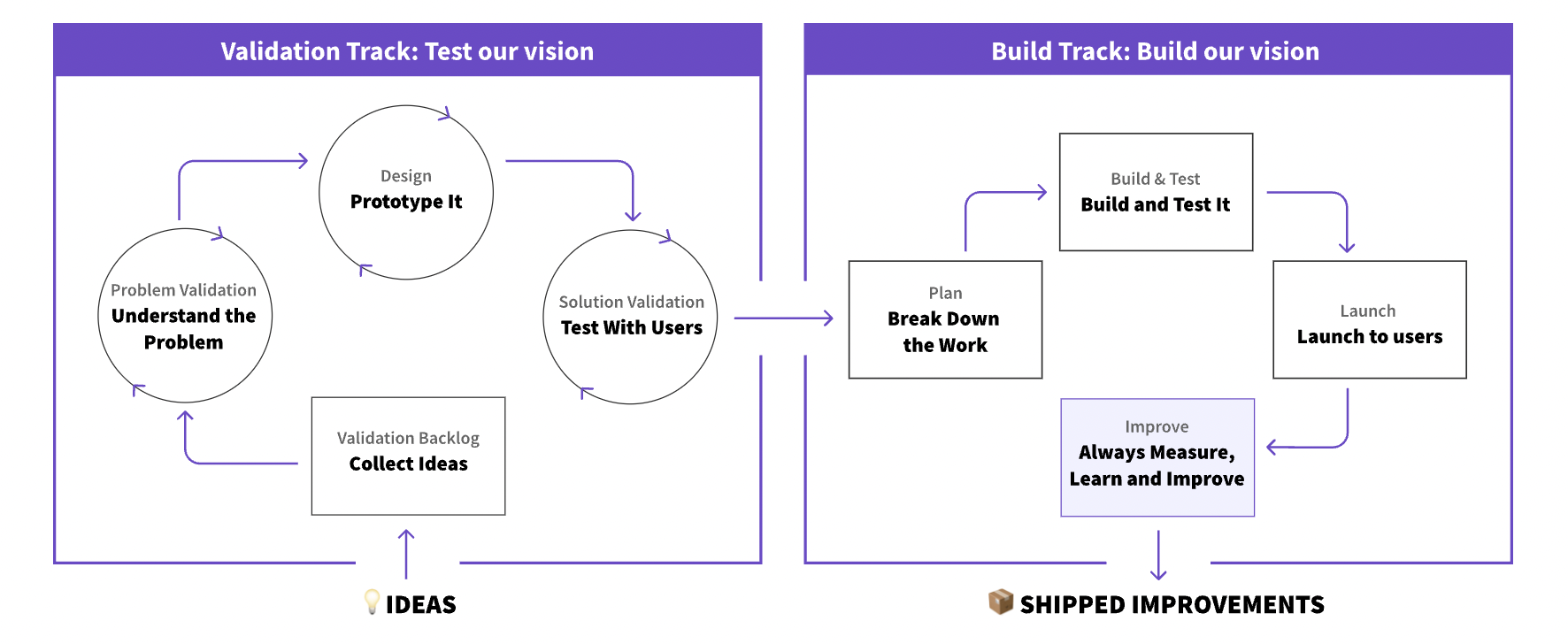
Issues go through problem validation and design readiness stages before entering implementation, ensuring the team has a shared understanding of the problem, stakeholder input, and documented requirements before design or development work begins.
GitLab designers also use workflow labels and handoff checklists to ensure solutions are properly documented before engineering starts implementation.
So I'd suggest that every request should come through a single intake process, whether that's a form, template, or ticket workflow. At a minimum, the request should include:
-
The problem being solved
-
The target users affected
-
Success metrics
-
Business priority
-
Relevant research, tickets, or supporting links
People may mistake this for bureaucracy, but it isn't. In my opinion, it's an effective solution for your entire organization to collectively decide what matters most.
2. Use your design system as a source of truth
A design system is not just a Figma library. It's the single source that both your designers and your engineers build from, and that's where teams get it wrong. If the Figma components and the coded components drift apart, you don't have a source of truth. You have two sources of disagreement.
I like thinking about design systems as a layered architecture:
-
Tokens at the base (color, spacing, type, elevation)
-
Components and elements built on those tokens
-
Patterns built from those components
The benefit of this structure is that one change at the token level updates everything above it at once, creating a consistent UI across systems.
For what this pays off at scale, look at what COBE built for Porsche Holding, an ecosystem of six brands. Instead of a separate system per brand, they created one shared token structure and component library, then aligned the different product teams and departments on the same processes, tools, and responsibilities.
With every brand on a single system, new designs roll out across the entire portfolio from one place.
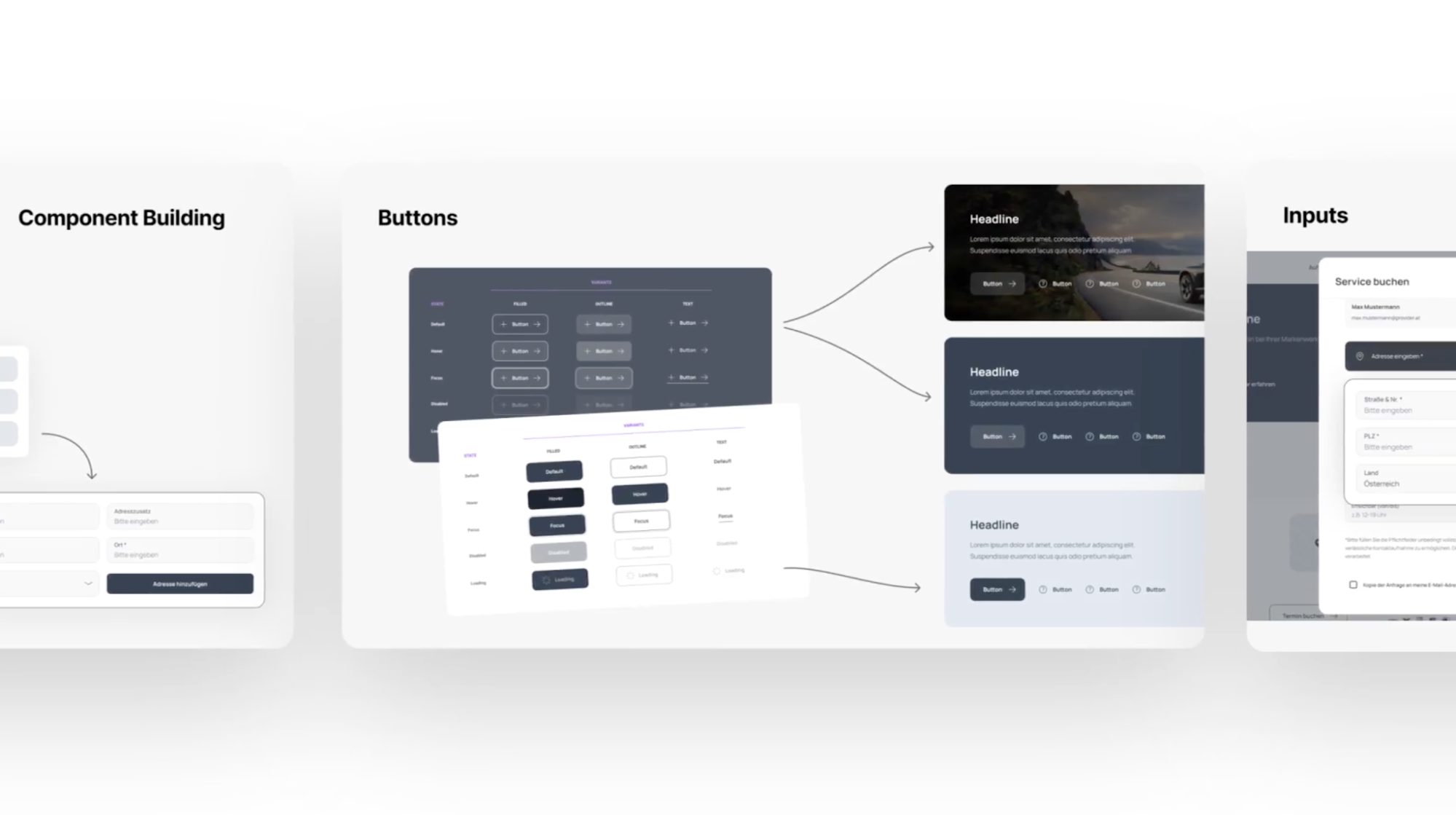
If you work across platforms, share your tokens across web, iOS, and Android, but keep the component implementations native. Sharing component code across platforms tends to cause more problems than it solves.
Also, don't start building until you've run an audit. Teams that skip this just lock in the inconsistencies they already have. So audit your current UI, catalog the variants, and start with the components that are used the most and vary the most.
If your team is using AI to generate screens, prototypes, or flows, this becomes even more valuable.
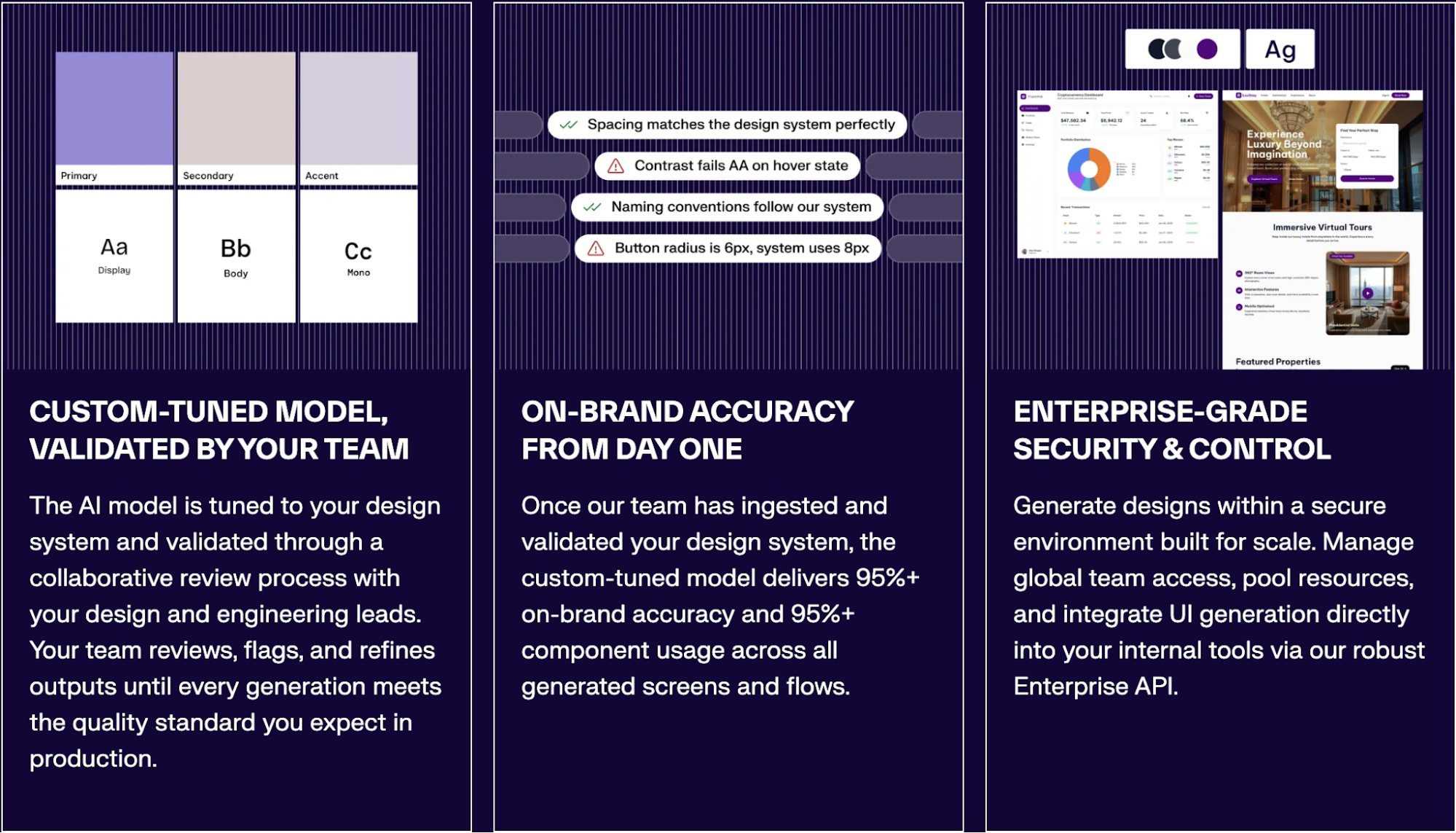
It's one of the reasons UX Pilot offers a UXPilot's Design System service: instead of generating from a generic component library, the model is trained on your existing design system so it works from your tokens, components, patterns, and brand guidelines, the same source of truth as your development team.
3. Structure design decisions for AI agents
Consolidating software and standardizing on core platforms helps streamline DesignOps. And for a long time, design systems were built primarily for designers and developers. Now there's a third consumer you need to think about: AI agents.
Whether you're using AI to generate code, build prototypes, or create product flows, the quality of the output depends on what the agent knows about your system. If it can't access your components, tokens, patterns, and guidelines, it's forced to make assumptions. And AI is very good at generating interfaces from assumptions.
That's why I recommend making your design system machine-readable.
In practice, this means exposing your design system through a Model Context Protocol (MCP) server. Instead of asking an AI agent to infer how a button should work from scattered source files, the agent can query your design system directly before generating anything.
The MCP layer should expose the same information a designer or developer would look for:
-
Component documentation, including props, variants, and accessibility requirements
-
Design tokens such as colors, spacing, typography, and elevation
-
Pattern guidelines and recommended usage
-
Implementation examples and code references
When an AI agent needs an answer, it should retrieve it from your design system instead of inventing one.
The good news is that you don't need to rebuild your design standards and system to make this work. If you've already documented your components and structured your tokens properly, an MCP server mostly acts as a retrieval layer on top of what's already there.
If your designers are already working primarily in Figma, a simpler approach is to make sure the AI design tools they're using can access the design system directly.
For example, UX Pilot built Nodey, a Figma-native AI design agent that works inside your existing Figma files and design workflow. Instead of generating screens from a generic UI library, Nodey can sync with your design system and reuse your components when generating designs.
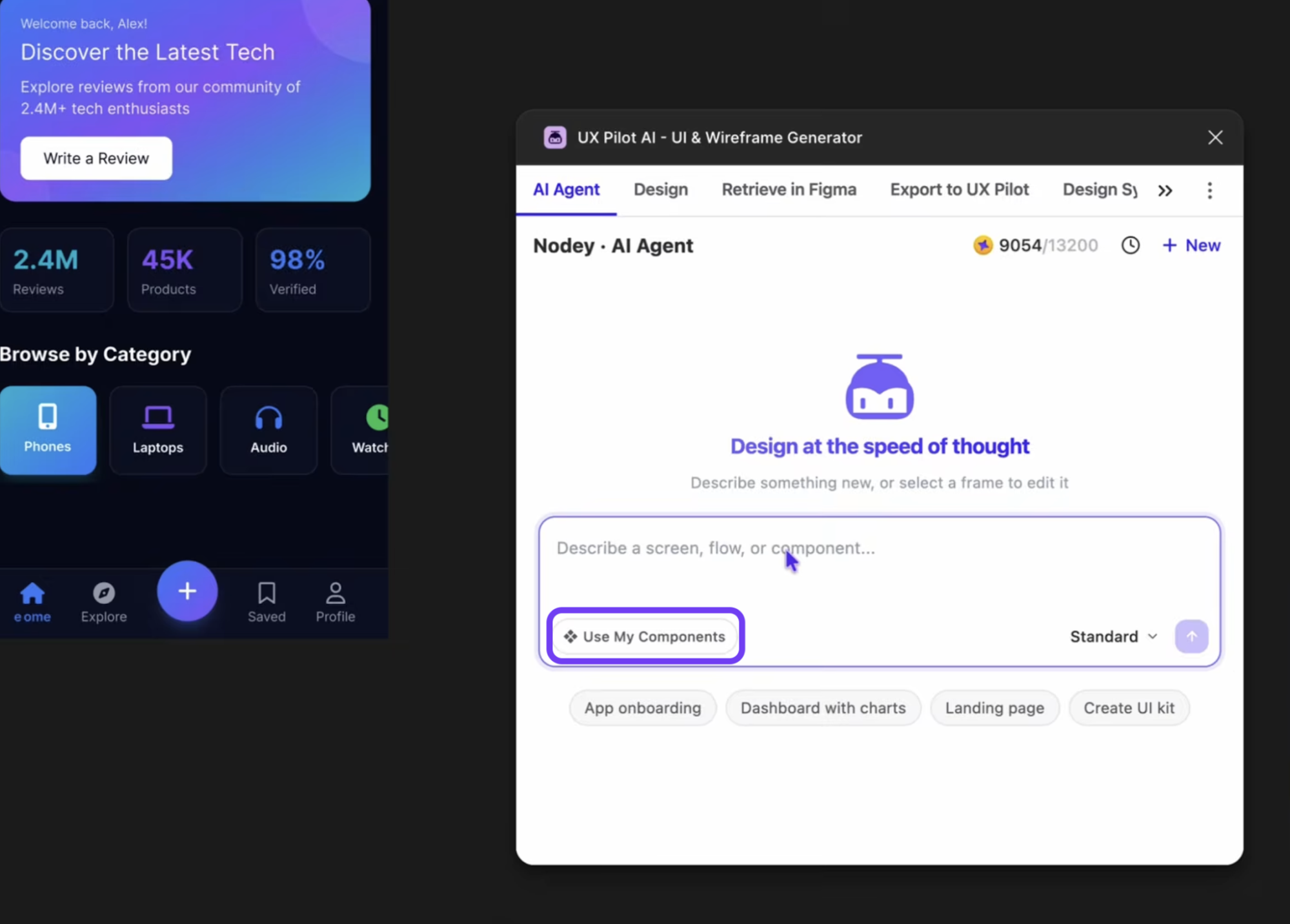
It's also important to think about this as a governance practice rather than an AI generation practice.
For example, Razorpay open-sourced their design system's MCP server as @razorpay/blade-mcp. The server exposes tools like get_blade_component_docs and get_blade_pattern_docs, allowing any AI agent to retrieve component documentation, design patterns, and implementation guidelines before writing code.
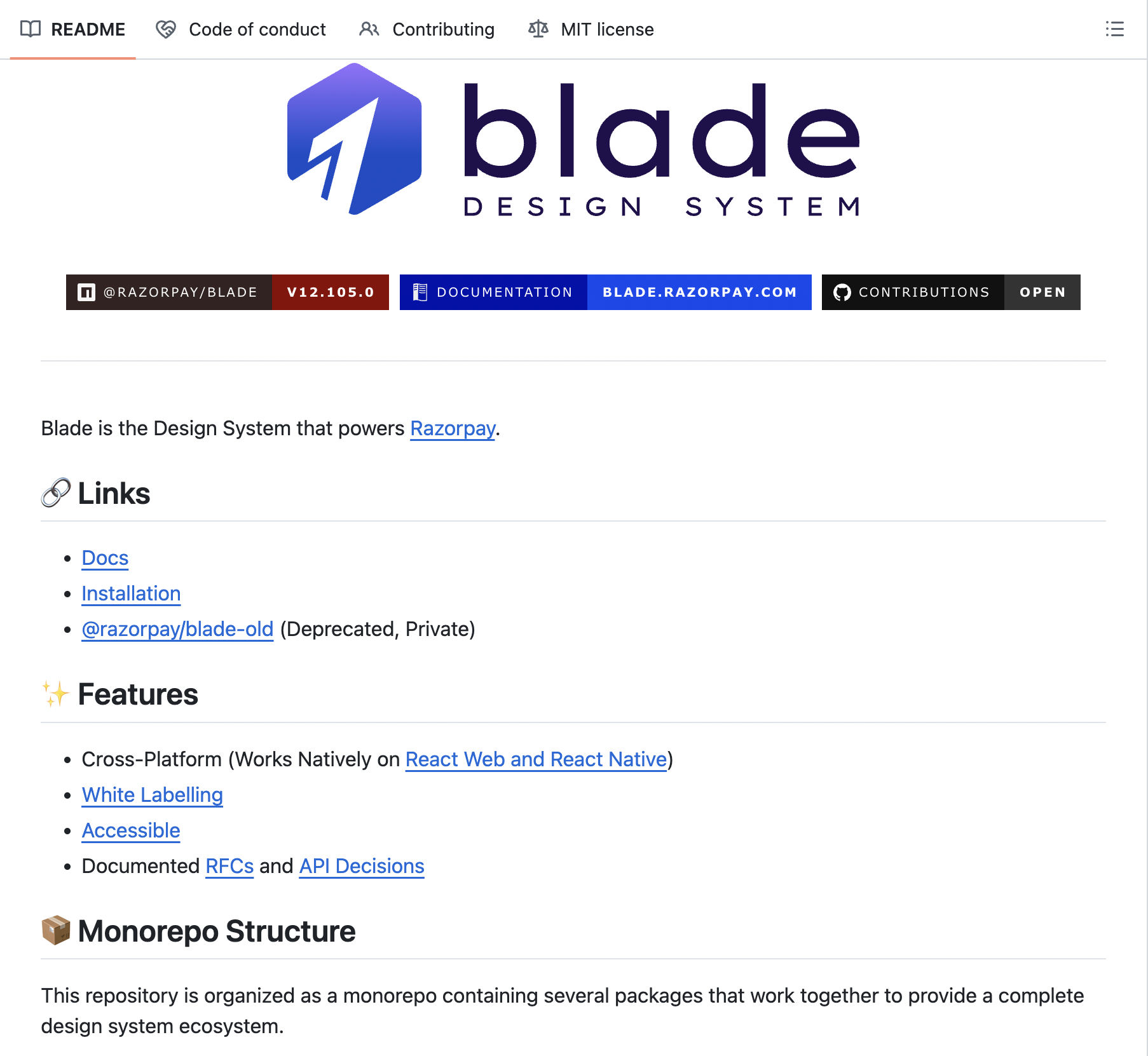
Their monorepo also includes a Figma coverage plugin that lints design files for system usage and an ESLint plugin that enforces Blade component usage in code, closing the loop on both the design and development side.
4. Automate non-creative tasks like handoffs and QA
I think the biggest opportunities when it comes to design automation are not just design generation, but also operational work around design.
DesignOps focuses on operational gaps within a company so designers can concentrate on designing.
Things like:
-
Handoff documentation
-
Design specifications
-
Accessibility checks
-
Design QA
-
Token exports
Take handoffs as an example. Instead of asking your UX designers to document the same information repeatedly, you can use tooling that extracts component structure, tokens, variables, and relationships directly from the source design and generates specifications automatically.
A lot of enterprises do this now, such as Uber. They built an agentic workflow called uSpec on top of the Figma Console MCP.
The system crawls component hierarchies, extracts tokens and variables, maps component relationships, and generates specification pages directly in Figma. The entire workflow runs locally, which means proprietary design data never leaves the organization's network.
It also keeps design project timelines from slipping on documentation that no one wants to do by hand.
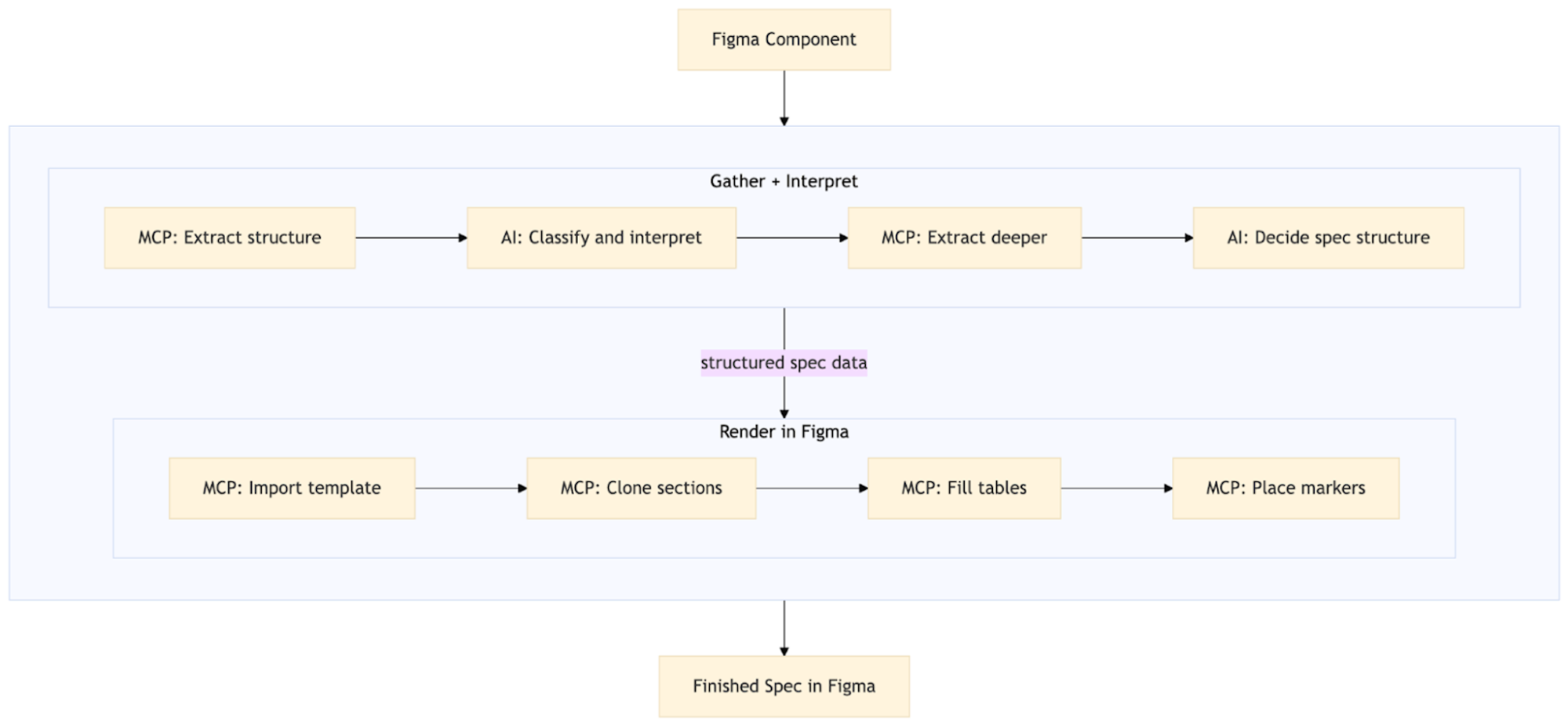
The same principle applies to QA. Wire these checks into your CI pipeline so regressions are caught at merge time, not after release:
-
Accessibility linting
-
Visual regression testing
-
Design token compliance
-
Design system usage validation
Token management is another area where automation can remove a surprising amount of manual work.
If a designer updates a token in Figma, that change shouldn't require someone to manually export values and update multiple codebases. A more structured approach is to create a token pipeline where design tokens flow through a transformation layer and are automatically converted into platform-specific formats, such as:
-
CSS variables for web
-
Swift constants for iOS
-
Dart classes for Flutter
-
Android resources
5. Set governance in place
Governance is the set of rules, ownership structures, and review processes that determine how your design system evolves. It's an effective means for cross-team collaboration.
I don't think governance should be about controlling every design decision. It is to prevent unnecessary divergence while still allowing teams to move quickly.
For example, accessibility requirements and token inheritance should be non-negotiable because they're fundamental to consistency and usability. On the other hand, product-specific patterns and brand expression can be flexible as long as they stay within established guardrails.
One model I like is federated governance. It's a team structure where, instead of a central design system team owning everything, a small core team owns the foundation:
-
Design tokens
-
Accessibility standards
-
System architecture
-
Release management
Product teams can then contribute new components, patterns, and improvements through a defined review process.
For example, Acuity's Fusion design system uses a federated governance model with multiple ownership layers.
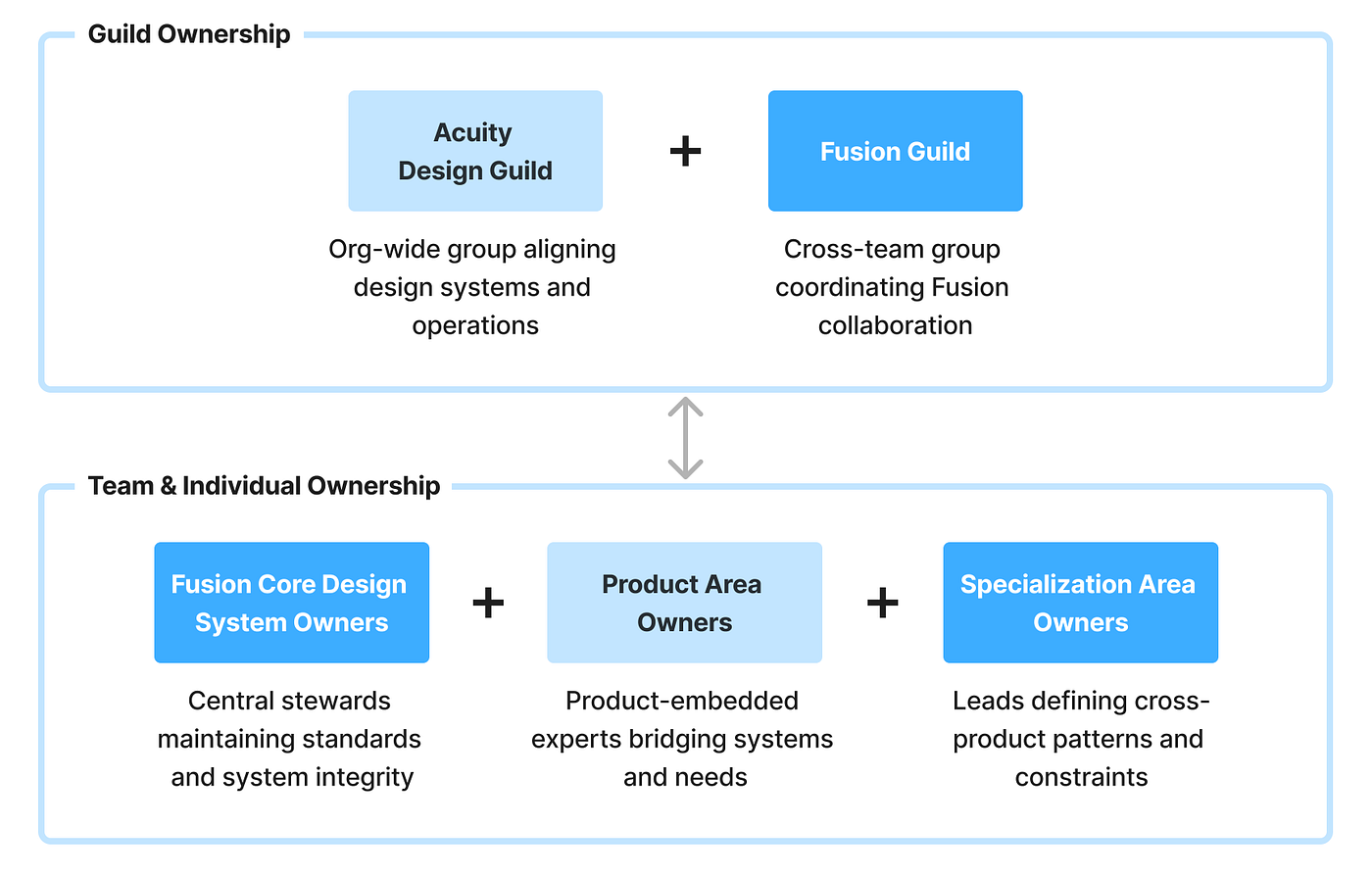
A cross-functional guild reviews proposals and coordinates changes across the organization, design system owners maintain standards and releases, and product-area representatives contribute patterns from their respective domains. The model gives teams flexibility to solve local problems while keeping the underlying system consistent.
I'd also suggest creating a consistent contribution workflow. Every change should follow the same path: Proposal -> Design -> Implementation -> Review -> Release. It prevents teams from bypassing the system and creating one-off solutions that become permanent.
Just as importantly, governance doesn't stop when a component is added. It also applies when a component is removed. If you deprecate something, provide a migration path, document the replacement, and communicate a timeline.
6. Define roles and responsibilities
I'd highly recommend explicitly defining responsibilities across the design-to-delivery process to avoid operational frictions.
One framework that works well here is RACI:
-
Responsible: who does the work
-
Accountable: who owns the outcome
-
Consulted: who provides input
-
Informed: who needs visibility
Even Nielsen Norman Group recommends this framework. They published a UX-focused RACI framework that maps product development activities across product managers, designers, and engineers.
Rather than assigning ownership based purely on title, the framework defines involvement based on responsibilities, expertise, and context, regardless of how your organizational structure looks. That makes it easier for teams to stay aligned even as roles evolve.
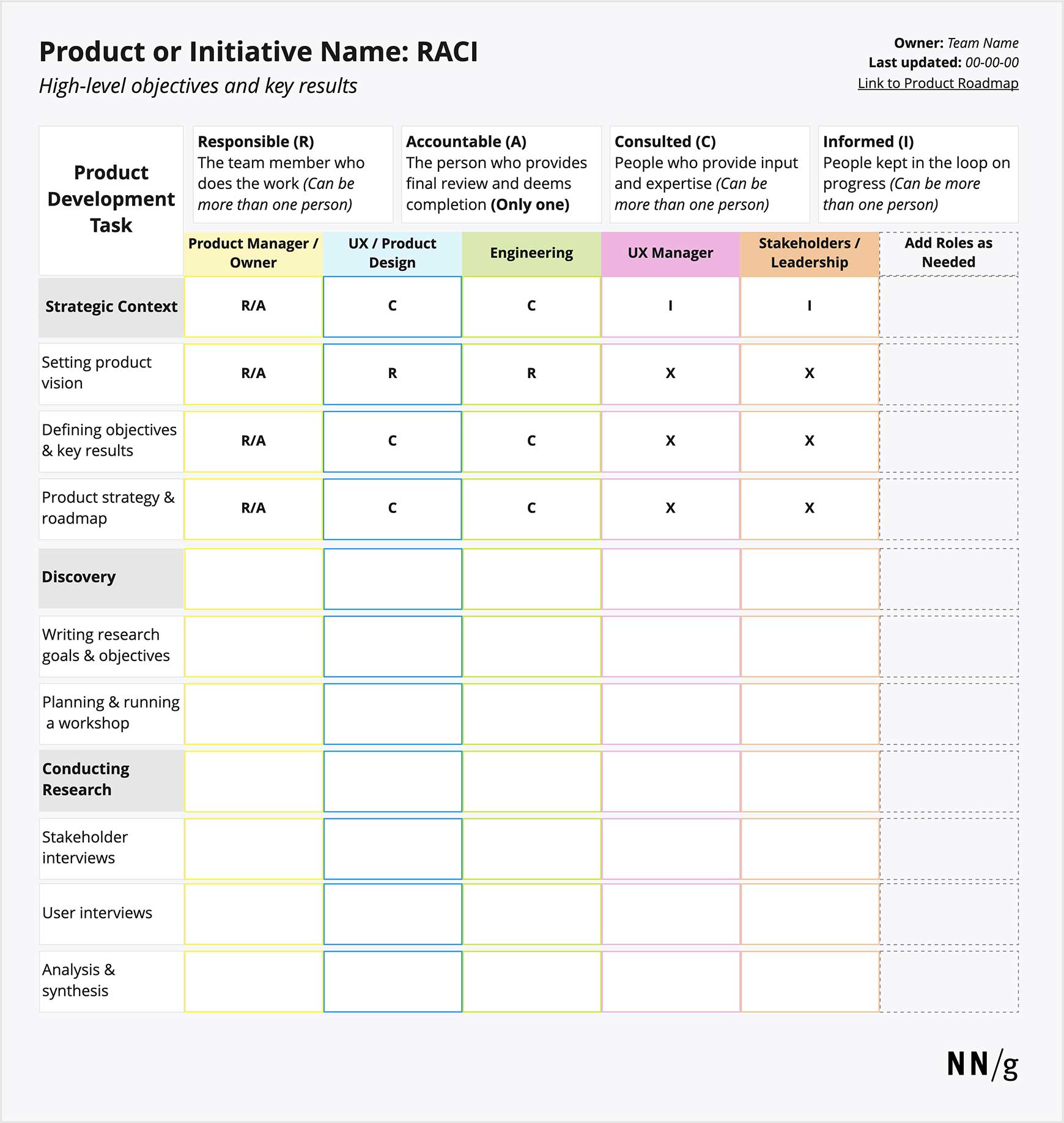
You don't need to apply this to every meeting or task. Focus on the activities that repeatedly create confusion, such as requirements definition, UX design, implementation, reviews, releases, and design system changes.
For most product teams, the ownership split is fairly straightforward:
-
Product managers own what gets built, including requirements, priorities, and release decisions.
-
Designers own how the experience works, including research, UX, UI, and interaction design.
-
Engineers own how the solution is built, including architecture, implementation, and code quality.
Ideally, you should have exactly one Accountable owner for every major activity. Shared accountability sounds collaborative, but it often creates situations where everyone assumes someone else is responsible.
It's also helpful to define ownership by role rather than by name. People change teams, get promoted, pursue other professional development, or leave the company. This will save you from such a situation when it happens.
7. Track adoption and design output
Tracking key performance indicators (KPIs) helps quantify a design team's operational efficiency.
A common mistake I see teams make is measuring the size of their design system instead of its adoption.
Knowing that you have 300 components in a library tells you what was built. It doesn't tell you whether anyone is using it. A much more useful metric is component coverage, which is the percentage of your product that's built using design system components.
You can measure this in both design files and production code, but I'd start with design because it's easier to collect.
For example, Pinterest's Gestalt team built an internal tool called FigStats that uses Figma's REST API to measure adoption across the organization.
Instead of counting components, it calculates the percentage of design nodes that originate from the Gestalt library relative to all design nodes. To avoid skewing the data, they only analyze recently edited files and pages marked for handoff, excluding drafts and exploratory work.
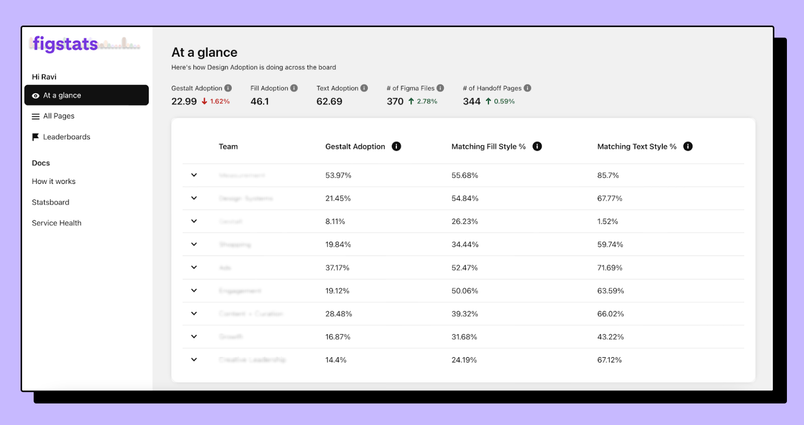
The same strategy can work for most teams. Scan your design files, identify which nodes come from the design system, and calculate adoption as a percentage of total nodes.
I'd also track a few supporting metrics:
-
Component detachment rates in Figma
-
Documentation coverage
-
Team-level satisfaction or NPS
-
New custom CSS introduced per pull request
These metrics can tell you where the system is creating friction. For example, a high detachment rate often means teams can't find what they need in the library, while increasing amounts of custom CSS can indicate engineers are bypassing the system entirely.
That's valuable feedback. It may mean the system doesn't support their use cases, the contribution process is too slow, or the components don't fit how they work.
In other words, measurement shouldn't be used to enforce adoption. It should help you understand whether the system is helpful and what needs to be improved next.
Build design operations into how your team ships
DesignOps defines clear hand-offs and communication channels between designers, product managers, and engineering teams to improve cross-functional alignment. That's why I'd think of DesignOps as a way of working instead of just a function inside a team.
If a designer spends an hour chasing context, that's a DesignOps problem. If developers can't tell which component they're supposed to use, that's a DesignOps problem. If AI generates something that doesn't match your product, that's a DesignOps problem.
So building DesignOps directly into how work gets delivered is what helps you scale.
It means maintaining a design system that serves as a source of truth for both humans and AI. It means automating repetitive tasks, defining ownership, establishing governance, and measuring adoption so you know what's working.
You don't have to do all of this at once. Pick one practice: standardize your intake, run an adoption audit, or set up a governance model. Prove it works with one team, then expand from there.
None of these design practices make a team more creative; they just make it easier for creative work to happen.
That's ultimately the goal of DesignOps.