
How To Write A Product Design Specification For Digital Products

Horea Matei
Created on Apr 10, 2026
Unclear product requirements and specifications will cause costly issues.
According to ComputerWeekly, employees use just 40% of available features in enterprise software. That means teams often ship features nobody asked for.
That's partly because engineers may misinterpret requirement documents set up by product managers, critical info is lost in unnecessary back-and-forths between departments, and scope creep inflates timelines until two-month projects go past six.
A proper product design specification (PDS) document prevents this. It translates product vision into concrete, buildable requirements for apps, SaaS platforms, and web products. This guide covers what PDSs are, what goes into them, how to create one collaboratively, and mistakes to avoid that can turn specs into shelfware.
What is a product design specification?
A product design specification is an early-stage document that outlines a digital product's requirements, features, constraints, and success criteria before the actual product development process begins.
Think of it as a business plan, but for individual products. A PDS serves as a roadmap that specifies:
-
Your product's overall goal.
-
How your product will achieve that goal.
-
What target audience pain point it will fix and how.
-
What factors might make it vulnerable to competitors, and ways to overcome them.
To illustrate, here's a Notion PDS template snippet the company itself uses in its product design processes:
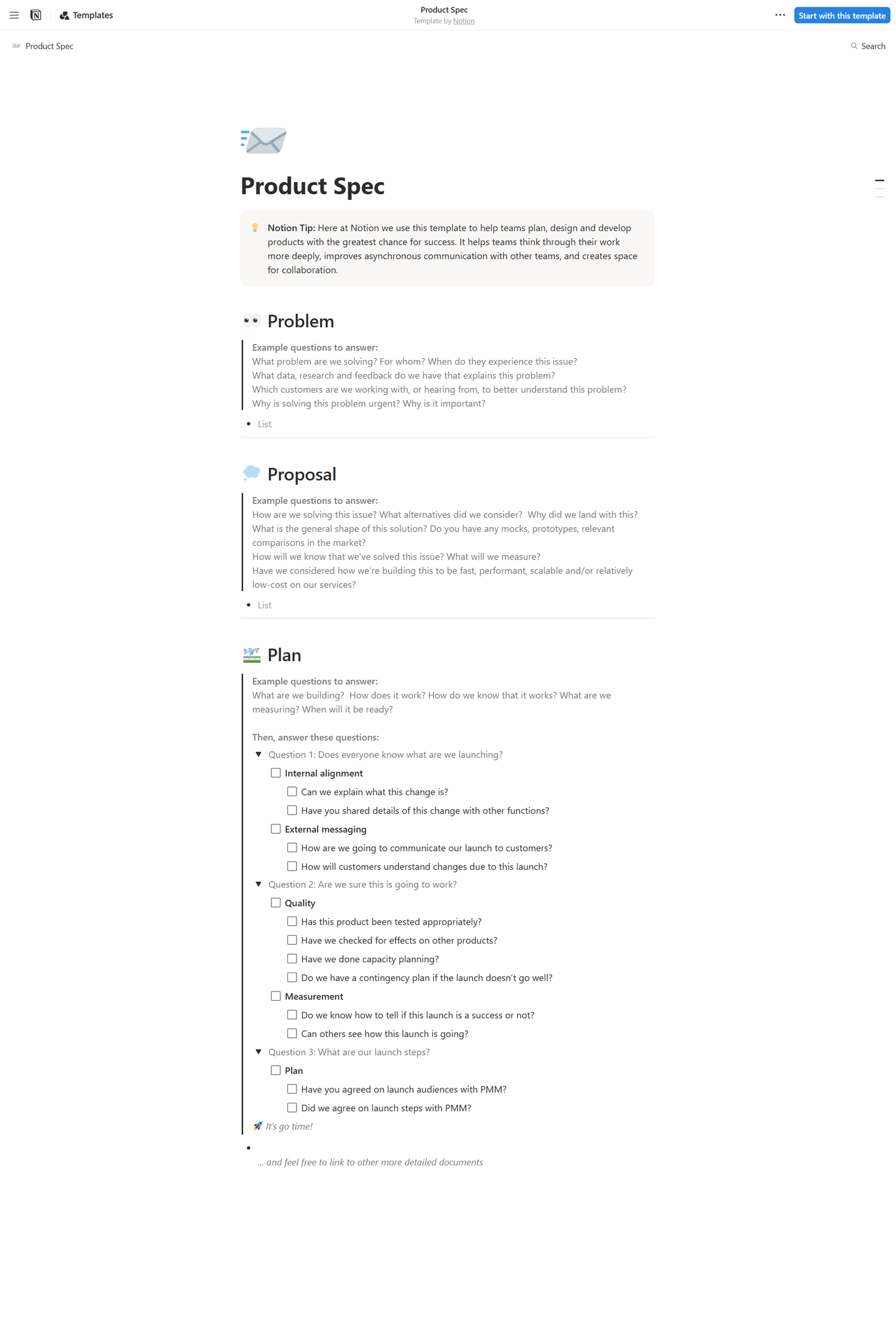
The design brief template highlights the core audience pain points, how the product will solve them, and the exact steps needed to make that happen, with the latter being the central part of the PDS.
It's worth noting that PDSs are closely tied to Product Requirement Documents (PRDs): documentation that specifies what product should be built and why.
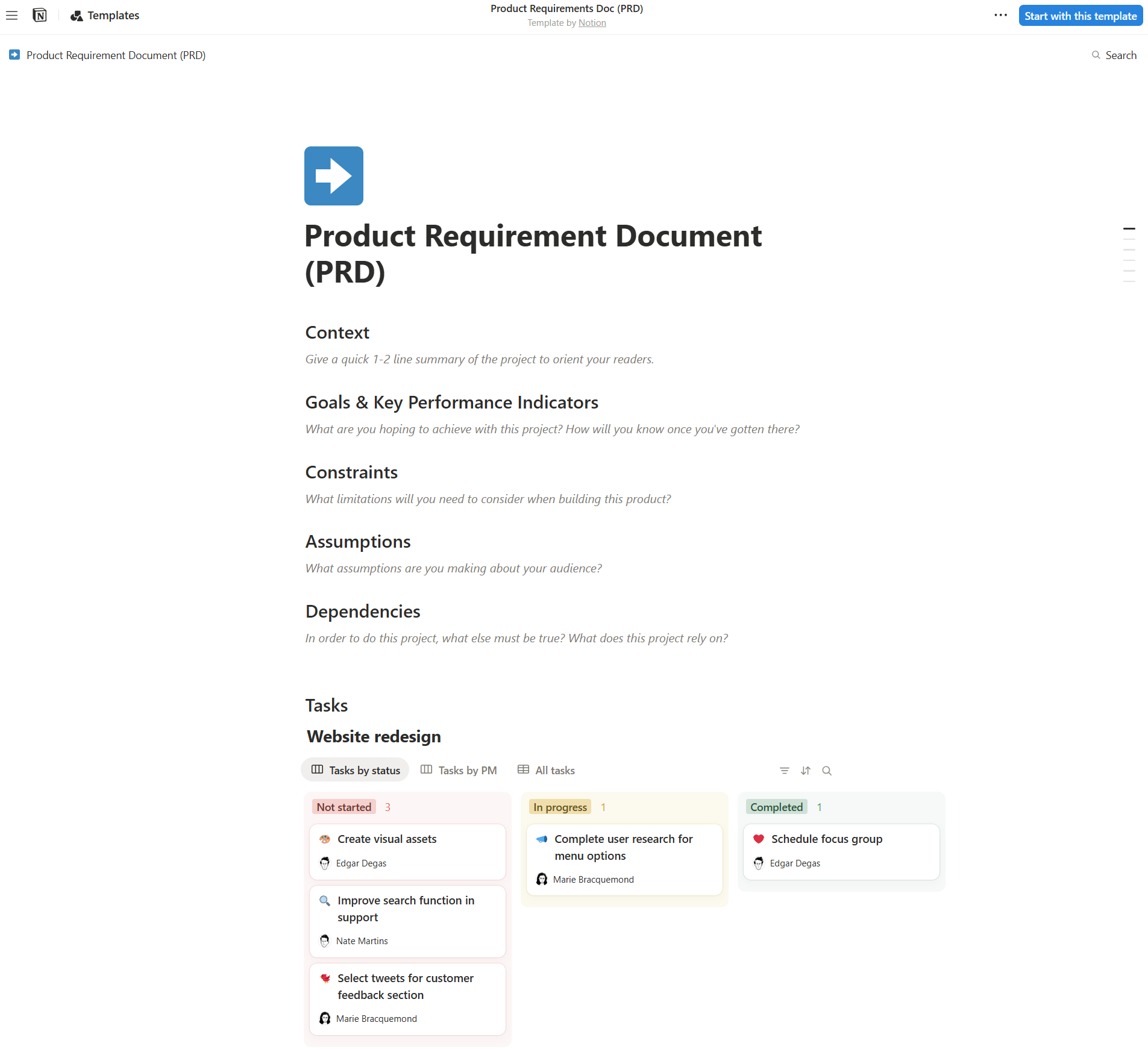
The Notion template above outlines:
-
The context behind a particular project.
-
The KPIs needed to quantify its success.
-
Important factors to keep in mind during product development (constraints, audience assumptions, and dependencies).
-
The exact steps needed to kick off product development processes.
To put it differently, if PRDs outline what products should be built and why, PSDs translate PRD content into specific design and technical specs that highlight exactly how these products should be built.
In terms of digital product development, however, PRD and PDS documentation often overlap or merge into a single document.
This centralizes all product development-related info into one detailed document and aligns all stakeholders involved: project managers, designers, developers, engineers, marketers, and so on.
And yes, Notion's got a template for this one, too.
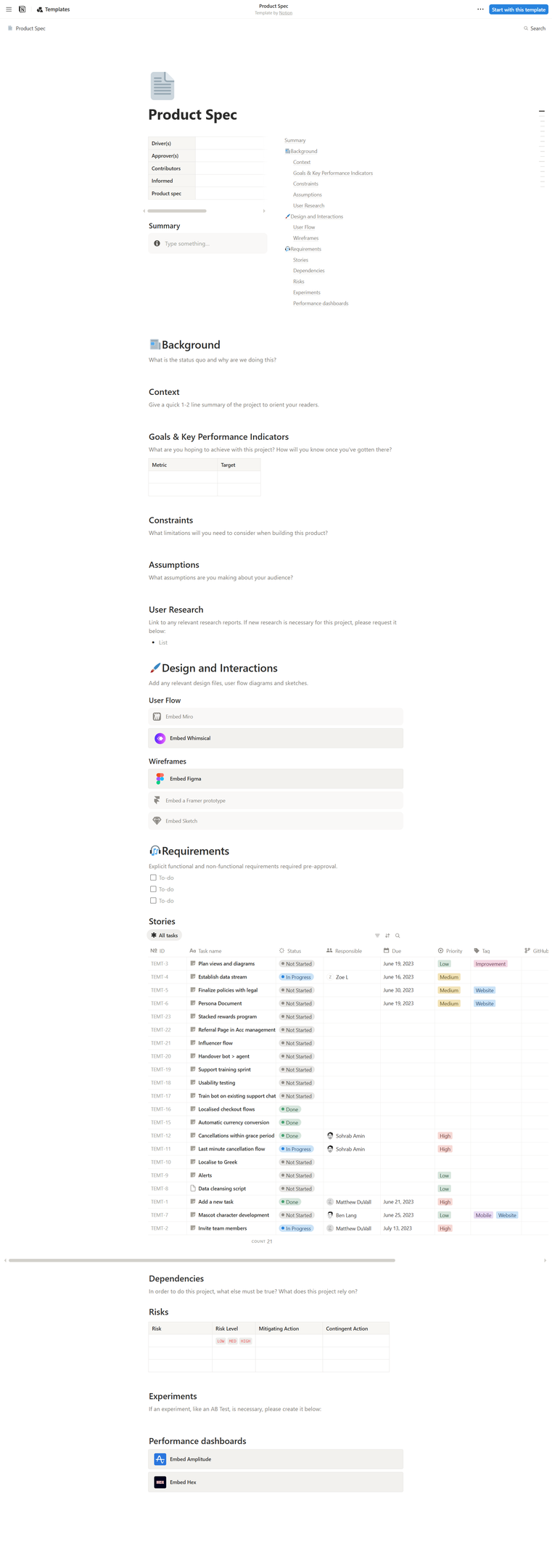
In this case, PDSs help product managers to align stakeholders on scope, designers to understand constraints, engineers to plan implementation, and QAs to define test criteria and quality control benchmarks.
As such, PDSs are more like cross-departmental communication tools first, documentation artifacts second.
Note: Agile teams commonly object that PDSs feel like a waterfall development practice. Teams running two-week sprints resist upfront documentation because it seems to slow them down. But that's not the case.
PDSs act as on-hand references to eliminate the constant "wait, what are we building again?" conversations that actually slow agile teams down. If everyone is running fast but with no clear direction, speed won't get you anywhere.
Anatomy of an effective product design specification
Now you'll learn about the key elements that go inside a proper product design specification document.
Keep in mind that your particular document must be tailored to your particular product and teams. The PDS checklist below covers the general wireframe needed to ensure any spec document is set up for success.
Define the problem, objectives, and success criteria
To quote from a The Guardian interview with Rochelle King, former Global VP of Design at Spotify:
"Anytime you kick off a project, you start by defining the problem and defining what you actually want to accomplish, what you need to do."
In other words, any typical PDS must always:
-
Start with a clear statement that defines the user pain point or market need your product aims to solve, just like in the above-mentioned Notion template. That's absolutely mandatory to ensure everyone is aligned and adopts a customer-centric approach to the design process.
-
Include clear and measurable objectives. SMART objectives like "reduce user onboarding time from 12 minutes to under 5 minutes within 90 days of launch" guide every department (design, engineering, QA) to achieve a common, crystal-clear outcome.
-
Specify success criteria teams can validate against after launch: engagement metrics, retention, conversion, and task completion rates, or performance benchmarks (load time, uptime). They also double as foundational benchmarks for QA test plans. QA teams may not exactly know what problems to fix or prioritize otherwise.
-
Summarize the overall product: what it is, who it is for, and its core value proposition.
Although these tips may seem a little rudimentary, they do decide whether your design process will succeed or fail.
Case in point, Rochelle King was behind the 2014 Spotify redesign project, which was a huge success.
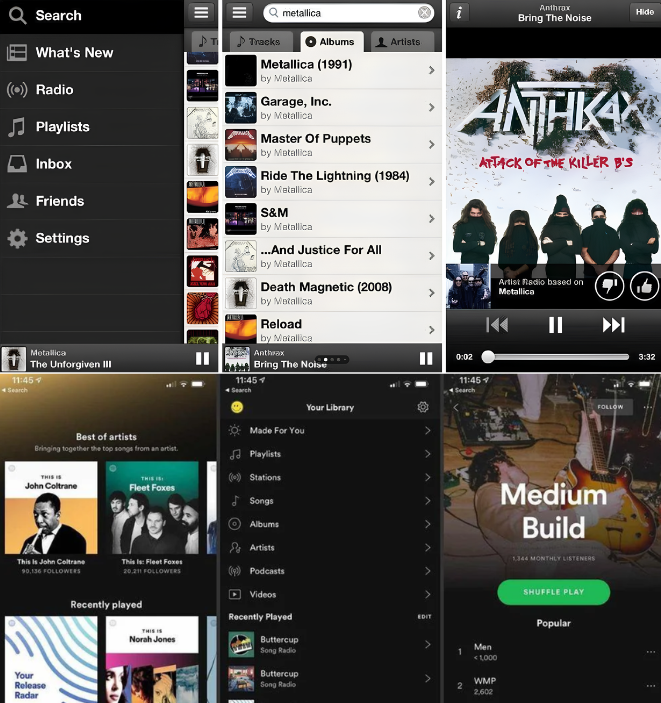
The entire process was based on five core principles:
-
Lagom, which is Swedish for "just the right amount." This principle established a perfect balance between a de-cluttered, yet highly functional UI.
-
Stay Authentic, a principle that prioritizes a unique, easy-to-recognize UI look that aligns with Spotify's brand identity.
-
Get Familiar to establish consistent UI layouts across all viewports and operating systems.
-
Be Alive through engaging user experiences via elements like vibrant color schemes.
-
Do less, which structured the layout so users could find and play music with as little effort as possible.
These five principles guided every design decision throughout the entire project. The result? A design so successful it required minimal adjustments, even a decade later.
Document functional requirements and design constraints
Next, create a centralized reference hub that aligns teams by defining roles, scope, design, test plans, release activities, and management activities. Here's a snapshot of how Atlasian puts this in practice:
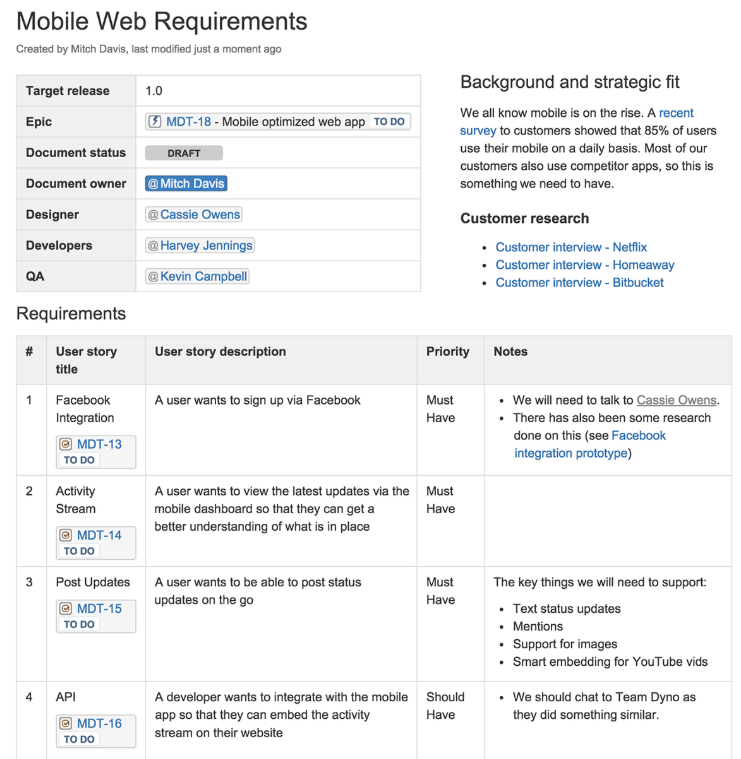
Such sections often include:
-
Functional requirements that describe the product's capabilities and what it must actually do to fulfill its purpose: user flows, feature behavior, API integrations, data handling, and platform support across web, iOS, and Android.
-
Non-functional requirements covering behind-the-scenes expectations on how the system should operate: performance targets (like a sub-two-second page load time), scalability expectations (support 10,000 concurrent users), and reliability standards (99.9% uptime SLA).
-
Design constraints that set the boundaries teams must work within. For digital products, these include responsive breakpoints, platform guidelines (like Apple's Human Interface Guidelines or Google's Material Design), browser and device support matrices, existing design system components, and technical stack limitations.
-
UI and UX specs like wireframes, mockups, and user flow diagrams.
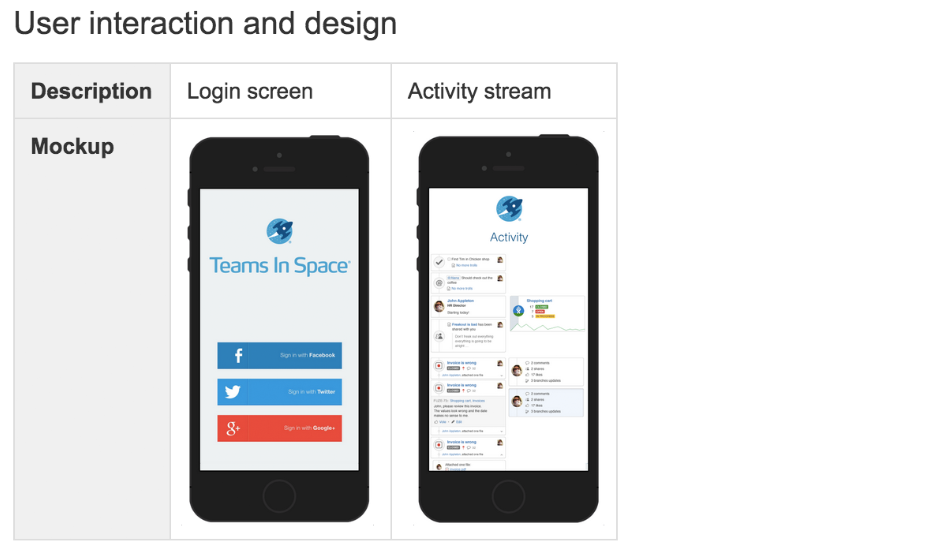
Functional requirements should be testable and easy to validate. For example, "Users can reset their password via email link within 60 seconds" is a solid statement. In contrast, "Users should be able to reset their passwords easily" is too vague and doesn't offer QA testers anything to benchmark against.
For UI and UX specs, your PDS should link to living assets in tools like Figma — not embed static screenshots.
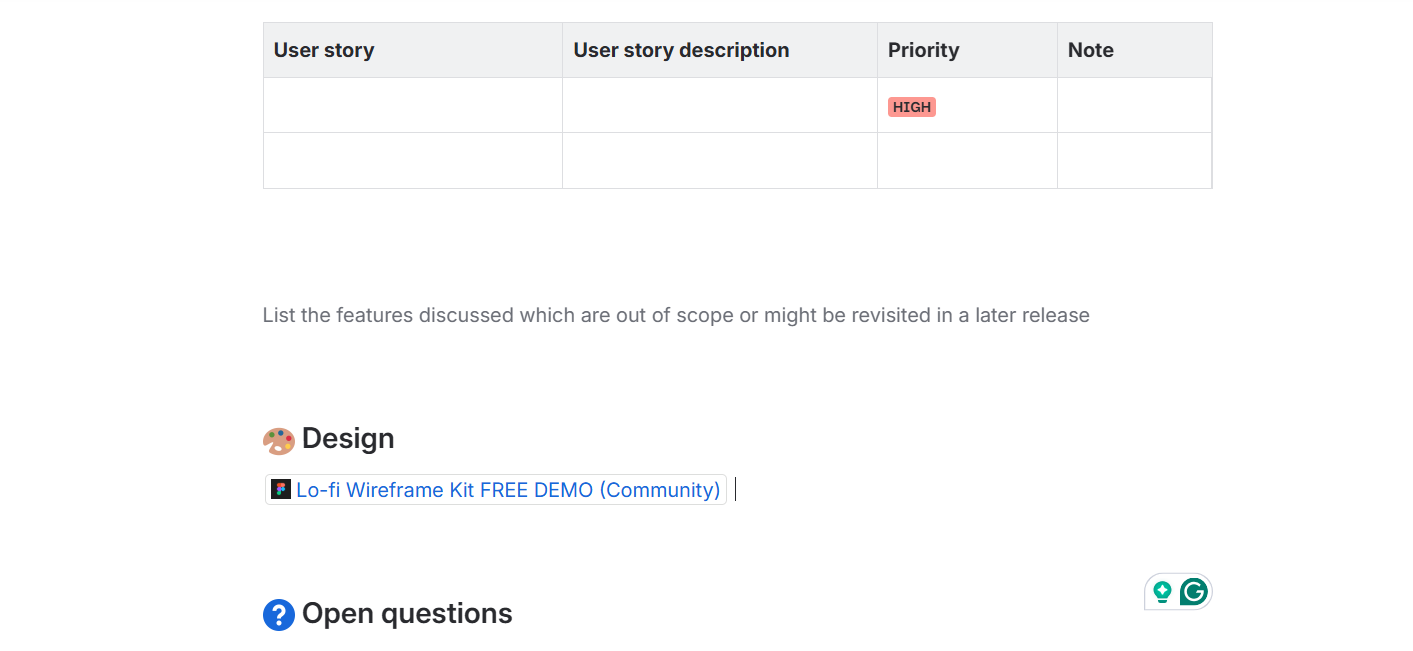
Static images go stale once you export them. Linking to the source file keeps the spec connected to a design's latest version.
Address accessibility, privacy, and technical constraints
These are non-negotiables. SDRs must establish accessibility, privacy, and technical constraints from the get-go.
This ensures teams build products with compliance regulations throughout the entire design process: research, concept development, build, launch, and post-launch — just as the UK's Information Commissioner's Office (ICO) recommends.
Nail down accessibility requirements as soon as possible.
Get thoroughly familiar with WCAG 2.2 guidelines (the current W3C recommendation as of December 2024). The guidelines define three conformance levels: A, AA, and AAA.
Here's a brief rundown of what each level means:
-
Level A: The minimum requirement level. It fulfills basic accessibility guidelines (image alt texts, simple keyboard navigation, and no excessive flashy visuals that may trigger seizures).
-
Level AA: This should be your absolute baseline. It makes your website/app accessible to a broader user range via sufficient color contrasts, self-explanatory hyperlinks, and full site-level keyboard usability.
-
Level AAA: The top accessibility level, usually achieved by government and healthcare institutions, for example. It involves factors like sign language interpretation for videos and no time-based user interactions.
It's worth noting that this ranking system evaluates each particular design element: colors, text size, fonts, navigation, and so on.
Here's a snapshot of how different foreground and background color combos fulfill different accessibility levels:
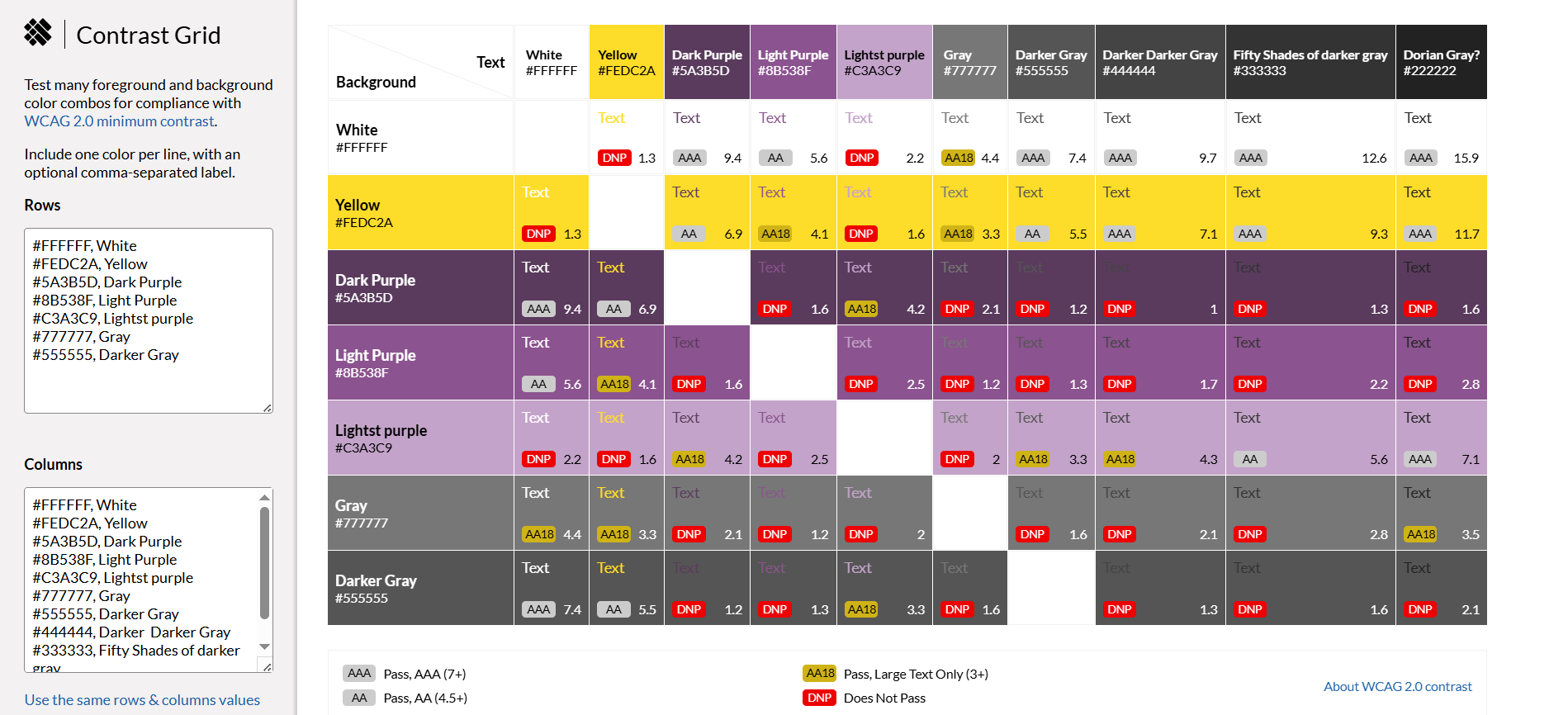
The higher the contrast, the better the accessibility. Make sure your SDR includes detailed information on how to meet all level AA accessibility requirements.
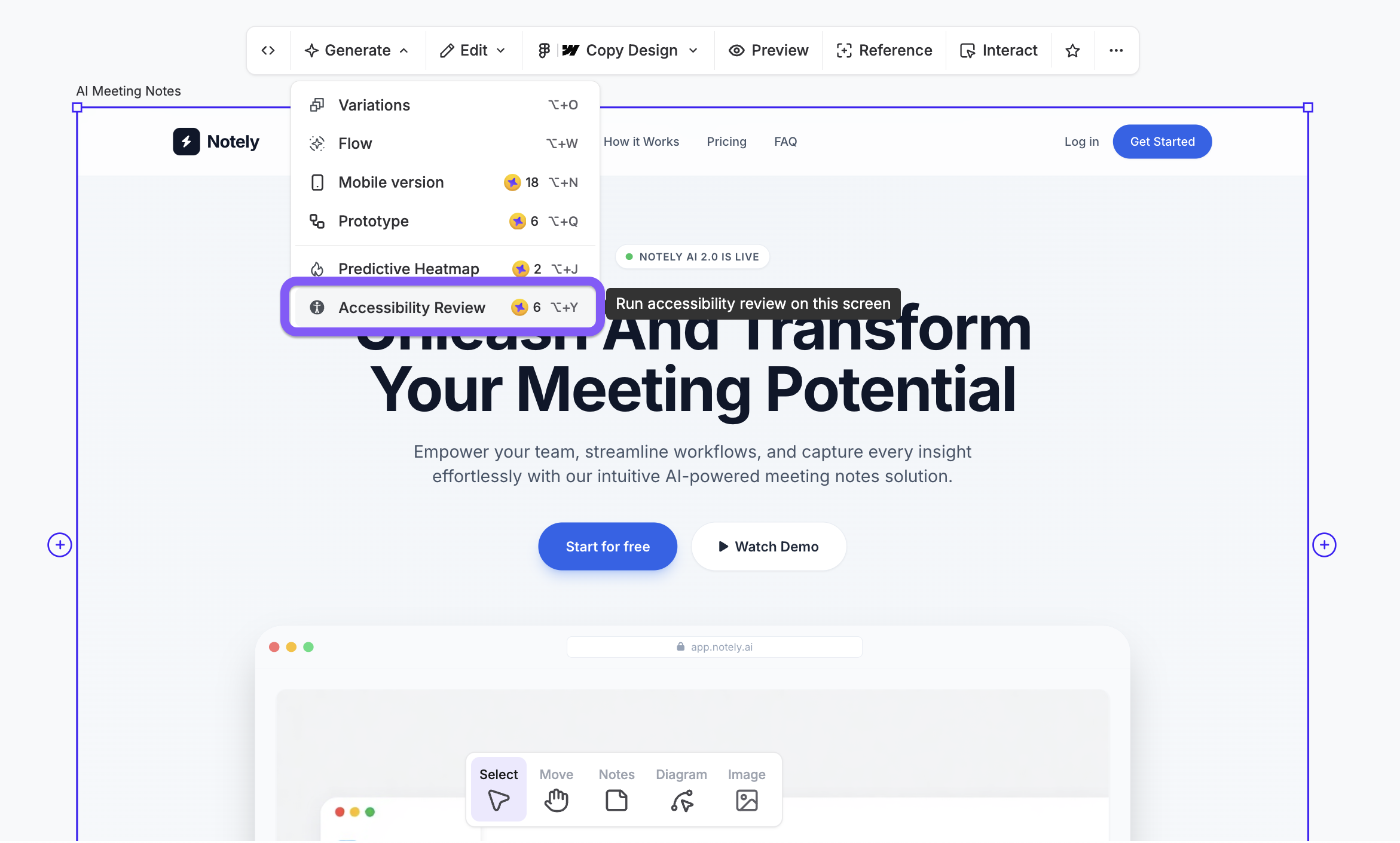
You can use UX Pilot's Accessibility feature to help review your product's accessibility. Select the Accessibility Review from the Generate dropdown tool.
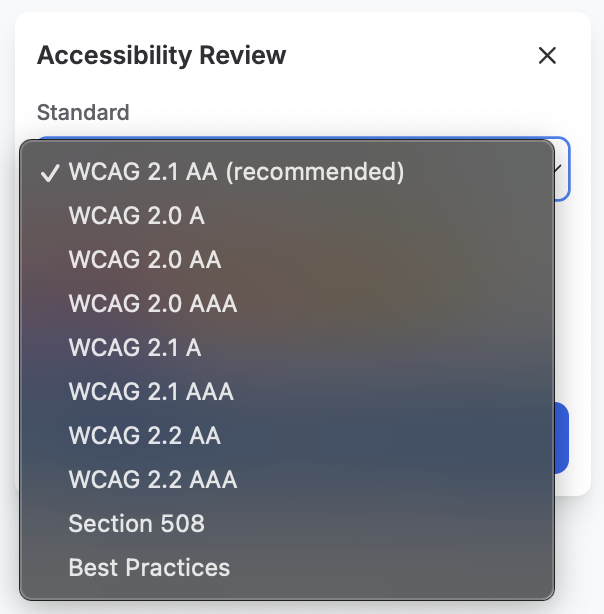
Select your preferred standard from the Accessibility Review drop down.
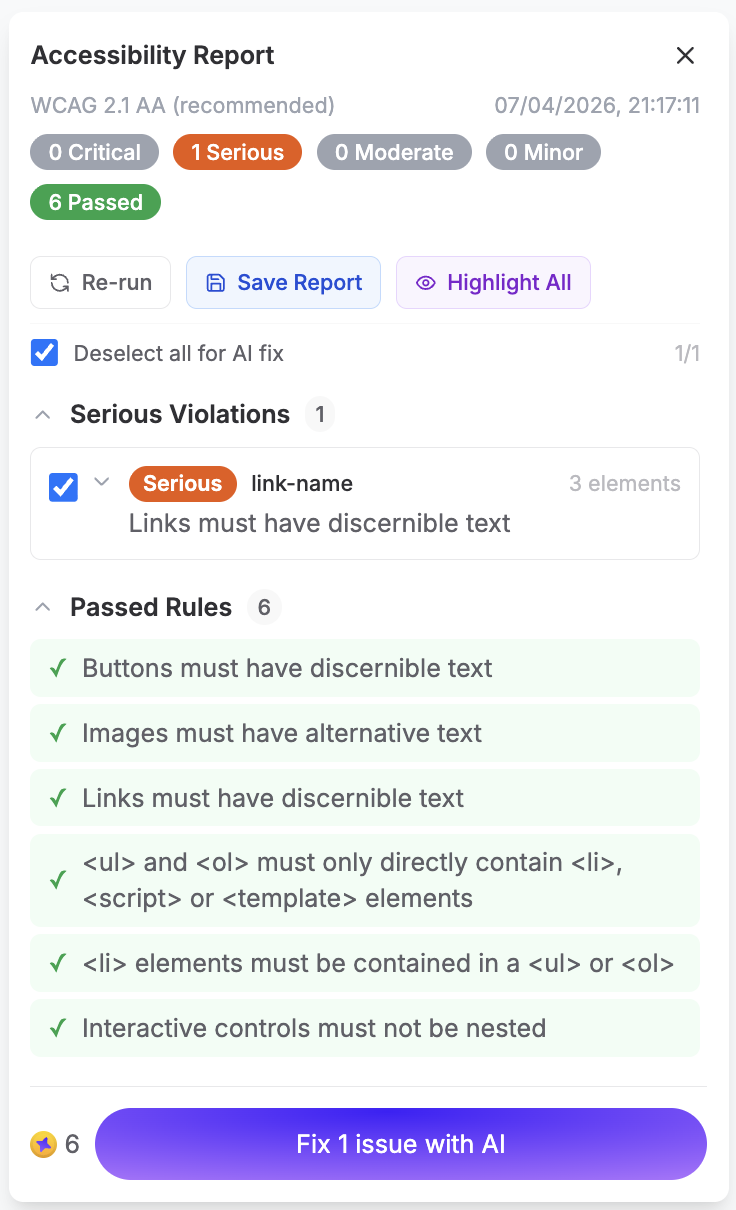
UX Pilot will display your product's Accessibility Report. You can review the report and even fix any issues using AI.
Privacy regulatory requirements are also very important.
GDPR in Europe requires opt-in consent, privacy-by-design, and data minimization: you can only collect the data needed for your features to function (e.g., email data access for a CRM platform). California's CCPA follows an opt-out model but requires mechanisms for users to see collected data and request deletion.
Your spec must explain how you plan to comply with these regulatory requirements so engineers build them into the database architecture from the start, not tack them on before launch — or worse, after launch.
Don't forget about technical details and constraints.
To wrap up this section, your PDS should include supported browsers and versions, minimum device performance requirements, API rate limits, and third-party service dependencies.
For SaaS products, it should also cover multi-tenancy requirements, data residency rules, and SSO or authentication standards. For example, if an enterprise client expects SAML-based single sign-on and it wasn't in the spec, that's a mid-build detour.
Although intended for commercial use (and not internal use), Apple's iPhone 16 spec sheet perfectly encapsulates all the above-mentioned details.
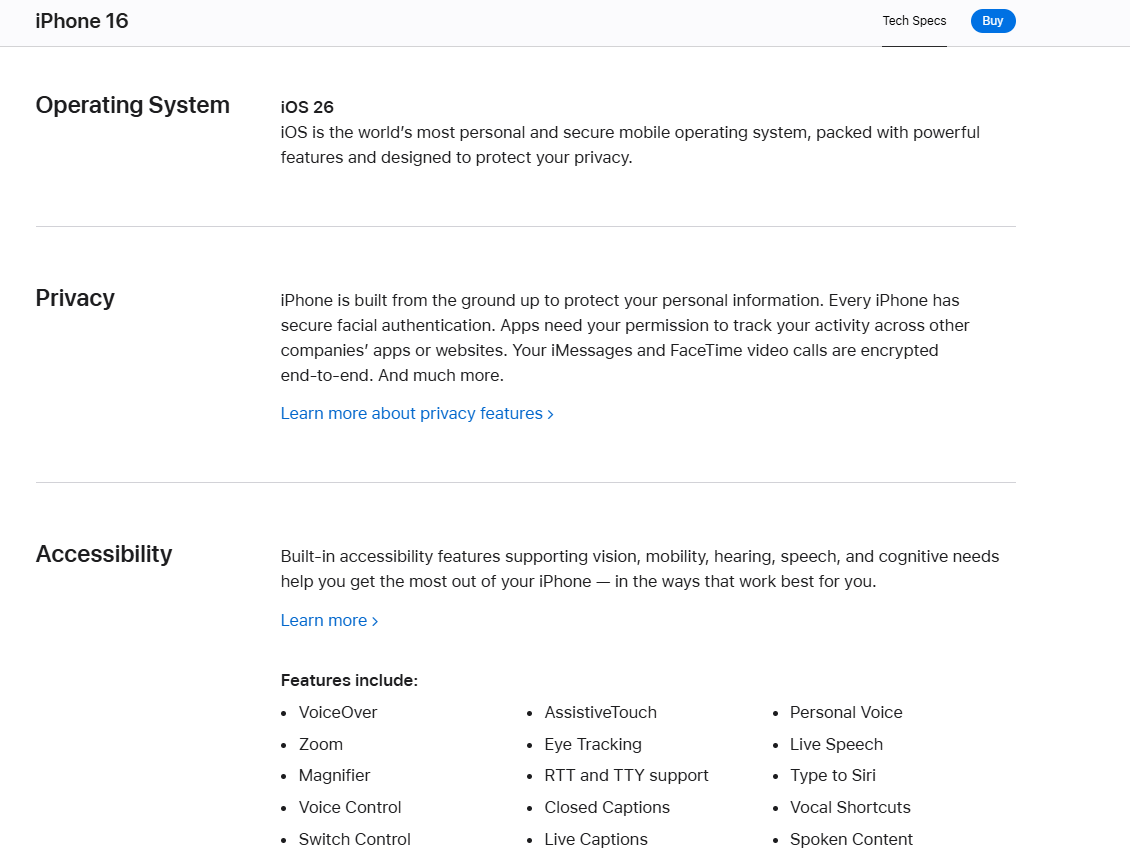
It includes all the technical, accessibility, and privacy details needed to give potential buyers peace of mind.
5 steps to create your product design specification from research to sign-off
Having covered the prerequisites, let's move on and see how to create a proper PDS from beginning to end.
1. Ground every requirement in user and market research
According to UserInterviews' 2025 Research Budget Report, 26% of respondents increased their research budgets in 2025.
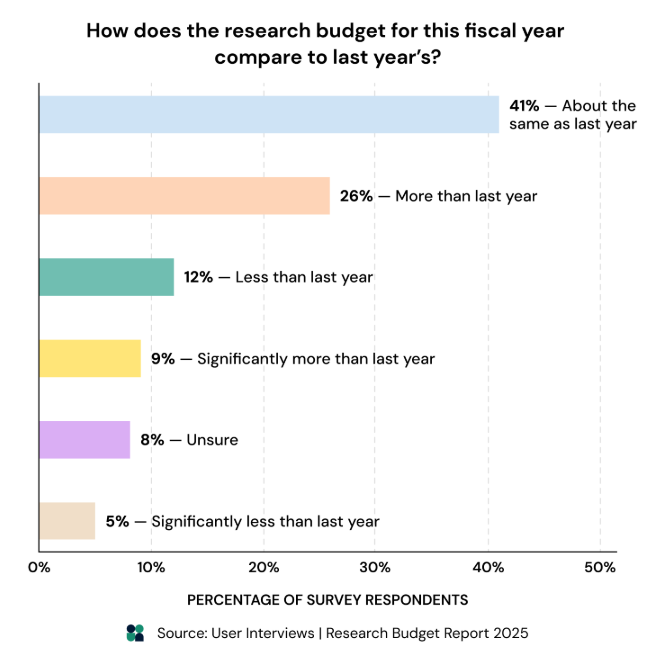
Most importantly, 9% reported they boosted their research budgets by a significant margin.
Almost a third of this 9% segment claimed that this approach helped their company achieve a user-driven status, an absolute key to aligning product development with actual user needs.
In other words, your SDR must be based on real user research, and not assumptions. Make sure you conduct:
-
Usability tests on existing products to evaluate the overall UX on current products and spot any weaknesses or strengths you can apply to future projects.
-
Support ticket analysis to identify and remedy common user complaints, bugs, and other UX-related issues.
-
Surveys and interviews to understand user needs and wants across new market segments.
-
User behavior tests to assess UX flows and navigation experiences.
Your SDR should make these research findings easy to access. Customers power businesses, so product ideation, development, and testing processes must fully focus on the end user.
Going back to Atlassian's SDR model, here's how it implements its research:
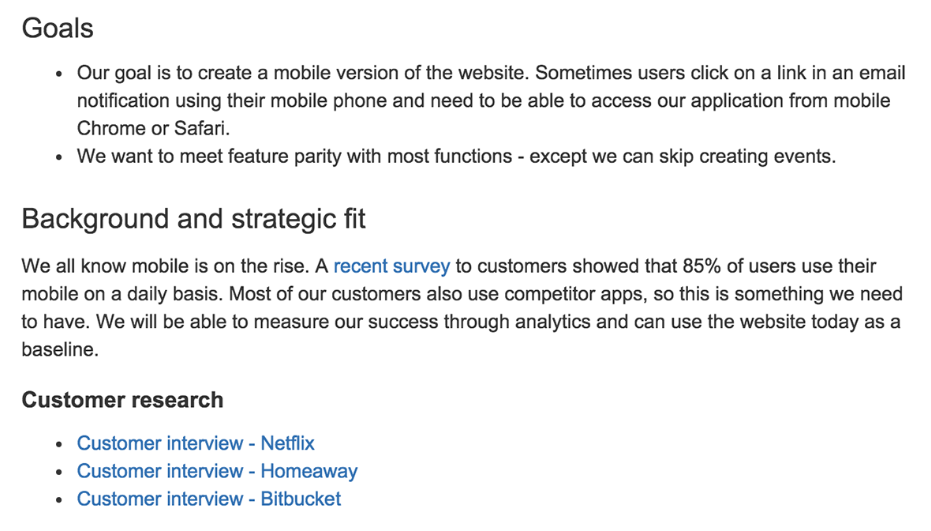
There's a dedicated research section in the top portion of the document, complete with hyperlinks and a bit of context on why this research is important for the project in question. It aligns all team members involved and gives them easy access to full customer interviews.
Also, perform competitive research to identify mistakes you can learn from. Check competitor product offerings and reviews across sites like G2 or Capterra to spot common user complaints and other gaps you can fill in.
Note: Translate research findings into concrete requirements. Statements like "users want faster onboarding" lack direction. Meanwhile, "reduce the onboarding flow from eight screens to four, pre-fill company data via domain lookup, and allow users to skip non-essential setup steps" gives each department something specific to build, design, and test.
2. Draft collaboratively with cross-functional stakeholders
Launching a successful product requires active involvement from all departments. The same applies to product specification docs. Product managers, design teams, engineers, and QAs should contribute to their respective SDR sections.
This gives your entire team full visibility over design processes and how to hand off projects from one department to the next.
It also helps anticipate and solve any potential hand-off issues using each department's perspectives and expertise. For example, design teams may spec a complex animation that engineering can't deliver on schedule, while engineers may propose a data model that doesn't support a planned feature.
Slack's development of Recap, an AI-powered feature, perfectly illustrates this collaborative model. Everyone shared project coordination responsibilities, while multiple teams joined forces on department-specific tasks.
For example, members across engineering and product design polished code together to smooth hand-offs as best as possible. The result was a product spec that reflected real technical constraints and real user needs rather than siloed assumptions.
Here's a step-by-step framework that shows you multiple teams can set up a PDS document.
-
PM drafts the problem statement, objectives, and success criteria.
-
Design teams contribute with UI/UX specs, wireframes, and accessibility requirements.
-
Engineering reviews technical feasibility, adds constraints, and flags dependencies.
-
QA defines test criteria based on the stated requirements.
Versioned tools like Notion, Confluence, and Google Docs are perfect for this format.
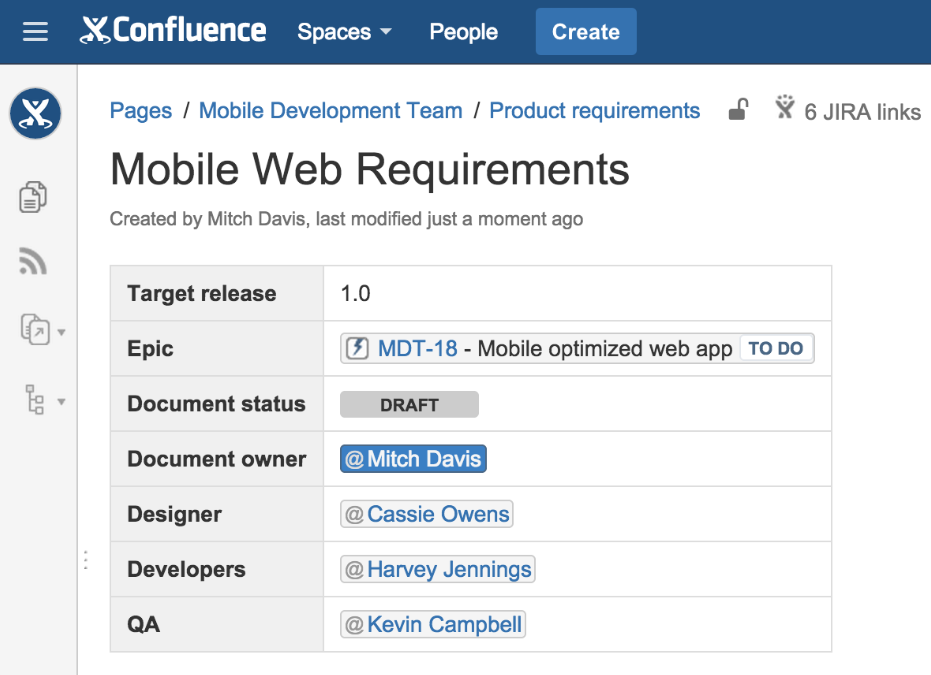
Case in point, the Atlassian PDS mentioned throughout this post was made through Confluence.
3. Validate with a structured review before development begins
Establish thorough SDR approval workflows before you kick off development. Leaders across project management, design, engineering, and QA, along with all other relevant stakeholders, must be able to review SDRs. Documents won't progress to development unless each and every department gives the green light.
This step is super important because it ensures absolutely everything is set in stone before development kick-offs. Don't try to wing any aspect of the development process. You may be prone to mid-project changes caused by unclear documentation, otherwise.
For example, Notion's product management system supports cross-functional collaboration and review processes across multiple product design-related tasks through Kanban-based approval workflows:
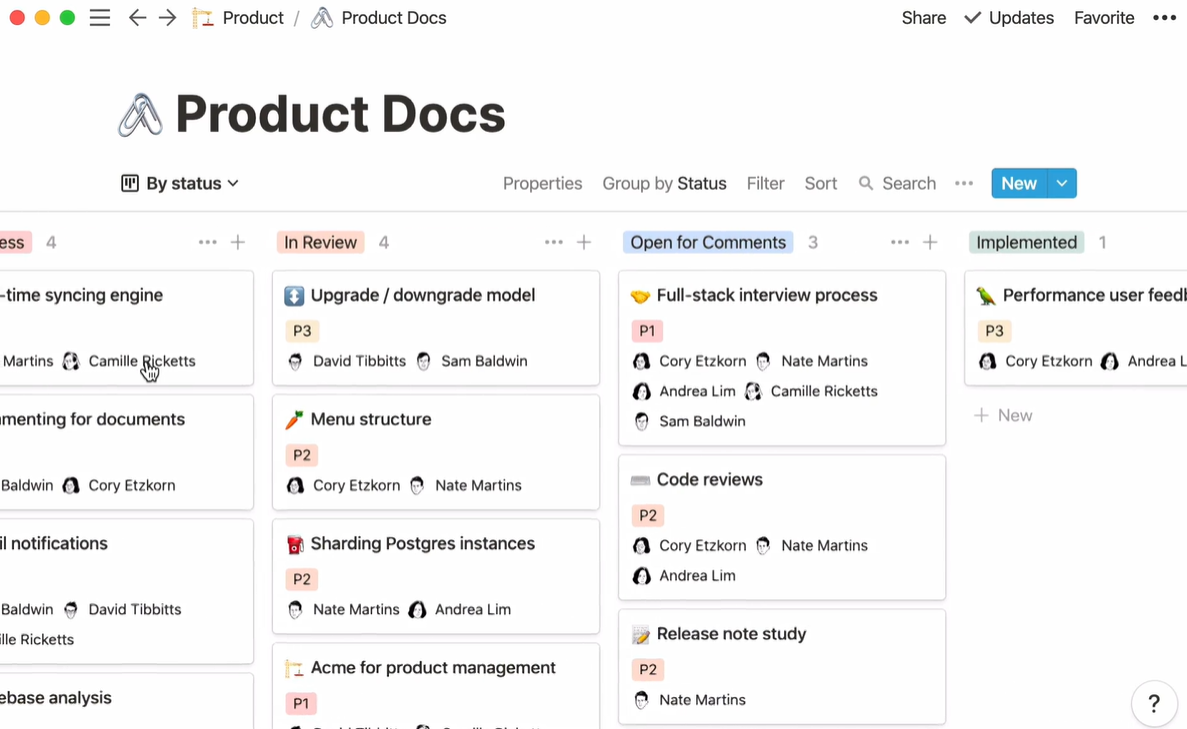
Of course, you can modify such boards to specifically reflect product specification processes.
To make the job a little easier, here's a quick SDR validation checklist with questions you should ask yourself during review processes:
-
Is every requirement testable and unambiguous?
-
Are success criteria measurable with the team's current analytics setup?
-
Has engineering confirmed technical feasibility and estimated effort?
-
Are accessibility and privacy requirements explicitly stated?
-
Is the scope clearly bounded? What's in and what's out?
-
Are dependencies and risks documented?
The answers should result in one of three outcomes: approved for development, approved with documented changes, or sent back for revision.
4. Balance precision with flexibility
Your product specification document must find a sweet spot between specificity and flexibility. Here's how you can do that:
-
Be super specific on the "what" and the "why": the problem, the success criteria, and constraints.
-
Be loosely specific on the "how": the exact implementation approach and the specific UI pattern.
This framework gives engineering and design room to find the best solution within clear boundaries. It also prevents feature creep, where each small addition seems reasonable in isolation, but cumulatively, they inflate timelines, technical debt, and degrade the user experience.
FlowSignal's case study is an excellent example. The company pulled feedback data from across Slack, customer calls, support tickets, and bug reports to create specific anchored-in-reality engineering specs that also allow room for creativity. The result?
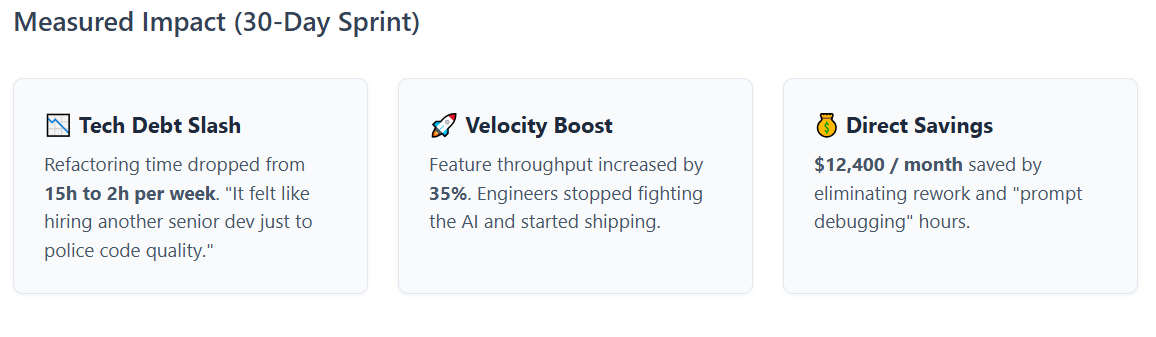
$12,400 per month saved, drastically improved productivity, 13 hours per week spent on refactoring saved.
By contrast, an overspecced PDS may get your project stuck in development limbo: locking every pixel, interaction, and edge case so tightly that there's no room for design iteration or engineering judgment. Plus, teams that won't be able to adapt without a formal change request for every minor adjustment. That equals time lost waiting for reviews and approvals for each small change.
Meanwhile, vague PDSs might cause team members from across departments to interpret requirements differently.
A vague statement like "The dashboard should be fast" might mean something different to each department: engineering may think about loading times, while design teams might focus on how fast the dashboard allows users to complete particular tasks.
However, phrases like "The dashboard loads in under 2 seconds on a 3G connection with 10,000 data points" are a lot more actionable.
5. Replace assumptions with evidence
Once again, each PDS statement should trace back to user research, business data, or a regulatory mandate.
Another reason for FlowSignal's success was that its PDS was based on concrete feedback from customer calls and support tickets. This also reduces the risk of specification-by-committee, where requirements get added because a stakeholder feels they're important rather than because evidence supports them.
Still, take user research findings with a grain of salt. For example, most Spotify users back in the day said they wouldn't pay $10 a month for mobile access.
But they did. Spotify conducted extensive market research and decided to roll out the premium tier even if users said they wouldn't pay for it. That decision turned out to be the right call.
In other words:
"That was our first lesson: user research is for understanding what people think they will do, not what they will actually do." — Gustav Söderström, Spotify Chief R&D Officer
Your PDS requirements should be based on a blend of market intelligence, user research, and competitive analysis.
This gives you the insights needed to create final products that align with bot end user expectations and financial business goals.
Put your product design specification to work
To wrap up, product design specification docs are only valuable as long as your teams actually find them useful. This post covered the groundwork to establish watertight PDS outlines, but the content itself must be fully tailored to your particular business goals, teams, and processes.
Keep in mind that the best design specs are living docs that get referenced across all scenarios: during sprint planning, whenever project scope changes, or revisited during retrospectives. Start simple: pick a project and build a PDS around a particular feature (and not an entire product) using the tips covered in this post.
Ask your team to build that feature based on your PDS and gauge productivity. A good PDS shouldn't slow your team down, but remove the ambiguity that does.