
How to Design a SaaS Development Process in 8 Steps

Saloni Kohli
Created on Mar 4, 2026
Many SaaS products fail because teams treat SaaS development like traditional software development.
A SaaS development process is not a one-time project. It is a structured, continuous lifecycle designed to reduce risk at every stage. From idea validation to long-term customer retention.
Unlike traditional software, which is built once and released, a SaaS product operates as an ongoing system that evolves through constant feedback and iteration.
In this guide, I’ll explain how the SaaS development lifecycle works and how it differs from the traditional software development lifecycle.
What is the SaaS development lifecycle (and how it differs from traditional SDLC)?
The SaaS development lifecycle is the end-to-end process of ideating, validating, building, deploying, operating, maintaining, and continuously improving a cloud-hosted software as a service product.
It includes:
-
Idea validation and market research
-
Requirements planning and technical architecture
-
UX/UI design and prototyping
-
MVP development
-
Testing and deployment
-
Post-launch iteration and scaling
A successful SaaS product does not reach a final “finished” state.
On the other hand, the traditional software development lifecycle is typically structured as a linear sequence: planning, development, testing, and deployment. Once released, updates are periodic and often require major version changes.
In software as a service, development does not stop after launch. Instead, teams continuously monitor performance, collect user feedback, and improve the product. The lifecycle becomes continuous because the product must adapt to:
-
User behavior
-
Customer feedback
-
Market demand
-
Infrastructure needs
Here’s a quick comparison of both models:
|
Aspect |
SaaS development lifecycle |
Traditional software development lifecycle |
|
Structure |
Continuous and iterative |
Linear and sequential |
|
Product state |
Always evolving |
Considered complete after release |
|
Validation |
Idea validation before heavy build |
Heavy planning before release |
|
Deployment |
Hosted on cloud platforms |
Often installed locally or on-premise |
|
Updates |
Continuous integration and frequent releases |
Periodic updates or version upgrades |
|
Feedback integration |
Ongoing user feedback shapes roadmap |
Feedback collected after release cycles |
|
Business model |
Subscription model where users pay recurring fees |
One-time purchase or license model |
A great example of a successful SaaS development lifecycle comes from Dropbox.
Before investing in backend systems, cloud infrastructure, or a full development team, founder Drew Houston created a short demo video that showed how the file synchronization product would work.
There was no finished application yet. The goal was to test whether the market actually cared.
The result was immediate traction. The video generated approximately 75,000 beta signups overnight, confirming that users not only understood the problem but actively wanted the solution.
Only after validating real demand did Dropbox proceed with full SaaS application development.
And that’s exactly what the SaaS development lifecycle looks like in practice. Validate the idea first, confirm market demand, then build and iterate based on real user feedback, not assumptions.
Stage 1: Idea validation and market fit
Skipping proper validation is one of the main reasons SaaS startups fail. Research also shows that 42% of startups fail due to lack of market need.
Before choosing a technology stack, defining technical architecture, or investing in cloud infrastructure, you need evidence that a specific user segment is experiencing a real, persistent problem.
Your objective here is not to validate the solution you are aiming to provide, but to validate the problem. Here’s what market validation involves:
1. Define the problem worth solving
The biggest mistake in early SaaS product development is starting with features instead of problems. That’s why you need to conduct effective market research to identify user pain points and validate demand for the solution before development.
Begin with customer discovery interviews. Speak with at least 10-20 potential users in your target market before building anything. These conversations should focus on understanding:
-
What workflow they are trying to improve
-
Where friction exists today
-
What tools they currently use
-
Whether they have tried to solve this problem before
The jobs-to-be-done (JTBD) framework helps structure these conversations. JTBD focuses on the “job” the user is trying to accomplish.
For example, a marketing automation SaaS product isn’t just useful for automating emails. It can be used to generate qualified leads efficiently. But if that job is not urgent or painful enough, user adoption will be weak.
Problem interviews should also test one if users care enough to seek or pay for a better solution.
If the answer is vague, the market demand may not be strong enough.
Remember that building based on assumptions is risky. Many founders believe their SaaS idea is innovative, but innovation alone does not guarantee demand.
Quibi is a clear example. The short-form video platform burned through $1.75 billion and shut down after just six months. Despite strong funding and high-profile backing, the product did not resonate with users. The issue was not execution speed. It was a disconnect between what was offered and what the market wanted.
This is why the first step in the SaaS development lifecycle is problem validation, not feature development.
2. Validate product-market fit before building
Once the problem is defined, the next step is validating product-market fit before committing to full SaaS application development.
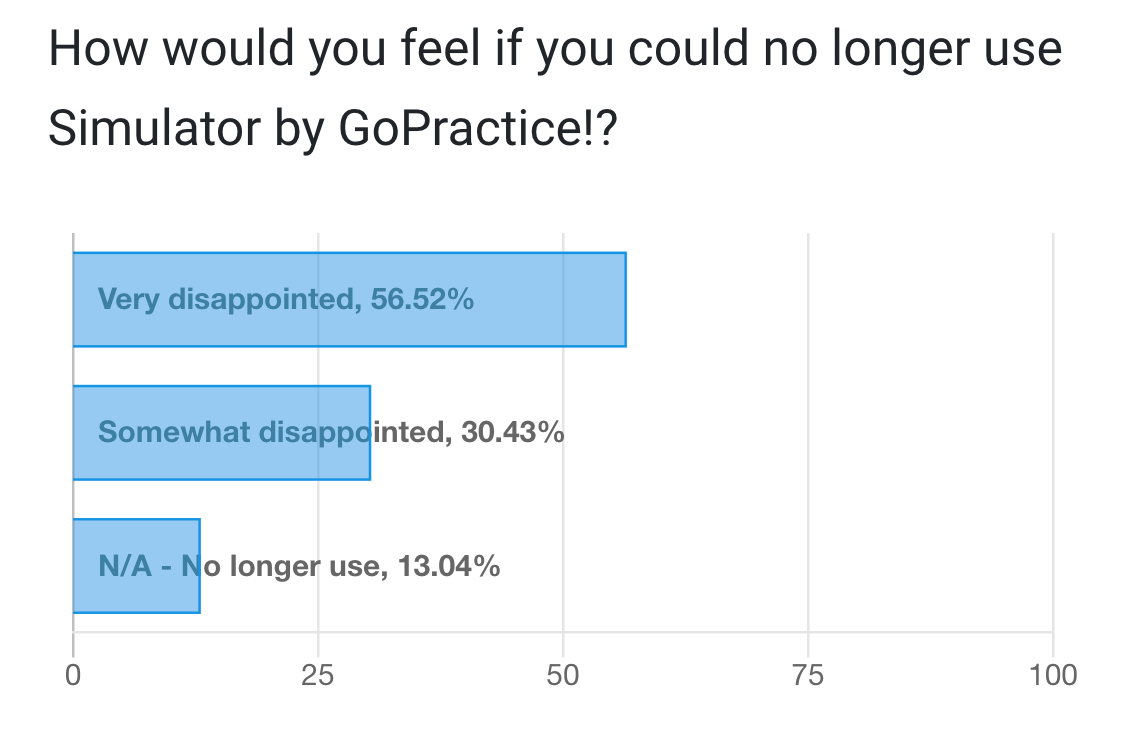
A common benchmark in SaaS is Sean Ellis’ PMF test. Ask early users how they would feel if they could no longer use the product. If fewer than 40% say they would be “very disappointed,” product-market fit has not been achieved.
[Source]
Validation should combine qualitative and quantitative research.
Qualitative validation includes:
-
Interviews focused on willingness to pay
-
Feedback on whether the solution meaningfully improves their workflow
-
Signals that users would switch from existing SaaS products
Quantitative validation includes:
-
Using Google Trends to assess market interest
-
Analyzing search volumes through SEMrush or Ahrefs
-
Reviewing competitors to identify gaps in existing SaaS platforms
Another practical method is a smoke test MVP (minimum viable product). This is a low-cost, pre-launch marketing technique used to validate demand for a product idea before actually building it.
Instead of building a full SaaS product, you test demand with a landing page, demo video, or interactive prototype. The objective of a smoke test MVP is to measure user behavior through signups, email captures, or early commitments, before investing in engineering resources.
Tools like UX Pilot are an effective way to validate market demand.
Instead of jumping straight into backend engineering, founders and product managers can use UX Pilot to generate realistic, high-fidelity UI screens or complete multi-screen flows from a simple prompt. Here's how.
Head to UX Pilot and enter a prompt to generate your UI design. For example, I created a personal finance SaaS that helps users manage money habits and trends.
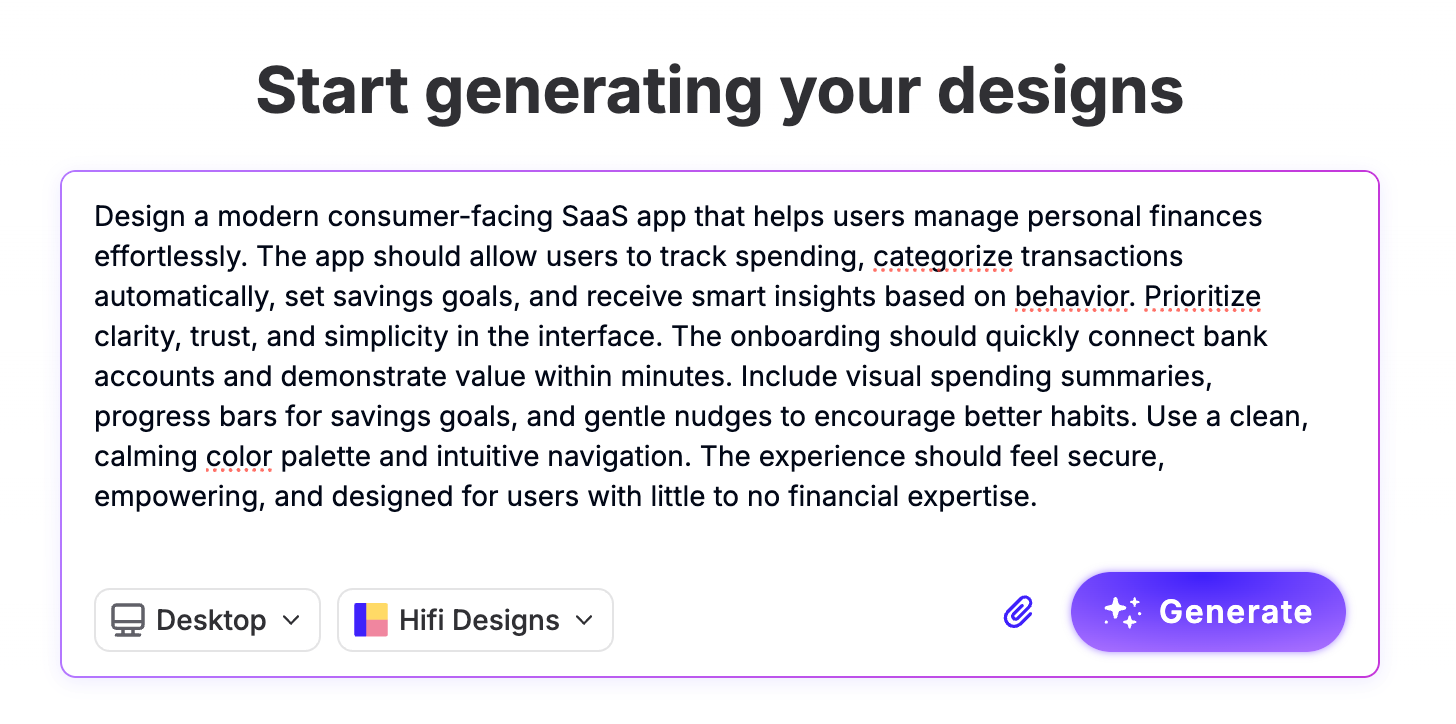
In a minute, I had 4 screens for my app. I can then use these to test user feedback and build a working prototype before investing resources into a go-to-market strategy.
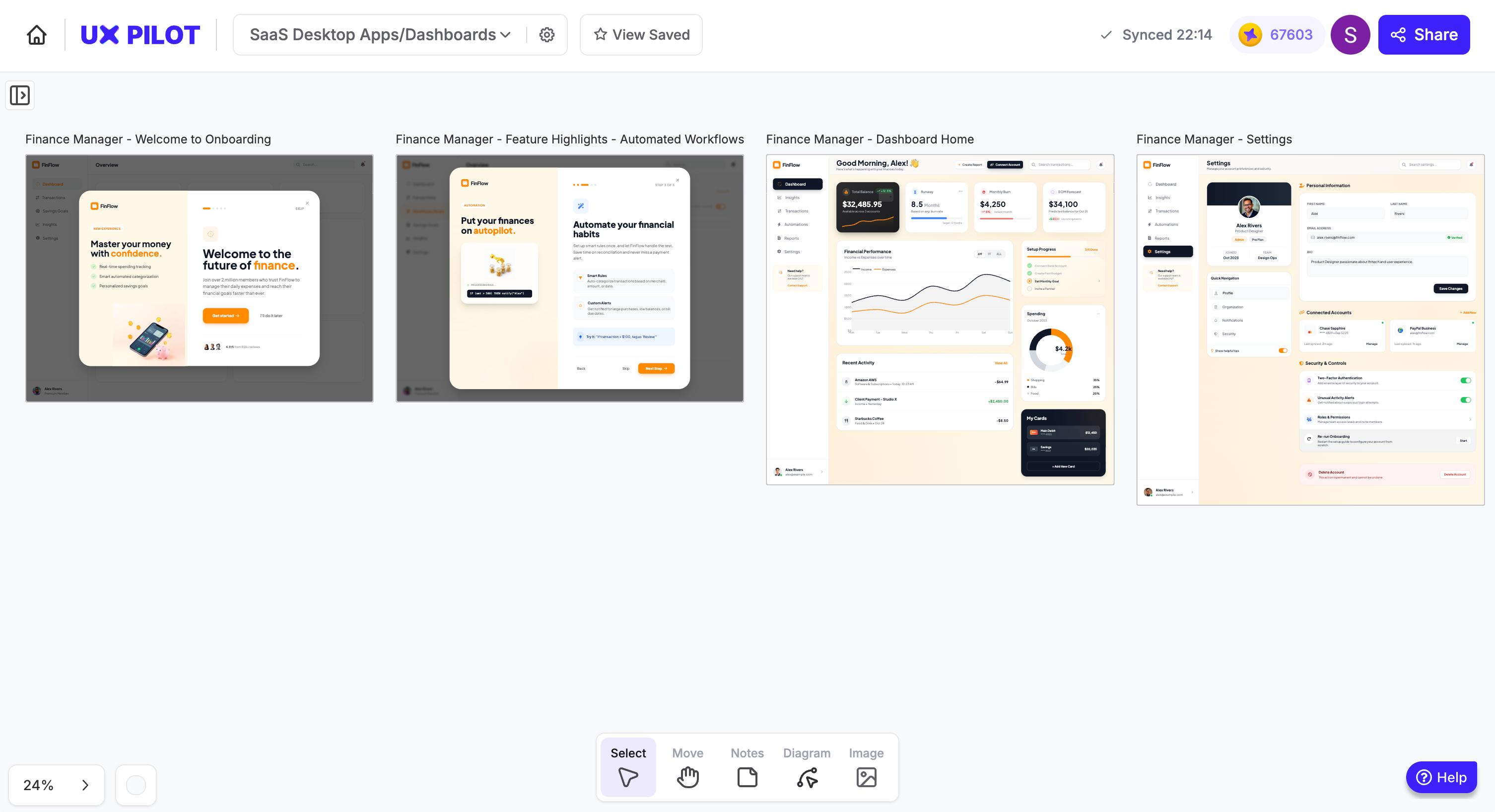
I prefer a different color so I'd change it but as you can see these are high fidelity dashboards that can exported to code immediately.
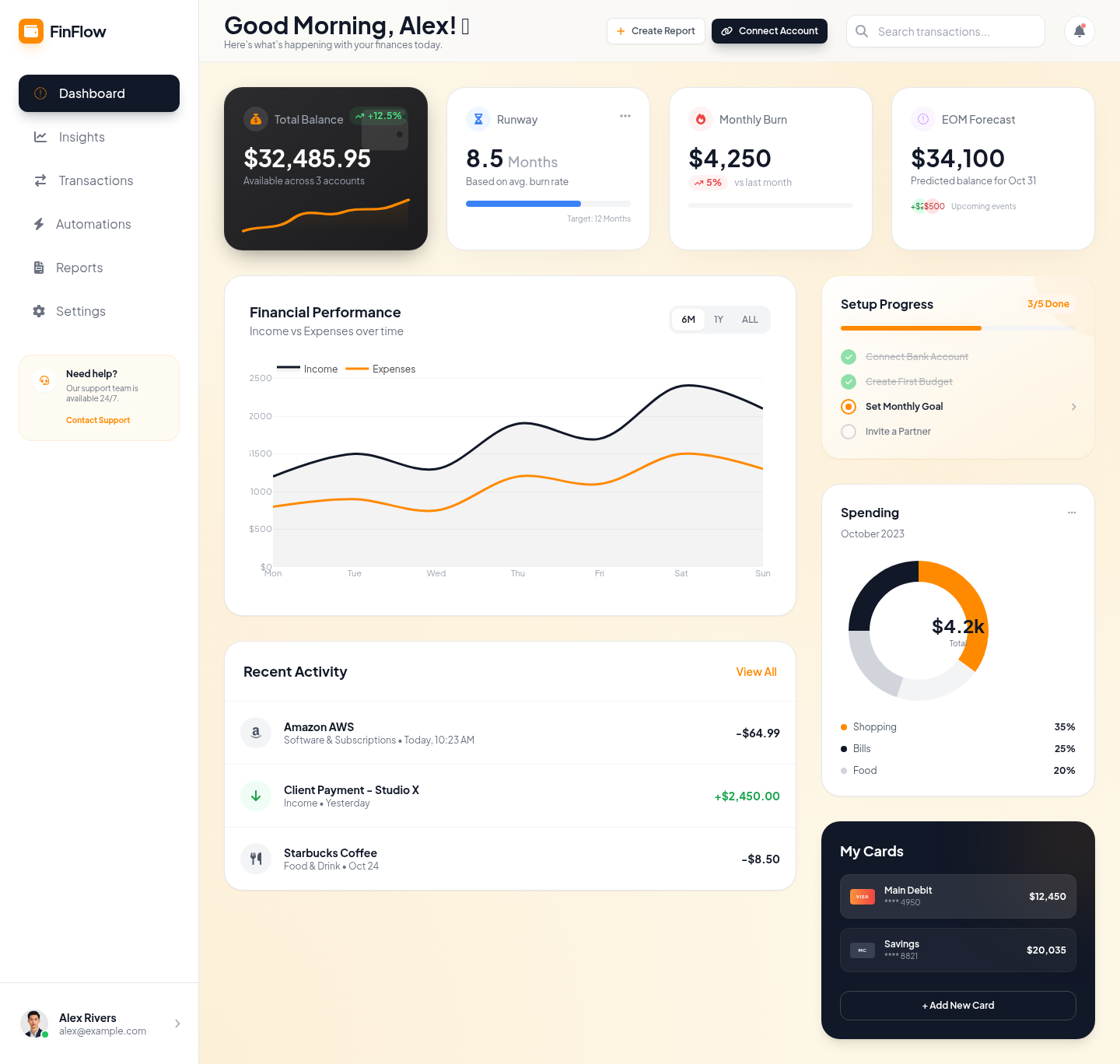
That means you can quickly visualize your SaaS product’s dashboards, onboarding flows, pricing pages, or feature workflows, without committing development resources, and create them instantly with zero design expertise.
These designs can then be used for:
-
Customer discovery conversations
-
Usability testing sessions
-
Landing page smoke tests
-
Investor or stakeholder validation
Instead of just asking users abstract questions about an idea, you show them something concrete and observe their reactions.
Do they understand the value? Does the user interface solve their workflow problem?
Would they sign up?
This approach reduces early risk in the SaaS development lifecycle. It allows you to test positioning, refine business logic, gather user feedback, and iterate on the experience before investing in full-scale SaaS application development.
Dropbox used a similar validation approach. In 2007, founder Drew Houston shared a simple explainer video on Hacker News demonstrating how the product would work.
The video generated approximately 70,000 email signups through a landing page before a full product was built. That response confirmed strong market demand before the team invested heavily in development.
Without validation, the rest of the SaaS lifecycle operates on assumptions instead of evidence.
Stage 2: Requirements and planning
Once idea validation confirms real market demand, the next step in the SaaS development process is translating that validated insight into concrete technical and business requirements.
This is where many SaaS models lose discipline. Poor planning leads to scope creep, misaligned priorities, and unexpected infrastructure costs. Research shows that approximately 29% of startups fail due to cash flow issues.
In most cases, this happens due to underestimated development costs, unclear technical architecture, and uncontrolled feature expansion.
That’s why a validated software as a service idea requires a structured execution plan to align business objectives, technical architecture, and resource allocation before full SaaS application development begins.
Start with these core requirements to reduce development time, avoid feature creep, and prevent budget overruns:
3. Create a software requirements specification (SRS)
A software requirements specification (SRS) is a comprehensive document that defines:
-
Project goals
-
Scope of work
-
Functional requirements
-
Non-functional requirements
-
Core features
-
Technical constraints
In the context of SaaS product development, an SRS should go beyond basic feature descriptions. It should address the realities of cloud computing and subscription-based SaaS platforms.
A strong SRS typically includes:
-
Multi-tenant architecture requirements (how multiple customers share infrastructure securely)
-
Self-service provisioning and onboarding flows
-
Access management and role-based permissions
-
Security measures for handling sensitive data
-
User activity monitoring and logging
-
Data storage strategy and backup policies
-
Compliance requirements (GDPR for EU data, HIPAA for healthcare, SOC 2 for enterprise SaaS providers)
-
Integration requirements with third-party communication tools or APIs
-
Performance expectations and scalability thresholds
In short, a clear software requirements specification (SRS) document minimizes ambiguity and scope creep during development.
It also makes outcomes more predictable. When technical architecture is documented early — including cloud provider selection (AWS, Microsoft Azure, or Google Cloud Platform) — you reduce the risk of expensive rework later.
This document should not be created in isolation. Always involve:
-
Software architects
-
Developers
-
Product managers
-
Investors
-
Cloud infrastructure specialists
As user feedback evolves and market conditions shift, updates may be necessary. The plus side is, structured documentation prevents reactive decision-making and protects the integrity of the SaaS development lifecycle.
Without this blueprint, unnecessary features will creep in, making the product harder to maintain and more expensive to develop.
4. Choose the right development methodology
With platform capabilities clearly defined, the next decision in the SaaS development process is how your team will actually build the product. There are two primary approaches that dominate software development:
-
Waterfall: A sequential development model where each phase is completed fully before the next begins.
-
Agile: An iterative development approach that delivers software in small increments through short cycles called sprints.
Waterfall works best when requirements are fixed and unlikely to change. Teams define the full scope upfront, complete the design, build everything, then test and deploy. That structure can feel organized and predictable.
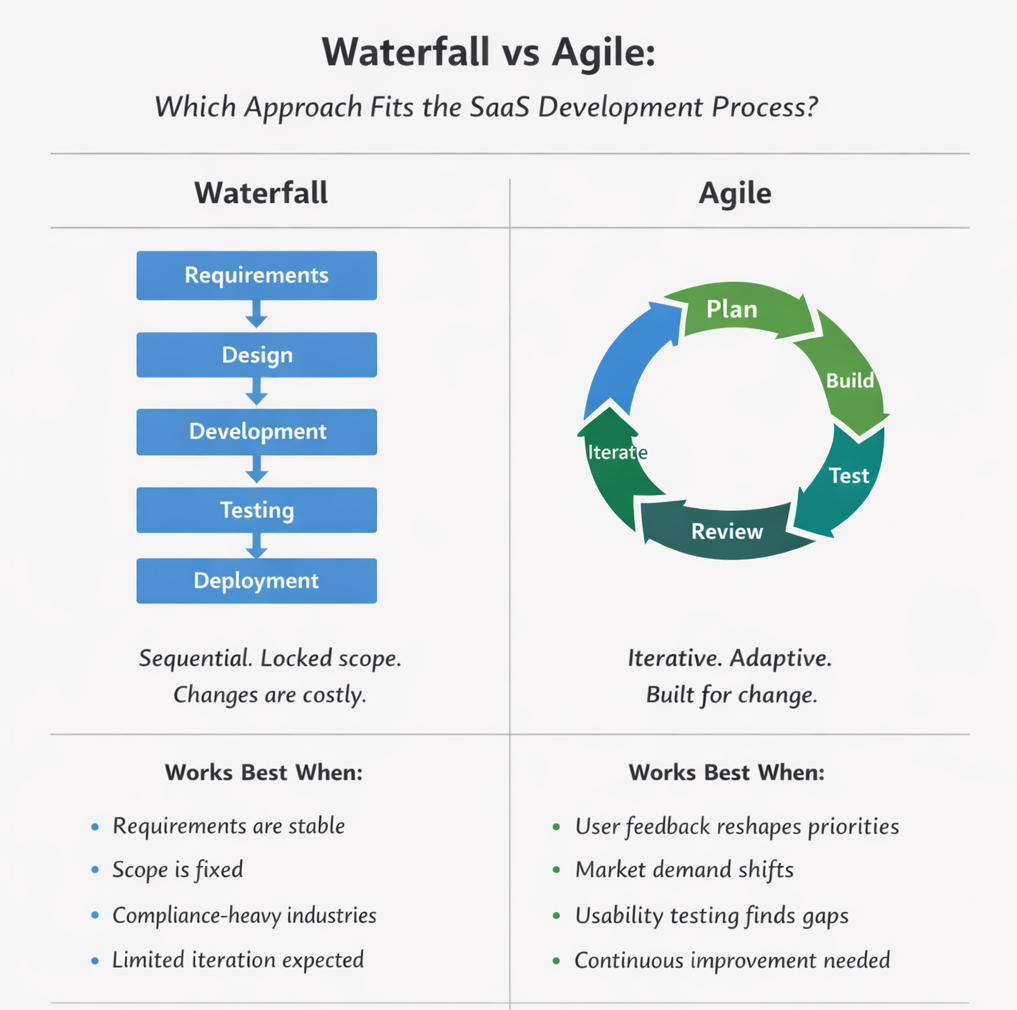
But in the SaaS industry, requirements rarely stay frozen because:
-
User feedback reshapes priorities
-
Market demand shifts
-
Early usability testing exposes gaps
When changes surface late in a Waterfall model, they are expensive because earlier phases are already locked in. That rigidity slows down iteration.
Agile methodologies, on the other hand, are designed for change. Work is broken into short sprints. After each sprint, the team reviews progress, gathers feedback, and adjusts priorities. This aligns naturally with the SaaS lifecycle, where continuous improvement and fast iteration are essential.
For SaaS lifecycles, Scrum is a subset of Agile which emphasizes:
-
Short sprint cycles
-
Regular retrospectives
-
Continuous backlog prioritization
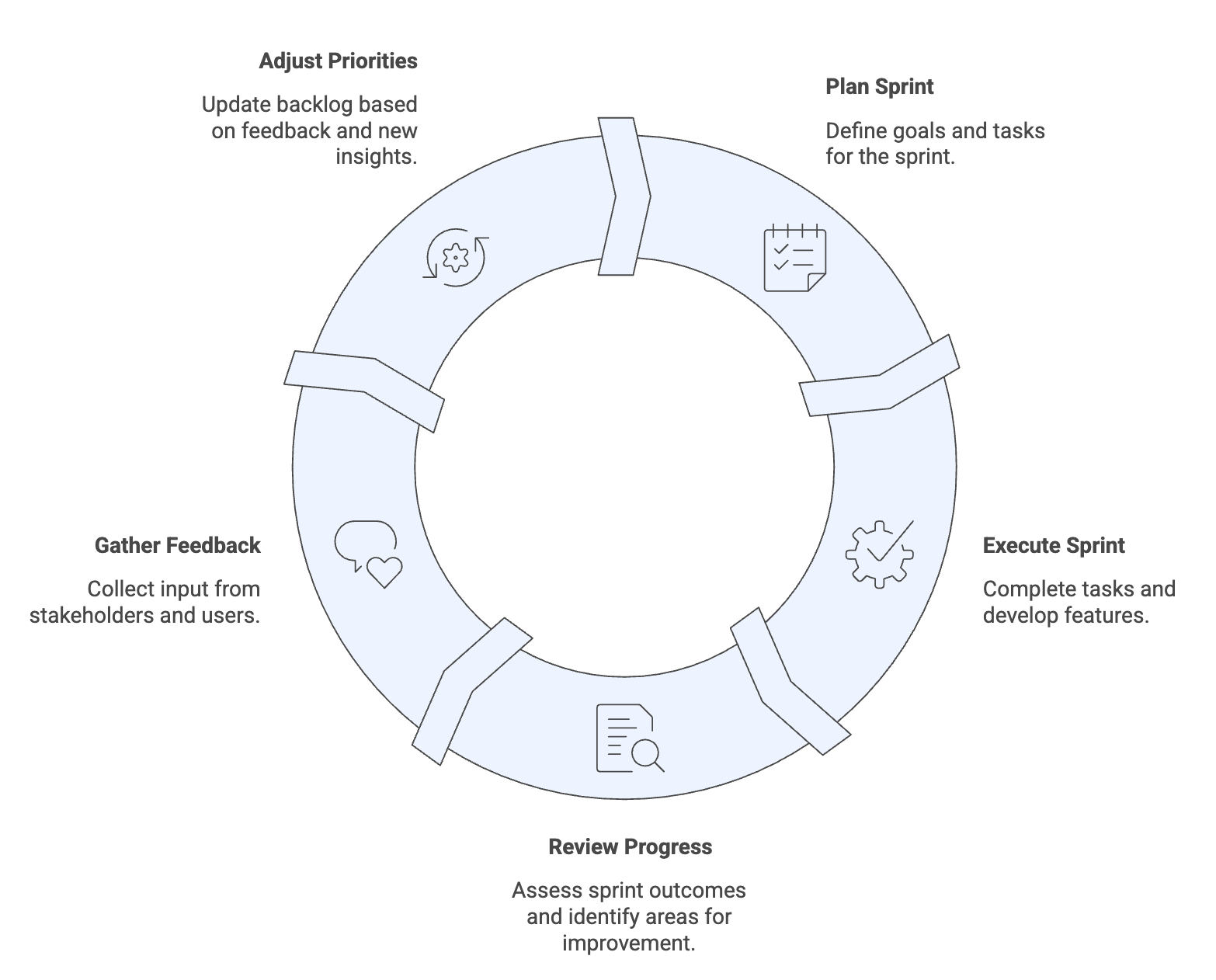
This structure supports continuous improvement and faster feedback integration.
According to the 2023 State of Agile Culture Report, organizations with a strong Agile culture can improve commercial performance by up to 277%. This reflects the advantage of adaptability in fast-moving markets.
Agile also aligns closely with DevOps principles. The Accelerate State of DevOps 2023 report identifies foundational capabilities such as CI/CD pipelines, strong documentation practices, and rapid code reviews as key drivers of performance.
Organizations with flexible infrastructure demonstrate up to 30% higher organizational performance. This flexibility directly impacts:
-
User engagement
-
Release velocity
-
Infrastructure efficiency
-
Customer satisfaction
For example, for SaaS development teams, choosing the right cloud observability tools starts with aligning them to your telemetry needs and ensuring they integrate cleanly with your existing infrastructure and deployment workflows.
In short, for SaaS providers, Waterfall’s sequential structure makes late-stage changes expensive and slow. But Agile supports iterative SaaS application development and aligns naturally with continuous integration (CI/CD), automated testing, and scalable cloud infrastructure.
Stage 3: UX/UI design and prototyping
Research shows that 55% of users stop using a product because they didn’t understand how to use it.
Your SaaS product can have great functionality, but without strong UX, users won’t stick around. A well-designed UI/UX can boost conversions by up to 200% while improving user satisfaction and reducing churn.
Design also impacts cost. When you test and adjust ideas in Figma, changes are quick and inexpensive. But once development begins, even small workflow changes can require code updates and system adjustments. Solving usability issues early is far easier than fixing them after the product is built.
So before development scales, the product experience needs to be deliberate. Here’s what that looks like in practice:
5. Design for multi-tenant architecture
Most modern SaaS platforms operate on a multi tenant usability. That means multiple organizations share the same cloud environment while keeping their sensitive data isolated.
This means your SaaS product is not serving one type of user. It may serve:
-
Admins managing access management
-
Team leads monitoring performance
-
End users completing daily workflows
-
Finance teams reviewing subscription model usage
-
IT managers checking compliance requirements
Each role interacts with the system differently and the user interface must reflect those differences without becoming cluttered. To accommodate these different user types, key design considerations include:
-
Role-based access controls that clearly limit feature visibility
-
Customizable dashboards tailored to tenant needs
-
White-label options for vertical SaaS solutions
-
Tenant-specific configuration settings
-
Clear user activity monitoring interfaces
You also need to account for the “noisy neighbor” problem.
In cloud computing environments, heavy usage from one tenant should not degrade performance for others. While cloud provider selection and cloud services configuration handle much of this at the infrastructure level, UX should communicate system states clearly to maintain user trust.
Accessibility must also be built in from the start. WCAG compliance ensures your SaaS product supports users across devices and assistive technologies. For SaaS companies handling sensitive data, accessibility and compliance are foundational to long-term SaaS operations.
When design is clean and minimal, users reach value faster. Faster value leads to stronger user adoption and better customer satisfaction.
Now that usability principles are defined, the next step is to validate them before development begins.
6. Prototype and test before development
Before committing to full SaaS application development, you need to test how users will actually move through your product.
Wireframes and clickable prototypes allow you to validate onboarding flows, navigation structure, feature hierarchy, and business logic without touching backend code. This stage protects both time and budget in the overall SaaS development lifecycle.
Traditionally, teams create prototypes manually in tools like Figma. That works, but it can be slow when you need to explore multiple flows, dashboards, or user roles across a multi-tenant architecture.
This is where UX Pilot changes the speed of iteration.
Instead of designing every variation from scratch, product managers and designers can generate complete UI screens and multi-screen flows from a prompt. For example, you can:
-
Generate separate dashboards for admins vs end users
-
Create alternate onboarding flows for different target customers
-
Visualize pricing tiers aligned with your subscription model
-
Simulate role-based access states
Select the wireframe mode inside UX Pilot and you'll get something like this. Of course, you can choose between high or low-fidelity wireframing.
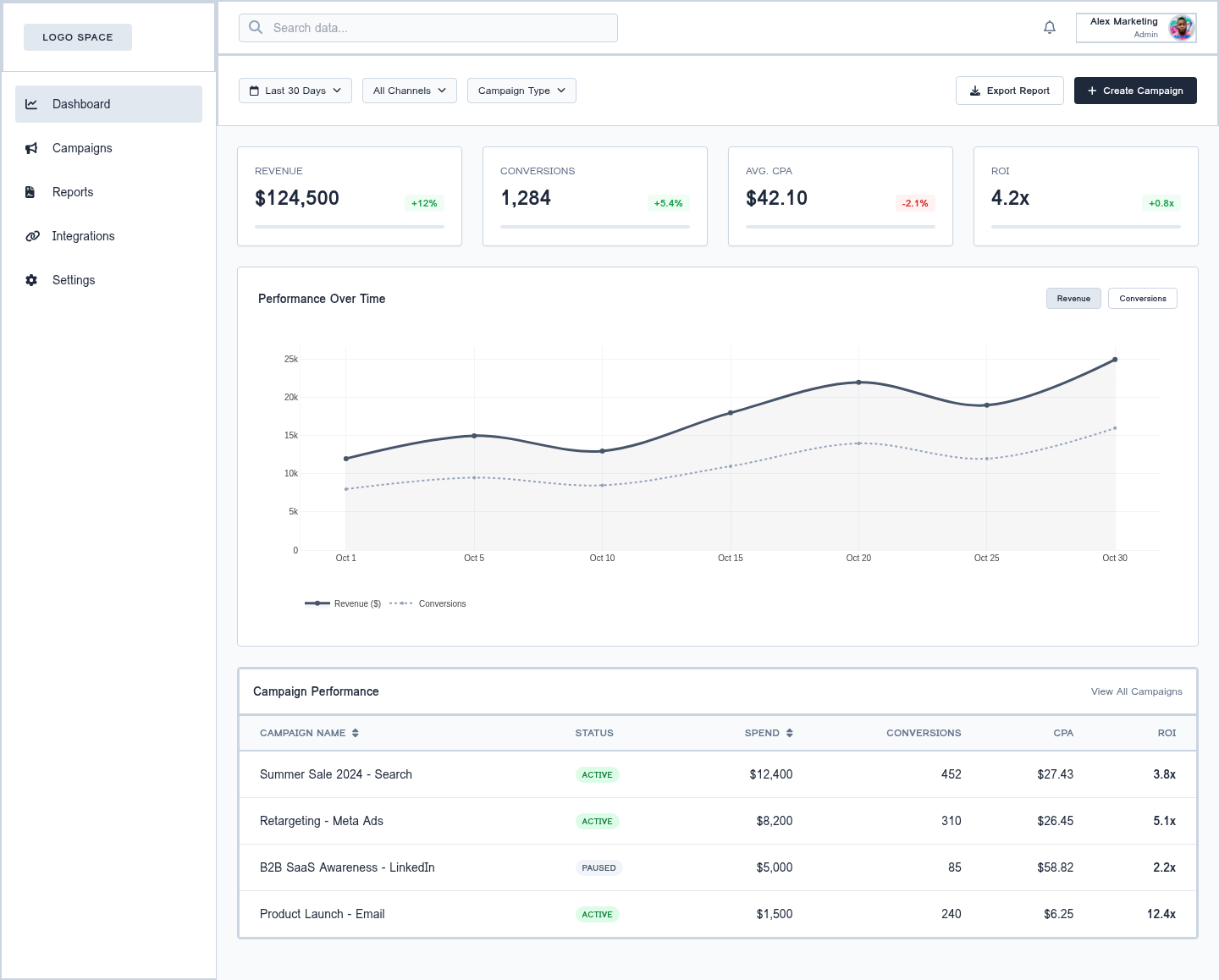
These prototypes can then be exported and refined in Figma if needed, but the heavy lifting of structuring the experience gets sped up.
This level of automation allows teams to test multiple versions of a workflow, gather user feedback, and adjust before engineering resources are allocated.
With your prototype, you can conduct at least 5-10 usability testing sessions with real users.
Watch how they navigate. Where do they hesitate? What do they misunderstand? Does the interface communicate value within the first minute?
This is the lowest-cost point in the development process to make structural changes.
Buffer’s early launch reflects this discipline.
Joel Gascoigne didn’t start with a full SaaS application or complex cloud infrastructure. He launched a simple landing page explaining the value of scheduling social media posts.
When users signed up, he didn’t immediately build the product. Instead, he followed up personally to ask whether they would pay, and at what price. Only after confirming willingness to pay did he move forward with development.
That sequence matters. He validated not just interest, but commercial viability. He tested user intent before committing to backend systems, technical architecture, and ongoing SaaS operations.
Stage 4: MVP development
Y Combinator recommends launching within 90 days. But most SaaS startups exceed that timeline because they build too much before releasing. Longer build cycles mean slower feedback and higher development costs.
That’s why SaaS providers should start with an MVP (minimum viable product), which is the smallest version of your SaaS product that solves one core problem well enough to test real user demand. It is not a feature-complete platform, just a focused release designed to generate feedback quickly.
From here, success depends on two decisions: ruthless feature prioritization and a tech stack that supports fast iteration.
7. Prioritize features ruthlessly
Feature creep is one of the most common risks in early SaaS application development. Teams begin adding “nice-to-have” features that expand the technical architecture, increase testing requirements, and complicate the development process, all without strengthening the core value proposition.
To prevent this, use structured prioritization frameworks.
MoSCoW framework:
-
Must have
-
Should have
-
Could have
-
Won’t have (for now)
RICE framework:
-
Reach
-
Impact
-
Confidence
-
Effort
These frameworks force product managers and development teams to align on what truly drives user adoption.
Another useful lens is the idea of a minimum sellable product. This means, you’re not just offering something that works, but something that delivers enough value that users pay for it.
If users aren’t willing to pay, the product isn’t delivering enough value. The key question is simple: what problem are users trying to solve, and does your product solve it well enough for them to pay?
Spotify’s early product case study is a great example that reflects this discipline.
When Spotify launched its MVP, it focused on one core capability: fast, stable music streaming via a desktop app. The founders operated on the assumption that users wanted on-demand streaming instead of owning music, and that artists would support a legal streaming model.
They did not begin with mobile apps, podcast libraries, advanced recommendation algorithms, or complex social features. They prioritized on proving how music streaming can feel instant and reliable.
With this mindset, Spotify’s prototype was ready in four months, tested internally, and then released to a controlled beta audience in Sweden.
Only after validating traction and user behavior did Spotify expand into mobile apps, artist partnerships, and additional features.
This points to how overcomplicated MVPs delay feedback, increase cloud infrastructure costs, and stretch development teams thin. Focused MVPs shorten the feedback loop and improve alignment between product and market demand.
8. Select a scalable technology stack and cloud infrastructure
Once features are prioritized, the next decision in the SaaS development process is choosing the right tech stack, which should balance three factors:
-
Development speed
-
Functional requirements
-
Future scalability
Common choices include:
-
Frontend: React, Vue.js
-
Backend: Node.js, Python (Django)
-
Databases: PostgreSQL, MongoDB
-
Cloud hosting: AWS, Microsoft Azure, Google Cloud Platform, or PaaS options like Heroku
At the MVP stage, you’re not designing infrastructure for five years from now. You should focus on something reliable enough for early users and flexible enough to change based on real feedback.
For many early-stage SaaS applications, that means choosing practical, proven tools:
-
Frontend: React or Vue
-
Backend: Node.js or Django
-
Database: PostgreSQL
-
Cloud hosting: AWS, Microsoft Azure, or Google Cloud Platform
These technologies are widely used, well documented, and supported by large developer communities. If your development team runs into issues, answers are easy to find and deployment across major cloud providers is predictable.
Where teams get into trouble is over-engineering. It can look like:
-
Splitting the system into microservices before the product has paying users
-
Building a custom authentication system instead of using managed identity services
-
Designing for global multi-region traffic before confirming product-market fit
Those decisions increase infrastructure overhead, complicate debugging, and expand the attack surface for sensitive data, without delivering immediate value.
So if your objective is to validate demand and reach 1,000 users, a clean monolithic backend deployed on a managed cloud platform is often more effective than a distributed architecture optimized for 1 million.
Team familiarity matters just as much as scalability. Tools with strong community ecosystems, stable release cycles, and active support reduce friction during rapid iteration.
This means, when pivots happen (and they often do in early SaaS product development), a simpler architecture makes changes cheaper and faster.
Stage 5: Testing and quality assurance
A buggy MVP can sabotage early traction, damage user trust, and hurt customer satisfaction before your product has a chance to gain momentum.
Unlike traditional software, SaaS products operate in live cloud environments where users access the system continuously. That means testing must cover multiple layers — from individual components to full end-to-end user workflows.
To prevent costly post-launch failures, testing must be built directly into how your team develops the product. Here’s how that works in practice:
9. Build testing into every sprint
Testing should start on day one, not a week before launch. In the SaaS development process, every sprint should include development and testing. If testing is postponed, bugs accumulate quietly and explode later in staging or production.
Start with automated testing early. For example:
-
Unit tests (using tools like JUnit) verify that individual components behave correctly.
-
API tests (with tools like Postman) confirm that services communicate properly.
-
Automated browser tests (using Selenium) simulate real user actions.
Automation reduces manual repetition and makes each release safer.
CI/CD (continuous integration and continuous delivery) strengthens this further. Every time a developer pushes code, the system automatically:
-
Builds the application
-
Runs test suites
-
Flags failures immediately
This prevents last-minute release chaos and eliminates “it worked on my system” problems. Instead of discovering issues weeks later, teams catch them within minutes.
Beyond automation, certain basics should always exist (even for an early-stage SaaS application):
-
Version control through Git
-
Mandatory code reviews
-
A separate staging environment
-
Issue tracking in tools like JIRA
Testing should also span multiple layers:
-
Functional testing: Does the feature work as intended?
-
Integration testing: Do services interact correctly?
-
Performance testing: Does the system remain stable under load?
-
Security testing: Is sensitive data protected?
-
Usability testing: Can users complete tasks without friction?
Catching issues early reduces cost dramatically. Fixing a bug during a sprint is simple, but fixing it after deployment affects cloud infrastructure, data storage, and access management, which is expensive and disruptive.
10. Conduct beta testing with real users
Internal testing is necessary. But it’s not sufficient.
Before launch, release your SaaS application to 50-100 users who closely match your target customers. These shouldn’t be random signups. Use your waitlist, early demo viewers, community members, or direct outreach from customer discovery interviews.
Most importantly, set expectations by clarifying that this is a beta version, and feedback is part of participation.
The purpose isn’t just bug hunting, but to observe real user behavior:
-
Do users complete the core workflow without guidance?
-
Where do they drop off?
-
Are there performance issues across devices or cloud environments?
-
Does the product feel reliable enough to trust with sensitive data?
This is exactly what Dropbox did.
After building its initial file synchronization MVP, the team invited a limited group of users to test syncing files across multiple devices. In controlled demos, the product worked well. But real users exposed edge cases like sync delays, file conflicts, and confusion around how files were stored and shared.
That feedback allowed Dropbox to improve reliability and simplify parts of the user experience before opening the product more widely.
And this is why Beta testing should always include structured feedback loops through short surveys, direct interviews, in-app prompts, and usage analytics. Analytics show where users struggle and data through surveys and nudges explain why they’re struggling.
Beta testing is the last controlled checkpoint before scaling. Once you move beyond beta, every issue affects your entire customer base, satisfaction and long-term retention.
Stage 6: Deployment and launch
Deployment includes infrastructure readiness, documentation, onboarding materials, customer support workflows, and marketing alignment.
Before going live, make sure everything surrounding the product is ready including; technical documentation, FAQs, onboarding guides, access management policies, and support channels.
And make sure your DevOps engineering is in order. Here’s how you can ensure this:
11. Implement zero-downtime deployment strategies
Because SaaS users pay under a subscription model, they expect continuous availability. Even short outages can affect customer satisfaction and user retention, ultimately leading to revenue loss.
One of the most reliable approaches is blue-green deployment. In this strategy, you maintain two identical production environments:
-
Blue: The current live environment
-
Green: The new version deployed in parallel
Here’s how it works:
-
Deploy the updated version to the green environment.
-
Test it thoroughly in a production-like setup.
-
Switch user traffic from blue to green.
-
Keep blue available for immediate rollback if issues appear.
This approach offers:
-
Zero user-visible downtime
-
Instant rollback capability
-
Safe production-level testing
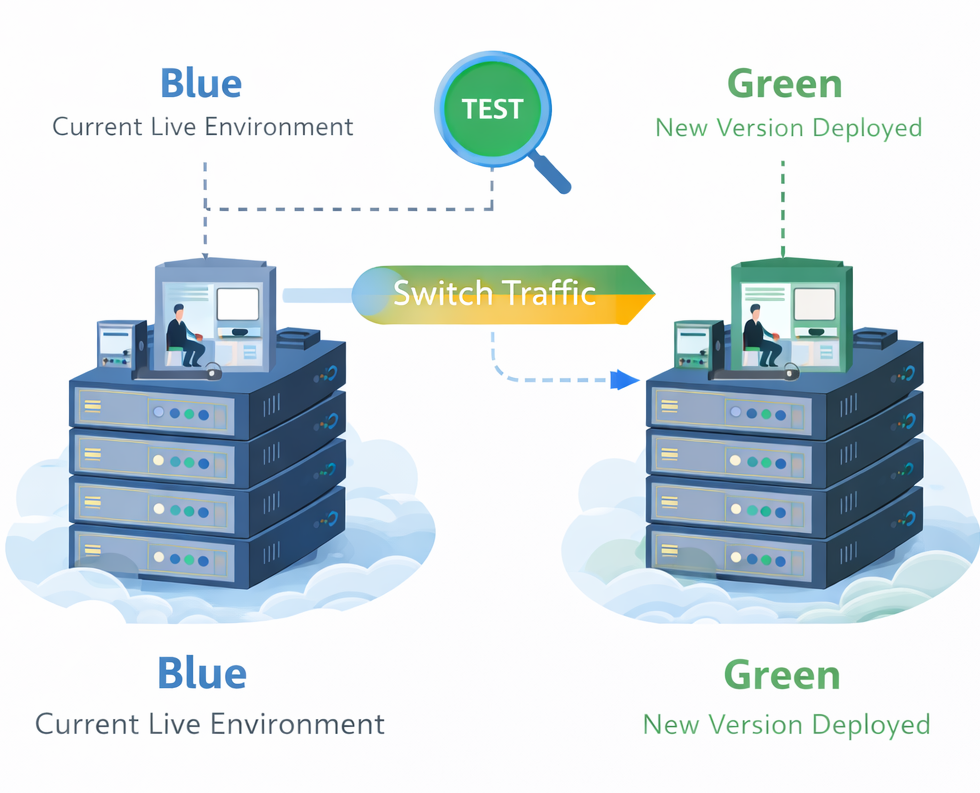
Blue-green deployment is especially valuable for SaaS companies operating on large cloud infrastructure where availability directly impacts business objectives.
Modern implementations often use:
-
Load balancers such as AWS ELB or NGINX for traffic switching
-
Infrastructure as Code tools like Terraform or CloudFormation
-
CI/CD pipelines via Jenkins, GitHub Actions, or GitLab CI
-
Docker containers for consistent deployment environments
A full-stack software engineer documented on DEV community his stages of blue-green implementation and achieved a full deployment cycle in approximately four minutes with zero seconds of user-visible downtime using Docker and NGINX for traffic routing.
For SaaS providers serving thousands or millions of users, this level of reliability protects user trust and stabilizes SaaS operations.
12. Execute your go-to-market plan
Launching a SaaS product without a structured go-to-market plan often leads to weak early traction, even if the product works perfectly.
Start by defining your ideal customer profile (ICP). Who is your product built for? What job are they trying to complete? What pain point does your SaaS solution remove?
Once the target customers are clear, sharpen your value proposition.
Your messaging should reflect the exact job your SaaS product solves. Sales and marketing must communicate what the product actually delivers. If expectations and experience don’t match, churn increases.
With this, you can start building early brand awareness before the launch by:
-
SEO-driven content marketing
-
Targeted campaigns within your SaaS market
-
Strategic partnerships in your ecosystem
By launch day, the right audience should already recognize the problem you solve.
Next, choose your release approach:
-
Soft launch: Limited audience. Monitor user engagement and refine onboarding under real conditions.
-
Full public launch: Broader exposure once infrastructure, support, and analytics are stable.
Before your launch, make sure you configure data analytics properly so you can track your success and understand where leads are coming from. Some metrics you should track include:
-
Customer acquisition cost (CAC)
-
Activation rate
-
User engagement
-
Churn rate
-
Customer lifetime value
These metrics determine whether your SaaS business model is economically viable.
Stage 7: Post-launch iteration and growth
Once your SaaS product is live, real usage begins to shape the product. This is where assumptions are either confirmed or challenged.
You now have real user behavior, real engagement data, and real churn signals. The question is not “Did it work?” but “How do we make it work better?” And this is why post-launch is where product-market fit is refined. Here’s how this iteration happens:
13. Collect and act on user feedback
After a launch, feedback becomes your primary growth driver. For this, you need structured channels, not scattered opinions. Start by understanding qualitative insights from:
-
In-app surveys after key actions
-
Direct customer interviews
-
Support ticket patterns
-
NPS scores
-
Email responses from active users
These sources will reveal friction, confusion, and satisfaction levels. Then layer quantitative behavior tracking:
-
Activation rate (who reaches first value)
-
Task completion rate
-
Time on task
-
Feature adoption
-
Cohort retention
Tools like Mixpanel or Google Analytics help track usage trends across your SaaS platform. Heatmap and session replay tools like Hotjar or FullStory reveal where users hesitate or abandon workflows.
The goal here should be to identify repeat patterns:
-
If onboarding drop-off is high, activation needs refinement
-
If engagement is shallow, the core value may not be clear
-
If churn rises after month two, the product may not deliver sustained benefit
Finally, this feedback can be directly tied into sprint planning. When customer feedback influences the backlog consistently, user satisfaction and retention improve.
14. Scale infrastructure as demand grows
As your SaaS product gains traction, usage patterns change. What worked for 500 users may not work for 50,000. Common signals that infrastructure needs attention include:
-
Slower response times during peak usage
-
Increasing server utilization
-
Rising cloud costs without proportional revenue growth
-
Support tickets related to performance
-
Engineering time shifting from feature work to firefighting
Scaling doesn’t just mean adding servers, but also choosing the right strategy for your architecture:
-
Horizontal scaling adds more application instances behind a load balancer. This spreads traffic and improves reliability.
-
Auto-scaling adjusts resources dynamically based on demand, which is especially useful for SaaS apps with variable usage patterns.
-
Load balancing and CDN optimization reduce latency and improve user experience across regions.
And as your customer base expands, database architecture becomes more critical too, especially in a multi tenant architecture.
AWS offers three tenant isolation models for this purpose:
-
Silo model: Separate database per tenant. Highest isolation, highest operational cost. Often used for enterprise customers handling sensitive data.
-
Bridge model: Shared database with separate schemas per tenant. Balances isolation and cost.
-
Pool model: Fully shared database with row-level security. Most cost-efficient but requires strict access controls.
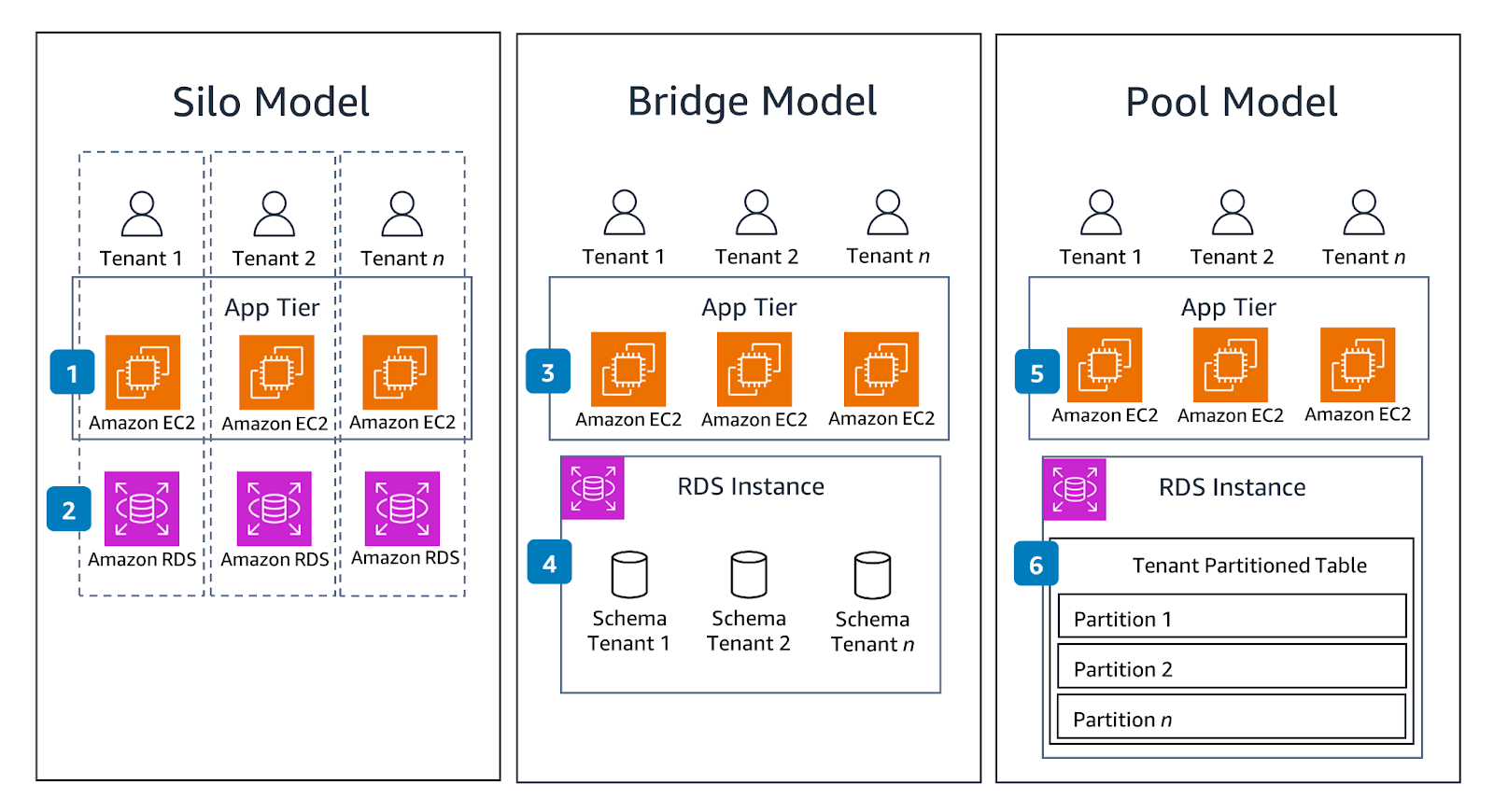
[Source]
The right model depends on your compliance needs, performance requirements, and customer tier. Some SaaS providers use hybrid approaches by offering stronger isolation to premium customers while maintaining pooled infrastructure for smaller accounts.
But scaling too early can be just as risky as scaling too late.
Prematurely introducing complex sharding strategies, distributed databases, or multi-region deployments increases operational overhead. Before expanding infrastructure, optimize queries, monitor usage patterns, and eliminate inefficiencies in your current cloud environment.
Remember that capacity planning and scalability testing should be continuous.
Load testing is the best way to ensure your SaaS application can handle growth without degrading performance or compromising user engagement.
Stage 8: Maintenance and continuous improvement
Maintenance is a structural part of the SaaS development lifecycle, not an optional phase. In many SaaS companies, ongoing maintenance accounts for 50-80% of total lifecycle expenditure.
Neglecting it leads to performance degradation, security vulnerabilities, rising technical debt, and ultimately higher churn. Sustainable SaaS operations depend on disciplined upkeep and structured improvement.
15. Manage security, compliance, and technical debt
Security updates must be continuous. Unpatched systems expose sensitive data and create legal and financial risk, particularly in cloud environments.
Compliance requirements vary by industry:
-
GDPR for EU data handling
-
HIPAA for healthcare-related SaaS applications
-
SOC 2 for enterprise SaaS providers
As your customer base grows, compliance expectations increase. And that’s exactly why you can’t afford technical debt at the cost of early speed.
Otherwise you’ll end up with temporary fixes, outdated libraries, and inefficient architecture choices made during MVP development. If unmanaged, it increases deployment risk and slows the development process.
To prevent this, teams should continuously monitor:
-
Infrastructure performance
-
Security vulnerabilities through a structured vulnerability scanning process
-
Code quality metrics
-
User behavior anomalies
For example, a SAST tool in your development workflow can help identify code vulnerabilities early, reducing security debt over time. Integrating DevSecOps practices ensures these security patches are embedded into CI/CD pipelines rather than treated as periodic audits.
16. Plan feature expansion and product evolution
Once stability is protected, attention shifts to structured growth. Start by using real usage data and customer feedback to decide what to build next. Look at:
-
Which features are used most
-
Where users drop off
-
What requests appear repeatedly in support tickets
-
Which customer segments generate the most revenue
Public roadmaps can help by allowing users to see what’s coming, submit feature requests, and understand development priorities. This builds trust and improves user engagement.
Slack is a strong example. By continuously refining onboarding and rolling out improvements based on user behavior, Slack expanded its platform without losing clarity or usability.
Remember that product expansion should remain balanced.
Every new feature increases system complexity. So before adding more capabilities, ensure performance is stable and technical debt is manageable. Feature growth and infrastructure health must move together.
As the product matures, revenue expansion often follows. This may include:
-
Tiered pricing models
-
Upselling premium functionality
-
Cross-selling add-ons
-
Offering implementation or professional services
Product evolution in SaaS is always continuous. The goal is steady improvement, not uncontrolled expansion.
Streamlining your SaaS development process
The SaaS development lifecycle works because it forces discipline. You validate before building. You limit scope before expanding. You test before scaling. And after launch, you keep adjusting based on how users actually behave.
92% of SaaS startups fail within three years due to a lack of proper product-market fit.
But, the teams that improve their odds are the ones who validate early, build only what matters, launch before overbuilding, and iterate based on real user data. Structure won’t remove risk, but it definitely prevents avoidable mistakes for a successful SaaS product.