16 Personalized User Experience Examples and Best Practices

Khanh Linh Le
Created on Jan 30, 2026
You open Netflix after a long day and immediately see a show that feels like the obvious next watch. No scrolling. No thinking. It just fits.
Then you visit a website that greets you with “Recommended for you” and proceeds to push products you’d never click on. Same idea. Very different execution.
That gap is the difference between good personalization and bad personalization. And today, personalization is no longer a nice-to-have UX enhancement, but rather a table stake. Users expect interfaces to adapt to their behavior, context, and intent. When that doesn’t happen, experiences feel generic and frustrating, even if the product itself is solid.
So, in this article, I’ll walk you through 17 personalized user experience examples that explain how personalization is implemented, what best practices to follow, and where teams often get it wrong.
What is personalized user experience (and why it matters)
When I talk about personalized user experience, I’m talking about systems that change based on you.
That means tailoring what you show, when you show it, and how it behaves based on each user’s behavior, personal preferences, and context. All without asking you to fill out forms or adjust settings.
Without personalization, every user gets the same experience. Same content. Same layout. Same push notifications. That one-size-fits-all approach forces you to filter information yourself, decide what’s relevant, and ignore what isn’t.
Over time, such friction can result in confusing user experiences that lead to product abandonment. Therefore, personalization is no longer a pleasant surprise but something you assume will be there.
In fact, data supports this as well. According to research done by McKinsey, 78% of customers have chosen, recommended, or paid more for brands that provide personalized experiences.
So if your product doesn’t personalize, users won’t wait around. They’ll move to competitors that already do and do it better.
How personalization actually works in UX
A personalization strategy isn’t magic, and it isn’t complicated. It’s a sequence of small, connected decisions that build on each other. Everything begins with data. A product observes what you do, looks for patterns, and uses those signals to decide what to show you next.
The interface then adjusts quietly, without asking you to stop and configure anything.
The inputs build up from past interactions. These include
-
behavioral data like what you click, view, or ignore,
-
transactional data that reflects intent through purchases or cart activity,
-
contextual data that provides situational clues, such as device type, location, or time of day.
In some cases, products also rely on explicit preferences, such as onboarding questions or settings, to speed things up.
From there, most personalization relies on two approaches to drive user engagement:
-
Collaborative filtering looks at users similar to you and recommends what worked for you.
-
Content-based filtering focuses on what you’ve interacted with before and finds similar items.
3 UX personalization types (and when to use each)
Once you understand how personalization works under the hood, the next question is What exactly should you personalize? Not every product needs the same level of adaptation, and trying to personalize everything at once usually backfires.
So, in the next sections, I’ll break down three common UX personalization types.
Type 1: Explicit personalization
Explicit personalization is the most straightforward approach. You ask users what they want, and you tailor the experience based on their answers. This usually happens through onboarding questions, user preference settings, short quizzes, or profile setup.
When your product has little to no behavioral data, this should be your go-to approach.
Early onboarding is the most common case. At that point, you can’t reliably infer intent, so the fastest way to personalize is to let users tell you directly. That input helps you avoid generic defaults and deliver something relevant from the first user interaction.
Grammarly is a great example of this. During onboarding, it asks users what type of writing they plan to do, so it can apply the right grammar and tone rules from the start.
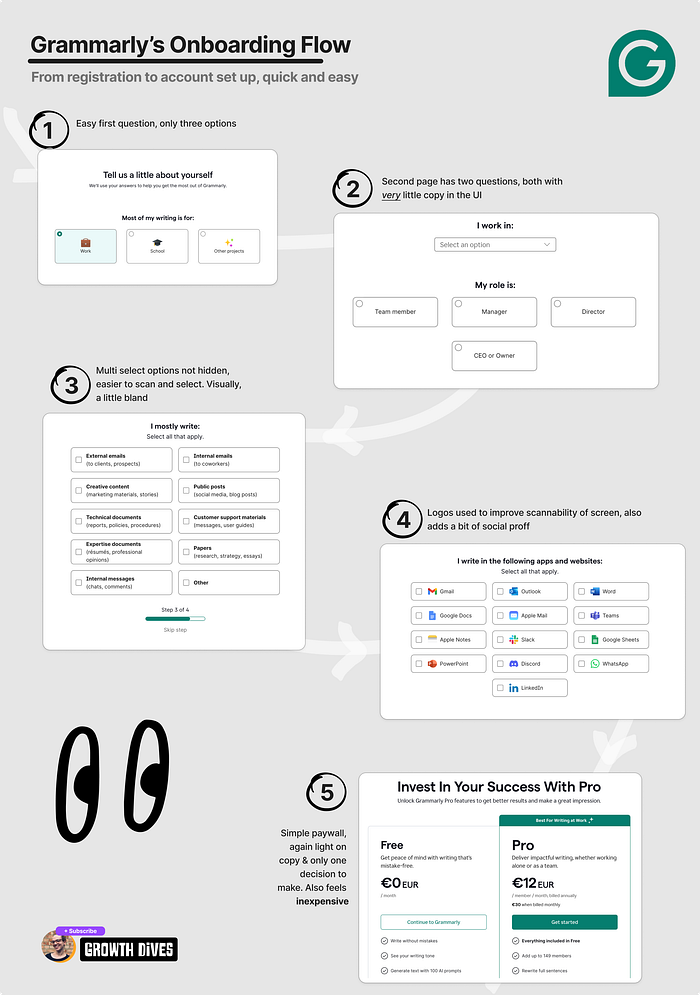
Image source: Growth Dives
However, while it helps deliver accurate personalized interactions, it also comes with a clear tradeoff. If your quiz is too long, you may risk users rushing through or abandoning it altogether.
Type 2: Implicit personalization
Implicit personalization works by observing user actions rather than asking them to explain them.
The product looks at behavioral signals across the customer journey, like time spent on pages, or how users interact with specific features, etc.
Then it gradually adapts the experience based on those patterns.
Spotify is a classic example. It analyzes your listening behavior to generate Discover Weekly playlists, learning what you like without ever asking you to spell it out.
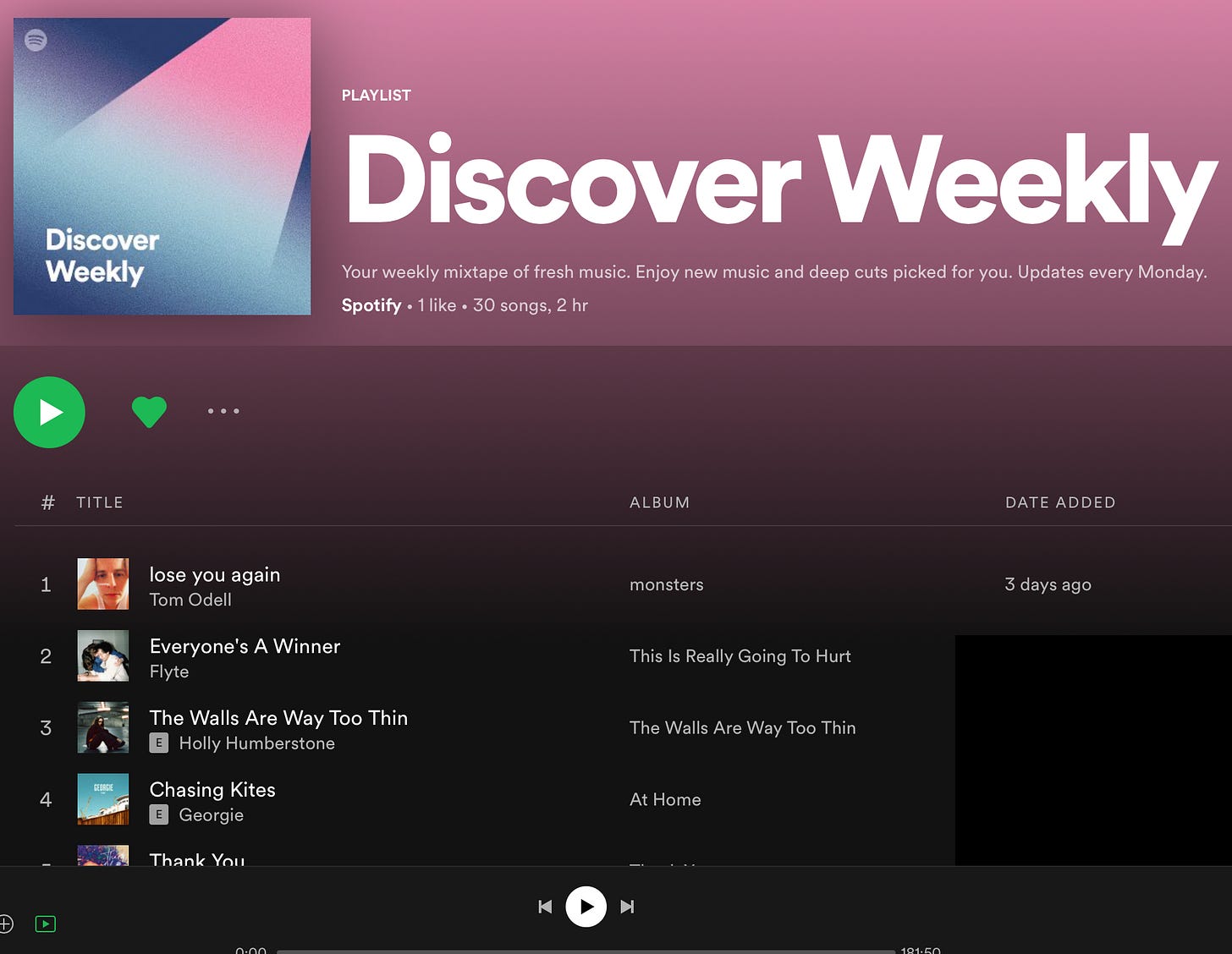
In my opinion, this approach is especially effective for ongoing experience optimization and recommendations, where preferences emerge through repeated behavior.
Nevertheless, its biggest downside is time. These systems need enough interactions to build an accurate profile, which means personalization improves gradually rather than instantly.
Type 3: Contextual personalization
Contextual personalization focuses on the situation a user is in right now. This means your product adapts the experience using signals like location, device type, time of day, weather, or what’s happening in the current session.
I find this type of personalization especially useful for location-based services, mobile-first experiences, and time-sensitive content. These are situations where relevance depends on context rather than past preferences.
Apple Maps is the most typical example of this. It suggests nearby places (like restaurants or attractions) based on your current GPS location and the time of day to make exploration more relevant.
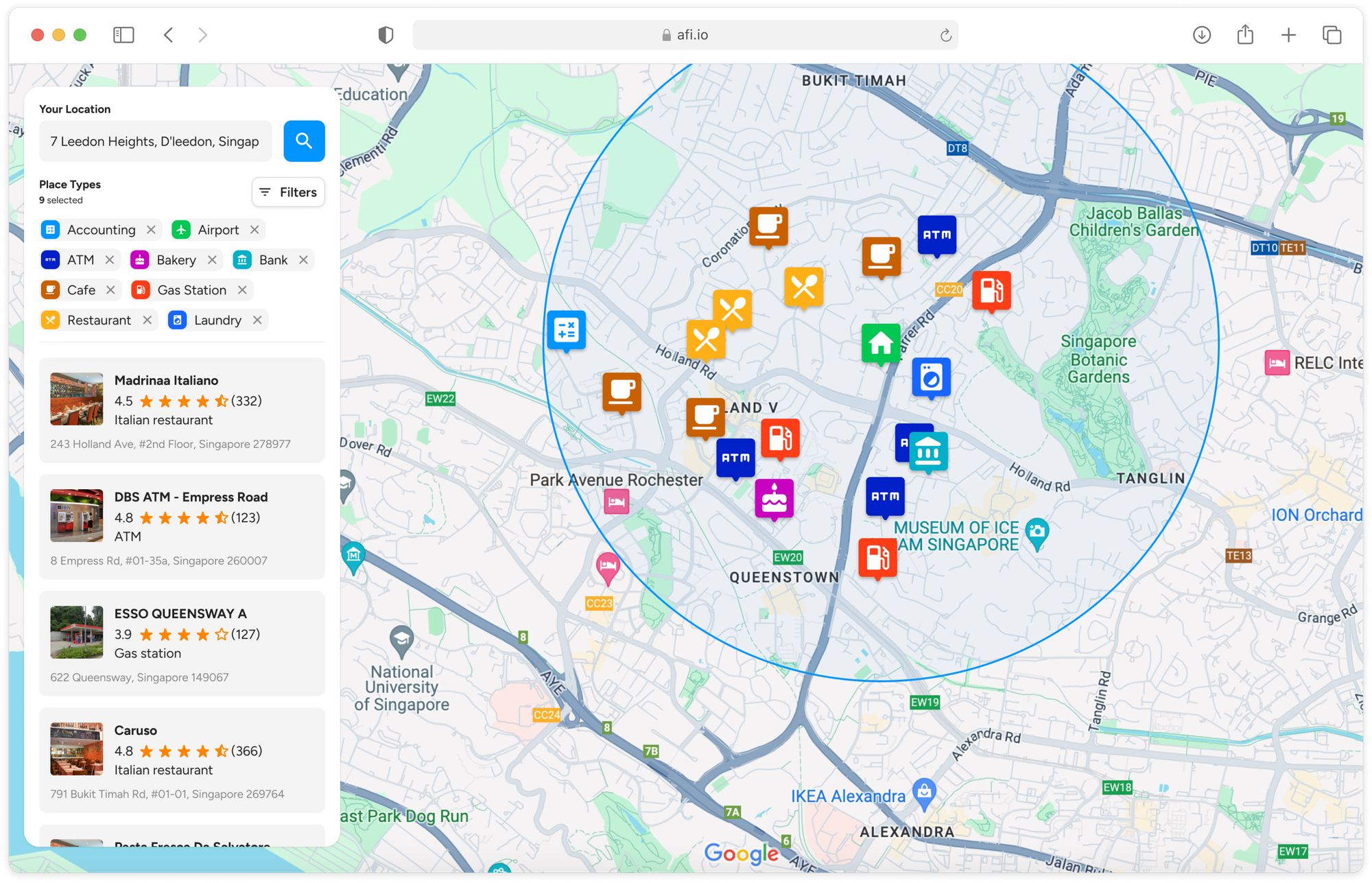
Image source: Afi
9 user experience personalization best practices that work
Once you understand the typical methods to deliver personalized customer experiences, the real challenge is execution.
I’ve seen teams assume that any personalization is better than none. In practice, that’s rarely true. The best experiences are selective.
So how should you do that? Below, I’ll break down the best practices that consistently work across products and industries.
1. Smart onboarding that adapts to user goals
When I think about where personalization matters most, onboarding is always the first place I look. This is the moment when you know the least about your users and when they’re deciding whether your product is worth sticking with.
Roughly 25% of users abandon an app after the first use. This means if onboarding feels generic, you may never get another chance to personalize at all.
That’s why smart onboarding focuses on capturing intent early.
Instead of showing everyone the same setup flow, you ask a few targeted questions about goals, role, or prior experience, then tailor the onboarding steps to match. This immediately solves the cold-start problem by giving you explicit signals before any behavioral customer data exists.
In addition, questions must feel helpful, not intrusive. Users don’t mind answering questions when they understand how it improves the experience. In fact, 83% of consumers are willing to share data for personalization if they see a clear benefit.
ConvertKit does this well by asking new users which email platform they’re coming from, then customizing import instructions accordingly.
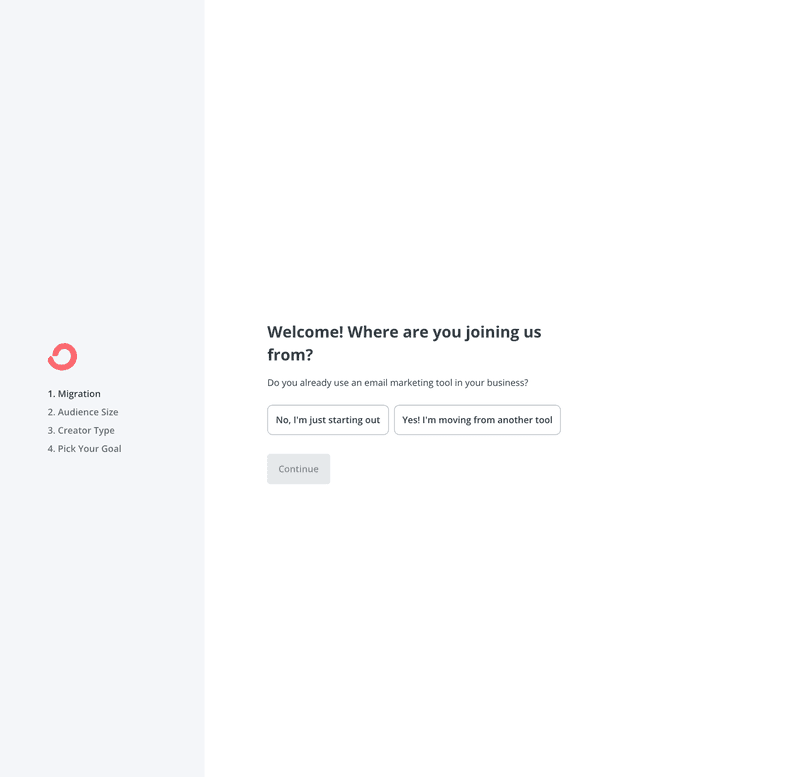
Image source: Userpilot
2. Behavioral recommendations
Personalization that truly earns its place in a product is always behavioral recommendations. This is the gold standard because it learns by watching what you do.
Netflix is the clearest example of this working at scale. Around 80% of what people watch on Netflix comes from personalized recommendations, not search or browsing.
At the core is collaborative filtering. Netflix analyzes viewing behavior across millions of users, finds people with similar tastes, and recommends shows and movies that similar users enjoyed. On top of that, it layers content-based signals like genres, actors, and themes to refine the match.
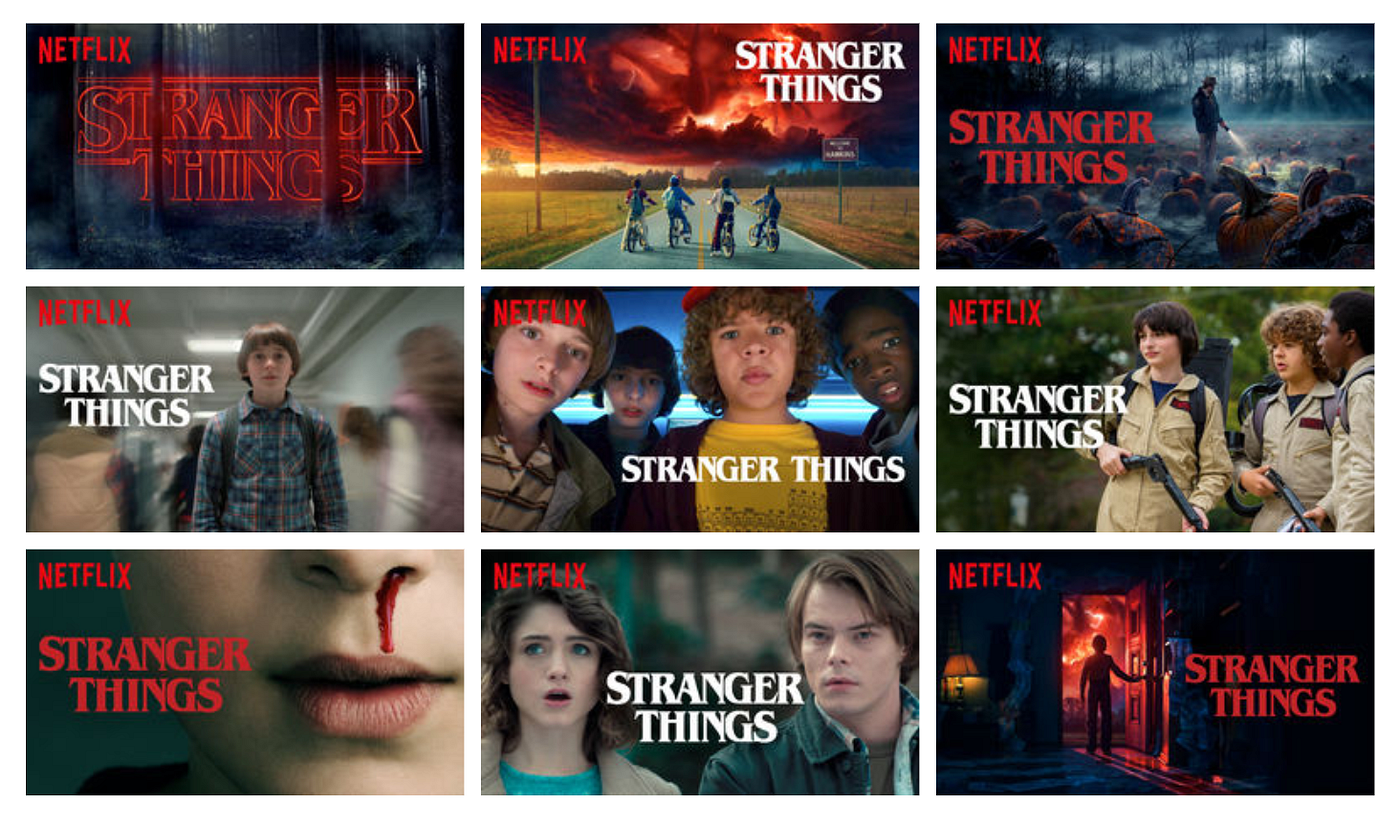
What’s easy to miss is how deep this goes. Netflix doesn’t just personalize what you see; it personalizes how you see it. The same movie can show different thumbnails to different users based on what they tend to respond to.
For example, Stranger Things alone has multiple artwork variations. Each is designed to highlight different themes, characters, or moments from the show.
A viewer who watches action-heavy content might see the dramatic red sky scene with the kids on bikes, while someone drawn to character-driven stories might see a close-up of the main cast.
Their personalization system is so effective that Netflix estimates their recommendation system saves them over $1 billion per year in reduced churn.
3. Dynamic content and adaptive interfaces
When personalization moves past recommendations, it usually shows up as dynamic content and adaptive interfaces.
Think of dashboards that change, navigation that prioritizes what you use, and features that surface only when they’re relevant.
The principle behind this is progressive disclosure. It helps reduce cognitive load by removing options that aren't relevant to you, while still giving power users access to advanced features when they need them.
Amazon demonstrates this at scale. Whenever you land on Amazon, you're seeing a personalized home page with sections built specifically for you.
If you recently bought a new comforter, the homepage may feature matching sheets and pillows. Browse for memory cards, and you'll see deals on adapters.
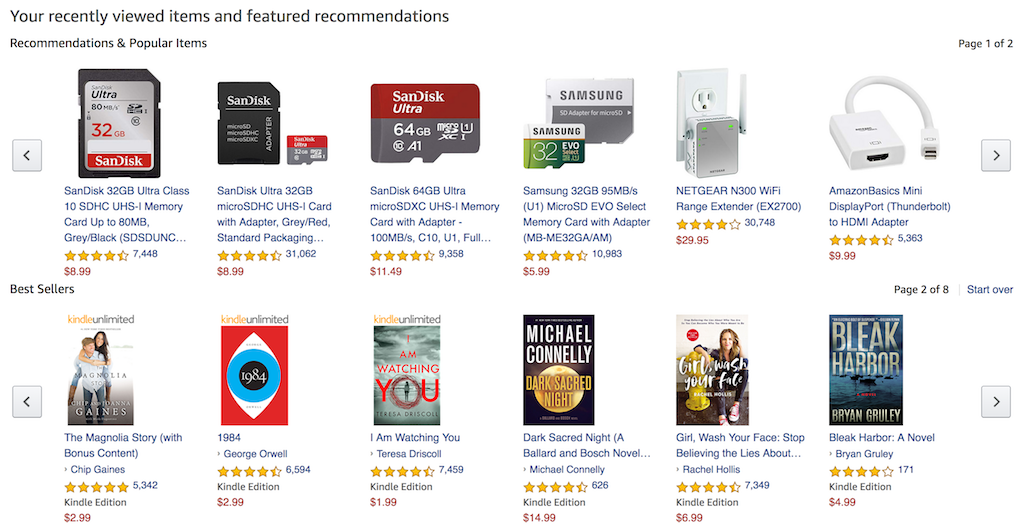
The entire page reorganizes itself around your recent purchases, browsing history, and what you've searched for.
To do this well, you will need to track feature usage and interaction patterns so the system understands different user needs.
4. Contextual triggers and micro-moments
When personalization is done at the right moment, it feels almost invisible. That’s what contextual triggers and micro-moments are about.
Instead of personalizing the entire experience, you personalize a specific point in time. For example, like when a user is most likely to need guidance, reassurance, or a push forward.
I think of micro-moments as short decision windows. You hesitate, get stuck, or hit a limit, and what the product does right then determines whether you continue, convert, or leave.
The triggers themselves fall into three types. Behavioral triggers activate when you take a specific action. Temporal triggers fire after a set period of usage or inactivity. Contextual triggers respond when you reach certain milestones or usage patterns. What matters is matching the trigger type to the user's actual need in that moment.
For example, Spotify uses a behavioral trigger tied to product limits. Free mobile users can skip six songs per hour. Hit that sixth skip, and Spotify prompts you to upgrade.
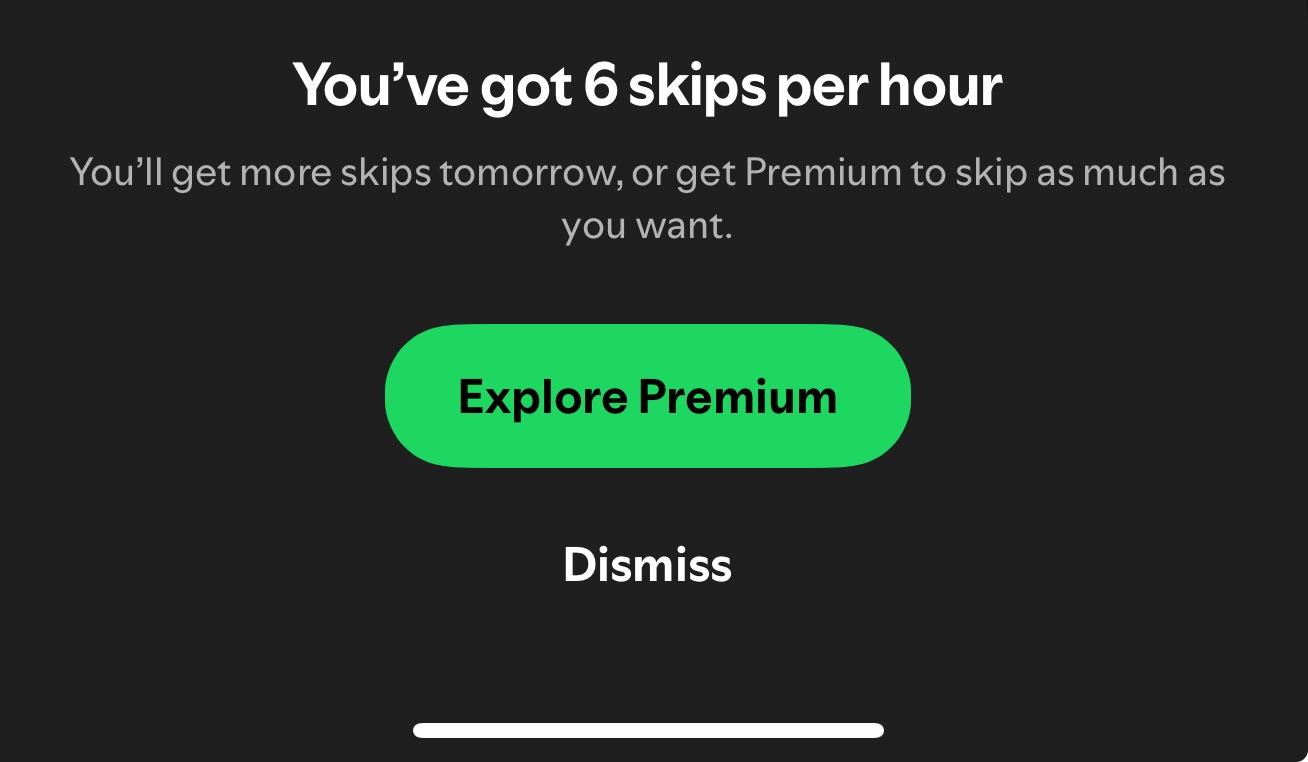
Why does this work? Because you're experiencing friction at the exact moment Premium would solve it. You're not being sold to, you're being offered a solution to a problem you're actively facing right now.
5. Show complexity only when needed
The challenge I often see with complex products is that they try to serve beginners and experts the same way. But this usually backfires. What both groups need is the right level of complexity at the right time.
The solution is building interfaces that grow with me. When I'm new, I see only what I need to get started. As I use the product more and demonstrate I'm ready for advanced functionality, those options become available.
For example, Notion does this really well. New users see pages with basic text blocks, headings, and checklists.
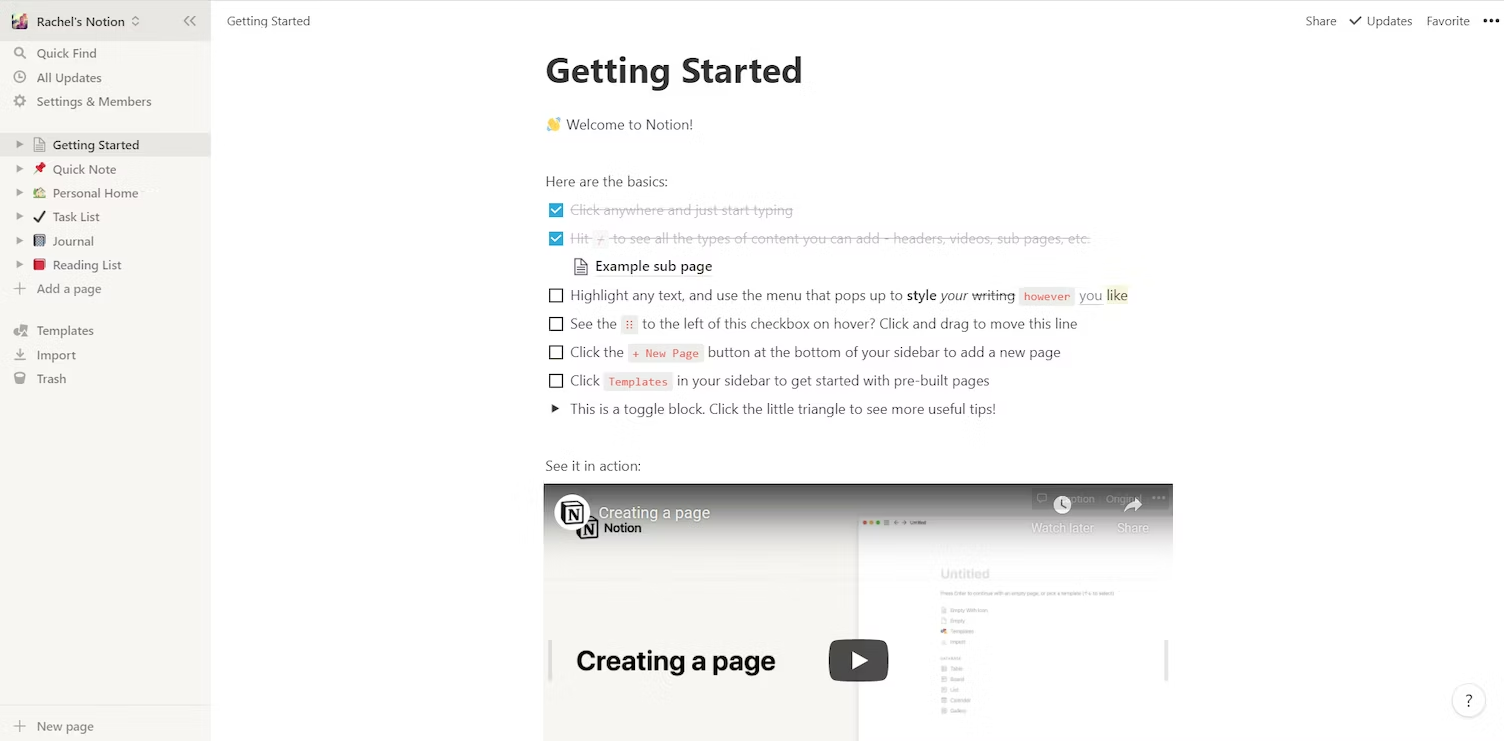
Image source: Userpilot
But as you explore, Notion gradually reveals its database features. You start with simple tables, then discover you can link databases together, create rollup properties, build complex filters, and write formula fields.
This keeps both groups happy. I don't abandon your product because it overwhelmed me on day one. I don't outgrow it six months later because the advanced features I need aren't there. The interface evolves with me.
6. Personalized search and discovery
When you type "shoes" into a search box, you probably expect to see shoes. But which shoes? That's where search personalization changes everything.
The best search systems don't show everyone the same results for the same query. They adapt based on your browsing history, what you've bought before, and what you've clicked on.
I like to think of personalized search as re-ranking, not reinventing. The system still understands your query, but it reshuffles results based on who you are, your browsing history, past purchases, and recent clicks.
That’s why two people searching the same term can see completely different outcomes.
The best example has to be Amazon. If you often browse running gear, “shoes” surfaces athletic footwear and related accessories. If you usually shop for formalwear, dress shoes rise to the top instead.
Behind the scenes, this is handled by a personalization layer that re-ranks results after the query is understood. The system blends language understanding with user-level signals to decide what matters most right now.
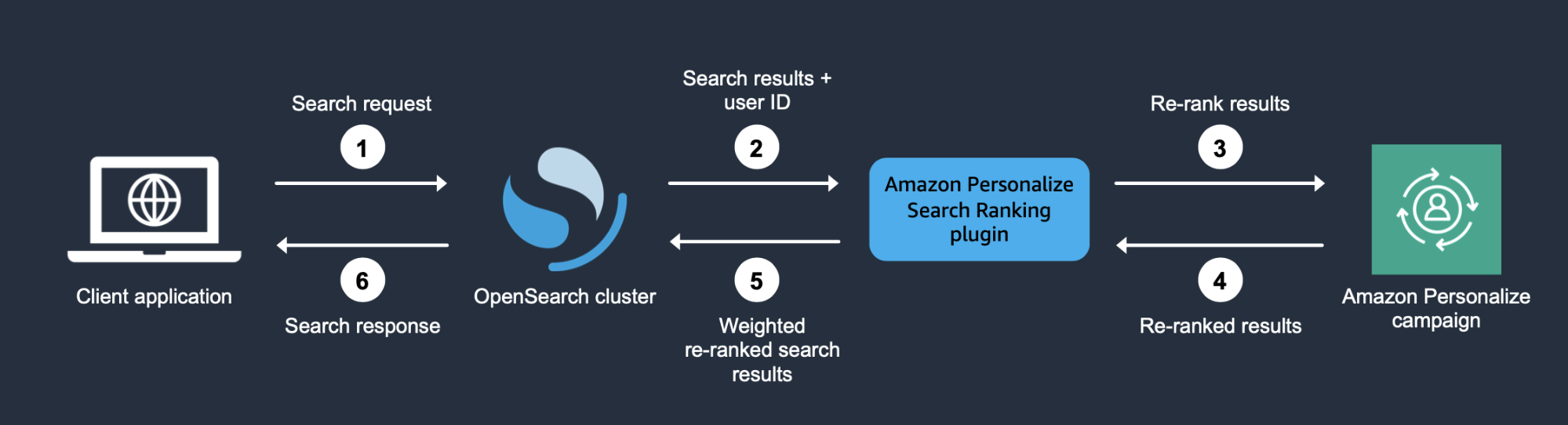
Image source: AWS Blog
Thanks to it, you spend less time scrolling through irrelevant results. You find what you need faster. You're more likely to buy something because what you're seeing matches what you want.
7. Location and context-aware experiences
Not all personalization requires watching what you do over time. Some of it can happen the moment you land on a site, based purely on where you are, what device you're using, and when you're visiting.
Let's look at ASOS as an example. Someone browsing from Berlin will see prices in Euros and read descriptions in German. Someone in Sydney accessing the same site in July will see winter clothes, even though it's summer in Europe.
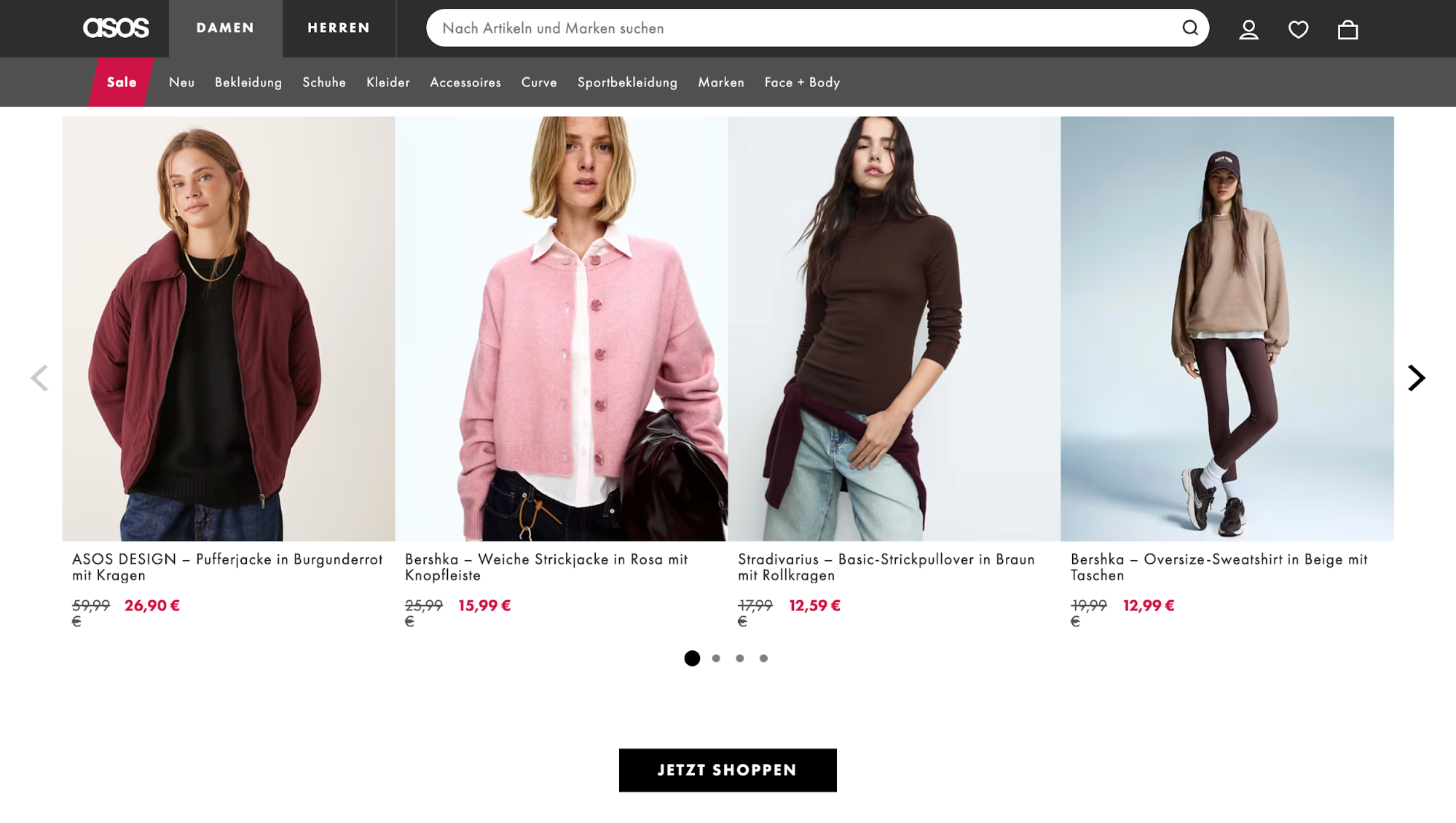
This type of personalization works through three main factors:
-
Location data signals identify where you're accessing from. This drives currency, language, seasonal relevance, and local holidays. This matters more than you might think, with stores supporting five or more languages seeing median conversion rates around 5.6%, compared to 1.6% for single-language stores.
-
Device context adapts the interface based on what you're using. With 60% of web traffic now coming from mobile devices, adapting your design to different mobile devices is a must. A few things you can do include making tap targets larger, simplifying navigation to reduce menu levels, removing hover-dependent interactions, etc.
-
Timing factors surface relevant content based on when you're visiting. You can use this to adjust what you promote. For example, a food delivery app should prioritize breakfast menus before 10 AM, lunch options from 11 AM-2 PM, and dinner choices after 5 PM.
8. Anticipate needs before users ask with predictive personalization
This is the most advanced form of personalization, which uses AI to predict what you'll need before you even think or look for it.
More specifically, products analyze historical behavior, purchase cycles, and long-term trends. Then they build a forecasting system from such data and leverage artificial intelligence (AI) to surface the right option for users at the exact moment.
A classic example I can think of is Amazon. As an e-commerce giant with decades of purchase data, Amazon basically set the blueprint for this.
They use predictive analytics to anticipate when you'll need product refills based on your purchase history and typical usage cycles.
Instead of waiting for you to search again, Amazon brings those predictions straight into your browsing experience. You’ll often see familiar items grouped into “Buy it again” sections, like this:
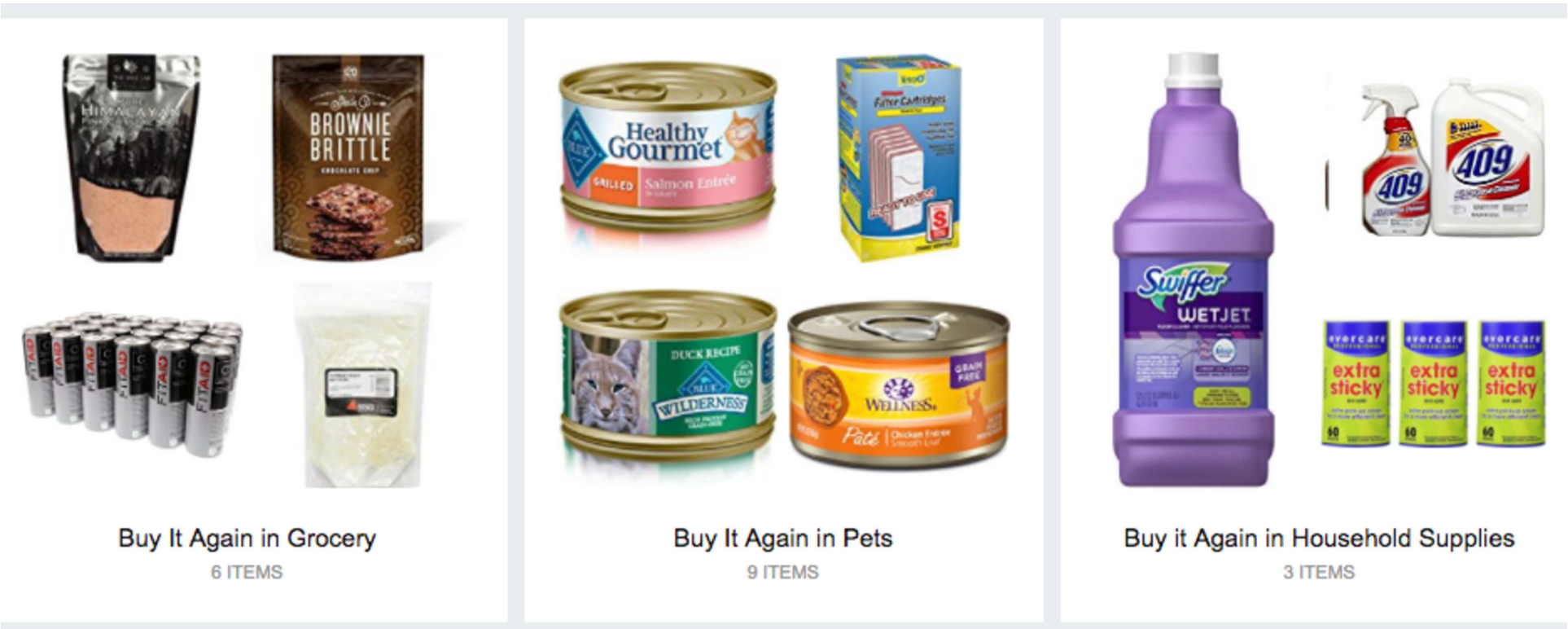
Image source: Amazon Science
These predictive refill programs now account for 23% of repeat purchases in consumable categories.
Nevertheless, this approach isn’t lightweight. It requires substantial historical data and mature machine-learning systems to avoid feeling creepy or wrong.
So, unless you have the infrastructure and data volume to do it well, I'd recommend starting with simpler forms of personalization first.
9. Collect data with consent
One of the biggest tensions in personalization is trust. I’ve seen the same pattern over and over, where users are only willing to share data when they understand the payoff.
Without transparency, that willingness collapses. In fact, 75% of consumers say they won’t buy from brands they don’t trust with their personal data.
Regulation has raised the stakes, too. Laws like GDPR in Europe and CCPA in California mean ethical data handling is a must.
You must get opt-in consent, collect only what’s necessary for stated purposes, and give users clear rights to access and delete their data.
Burying this in Terms of Service won’t cut it. Consent mechanisms must be specific, clear, and give users granular controls, like this:
Netflix is one of the clearest examples I’ve seen. Its Help Center openly explains how recommendations work.
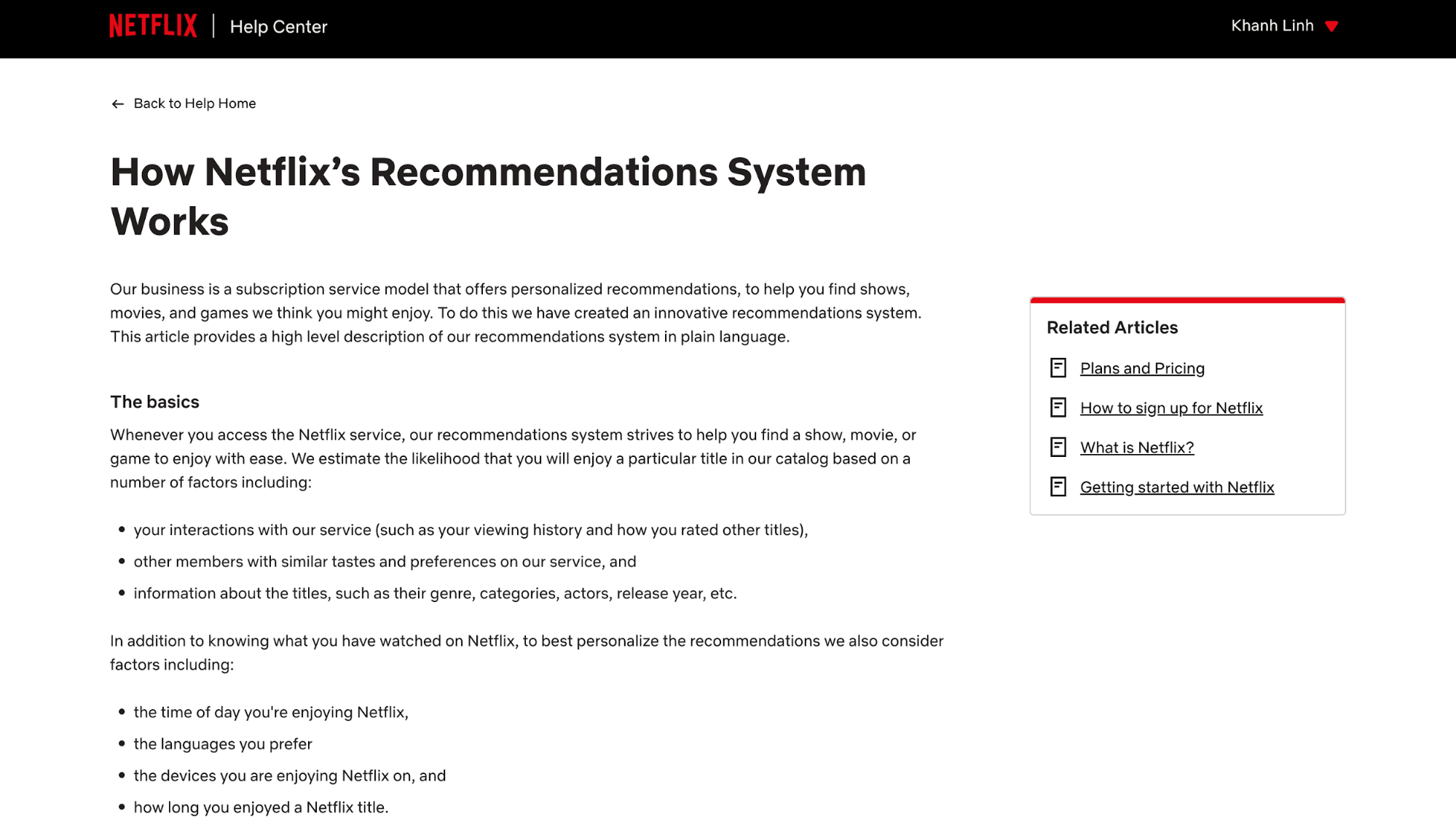
They list the exact signals it uses, such as watch history, searches, device usage, and explicitly state what they don’t use, like age or gender. That level of transparency makes the value exchange obvious, which is exactly why users stay comfortable opting in.
7 examples of user personalization
By this point, you’ve seen the theory, the systems, and the best practices behind personalization. Now let's move on to what it looks like when those ideas show up in real products.
1. Spotify: Discover Weekly's collaborative filtering magic
When I think of personalization done right, Spotify’s Discover Weekly is always the first example that comes to mind. Launched in 2015, it now lands in front of over 200 million users every Monday and has driven more than 100 billion track streams over its ten-year run. That kind of scale doesn’t happen by accident.
Under the hood, Discover Weekly blends a few systems together. Spotify uses collaborative filtering to spot listeners with similar tastes and surface what they’re enjoying. It layers in content-based filtering by analyzing song attributes like genre, tempo, and mood. On top of that, audio analysis helps the system understand the actual sound of a track, not just its metadata.
What I find especially smart is how Spotify keeps evolving the experience. In 2025, it introduced genre controls for Premium users, letting you nudge Discover Weekly toward specific styles without fully overriding the algorithm. That balance matters.
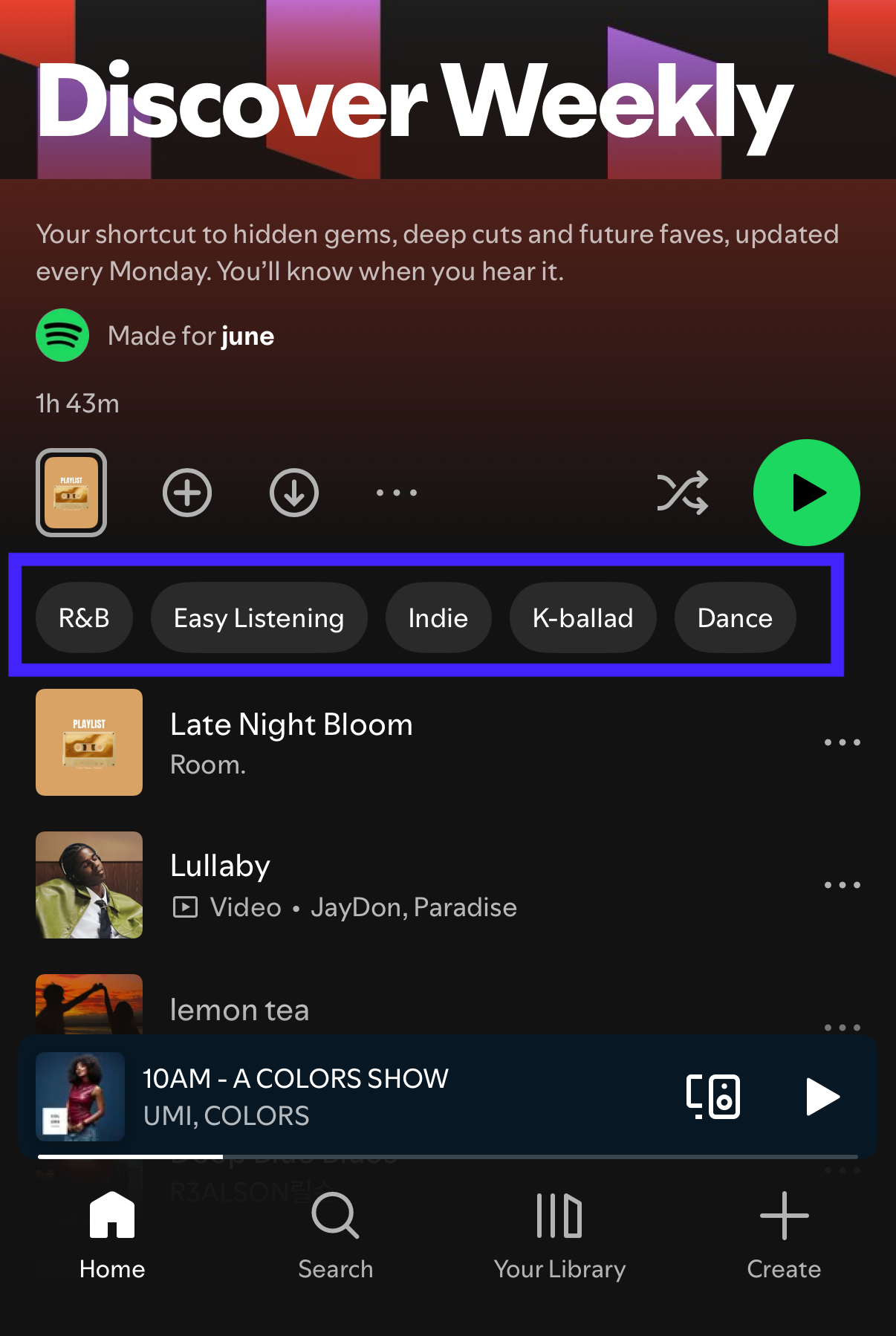
The real lesson here is that great personalization isn’t just about giving you more of the same. It works because Spotify mixes familiarity with just enough surprise to help you discover something new.
2. Amazon: 35% of revenue from recommendations alone
If you ever doubt how powerful personalization can be, Amazon is the reality check. Its recommendation engine is estimated to drive around 35% of the company’s total revenue, which tells you this is core to their business.
What stands out to me is how deeply personalization is woven into the entire experience.
You see it in sections like Inspired by Your Browsing History, Customers Who Bought This Also Bought, and Frequently Bought Together.
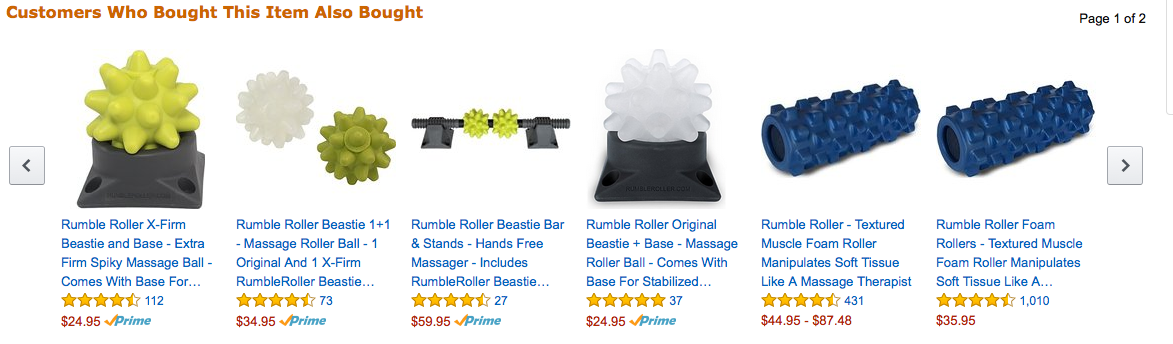
Image source: Rejoiner
It shows up in personalized search results, autocomplete suggestions in the search bar, follow-up emails, and even the ads you see off-platform.
Amazon pioneered collaborative filtering at a massive scale. Plus, it continues refining those systems with AI and machine learning as user behavior evolves.
The key lesson here is not only about smarter algorithms, but also coverage. With over 3.6 billion visits per month in 2025 and nearly 38% of the US ecommerce market, Amazon treats every touchpoint as a chance to personalize.
Therefore, if personalization matters, it needs to follow users through the entire user journey.
3. Sephora: Beauty quiz-to-purchase personalization
Sephora is a great example of how personalization works best when products are complex, and choice overload is real.
If you’ve ever shopped for skincare or makeup, you know how easy it is to feel unsure.
Shopping online with Sephora often starts with beauty quizzes. They ask you things like skin type, tone, concerns, and goals, and then use those answers to recommend specific products.
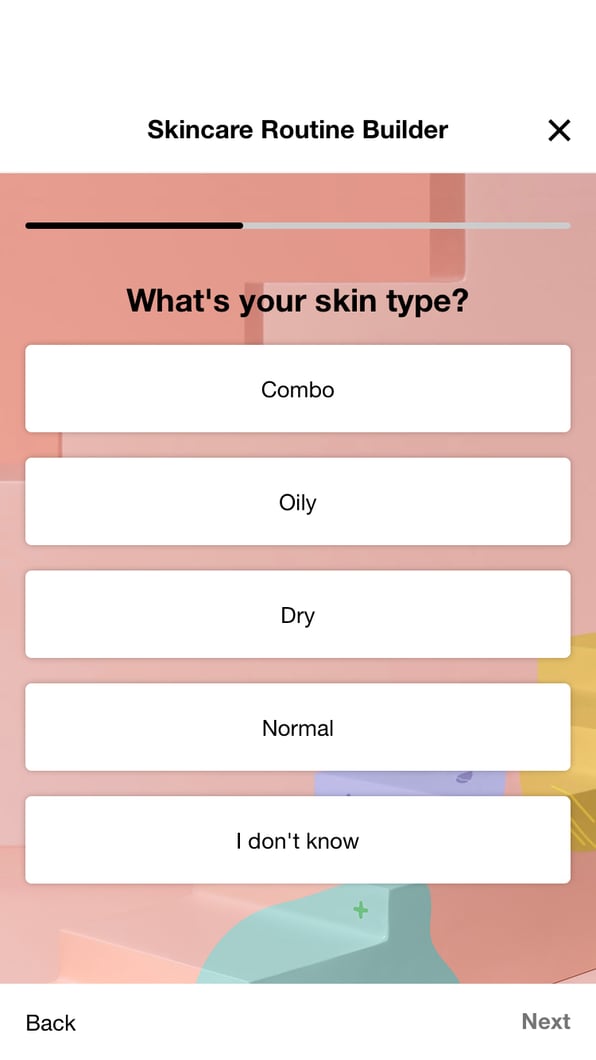
Image source: Popsugar
I like this approach because it turns product discovery into something almost playful, while quietly collecting explicit preferences.
That data doesn’t stop at the quiz. Sephora follows up with personalized emails based on purchase history and browsing behavior, and ties everything into its Beauty Insider loyalty program.
With over 31 million members, the program offers tiered rewards like discounts, free products, and early access based on how and what you buy. In an interview with Retail Dive, Sephora’s head of loyalty, Emeline Berlind, confirmed that the program contributes to the majority of the company’s sales.
So, when users can’t easily articulate what they need, quizzes are an effective way to guide them and collect data for personalization.
4. Nike: Multi-app ecosystem driving personalized fitness journeys
What I find most impressive about Nike’s personalization is how everything connects. Nike doesn’t treat its apps as isolated products.
The Nike App, Nike Run Club (NRC), and Nike Training Club (NTC) work together to build a continuous picture of how you train, what you care about, and what you might need next.
For example, inside the Nike App, when you start a run, you can select the exact pair of shoes you’re wearing. Those shoes aren’t just listed, they’re tracked.
You can view all your shoes, assign mileage targets (with a default of around 500 km), edit details, and even retire pairs once they’ve hit their limit. That data then follows you across runs.
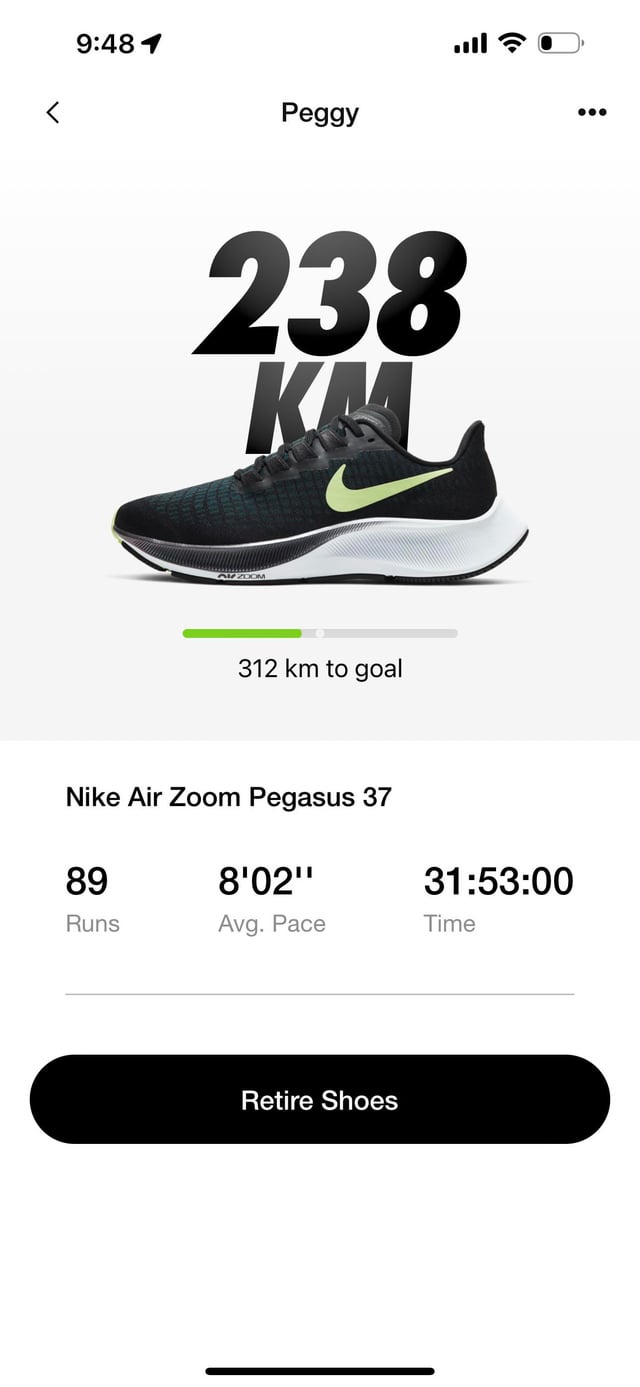
Therefore, if you have multiple touchpoints, let all the data flow between them. That’s how you move from isolated experiences to a genuinely personal journey.
5. Agoda: Behavioral discovery that feels like mind-reading
Agoda is a strong example of contextual personalization efforts. They rarely ask you to set preferences up front, yet the app quickly adapts to your browsing habits.
The places you search for, the dates you check, the neighborhoods you explore, and the listings you save all quietly shape what shows up next.
What works especially well is the timing. When you’re booking homes in Japan, Airbnb doesn’t just show you more hotel options; it starts surfacing local experiences and activities right when you’re shifting from planning to imagining the trip.
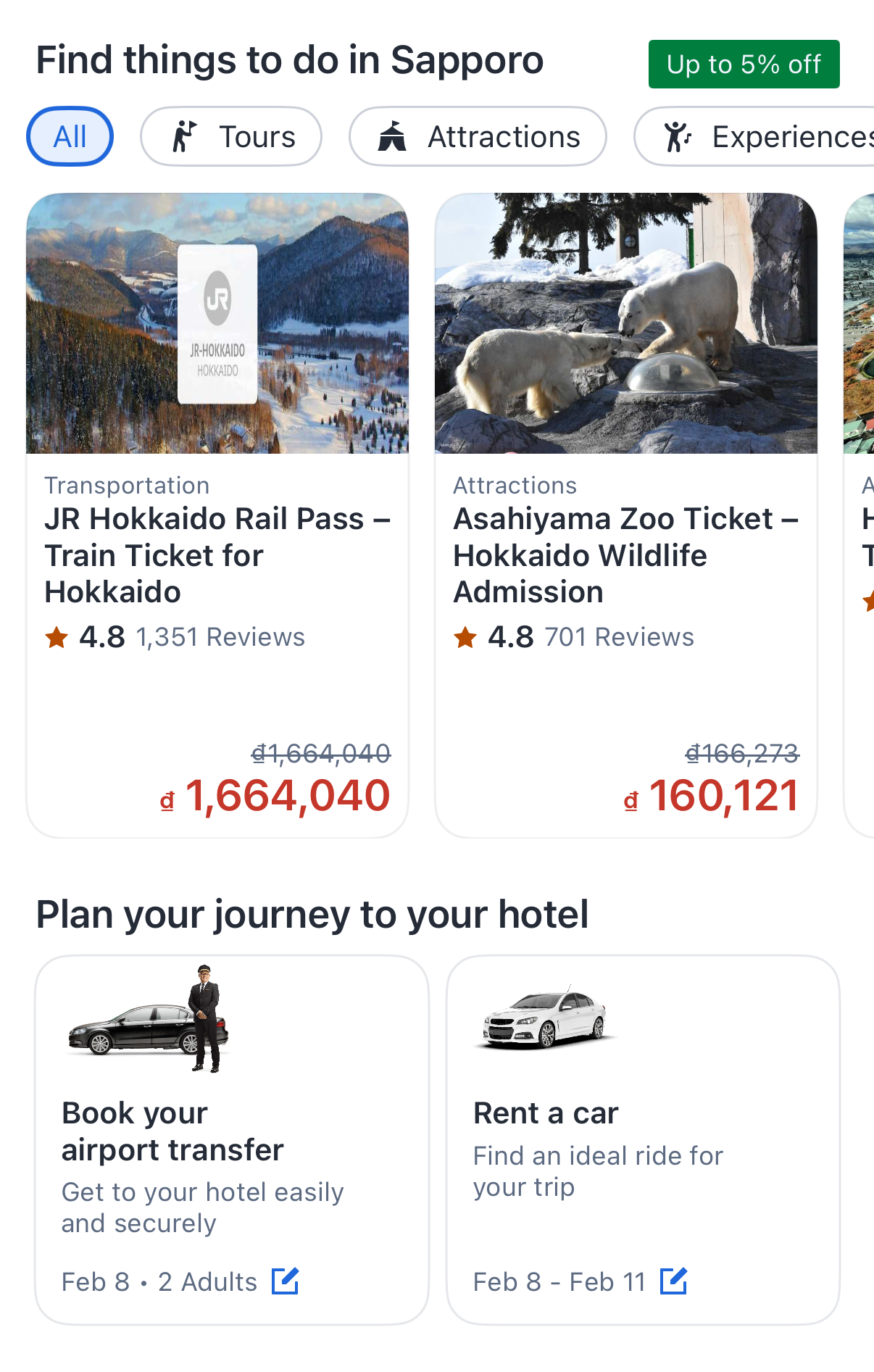
To me, this creates a sense of guided discovery. You feel like the app understands your travel style without you having to explain it.
6. Stitch Fix: AI stylist replacing the fitting room
Stitch Fix is my go-to example when people ask whether AI can handle something as subjective as style.
You start by taking a style quiz, sharing preferences, sizes, and fit concerns. Algorithms analyze the input alongside historical data, such as what similar customers have kept or returned, how items fit different body types, and current trends. Then a human stylist steps in to review the recommendations and make the final call.
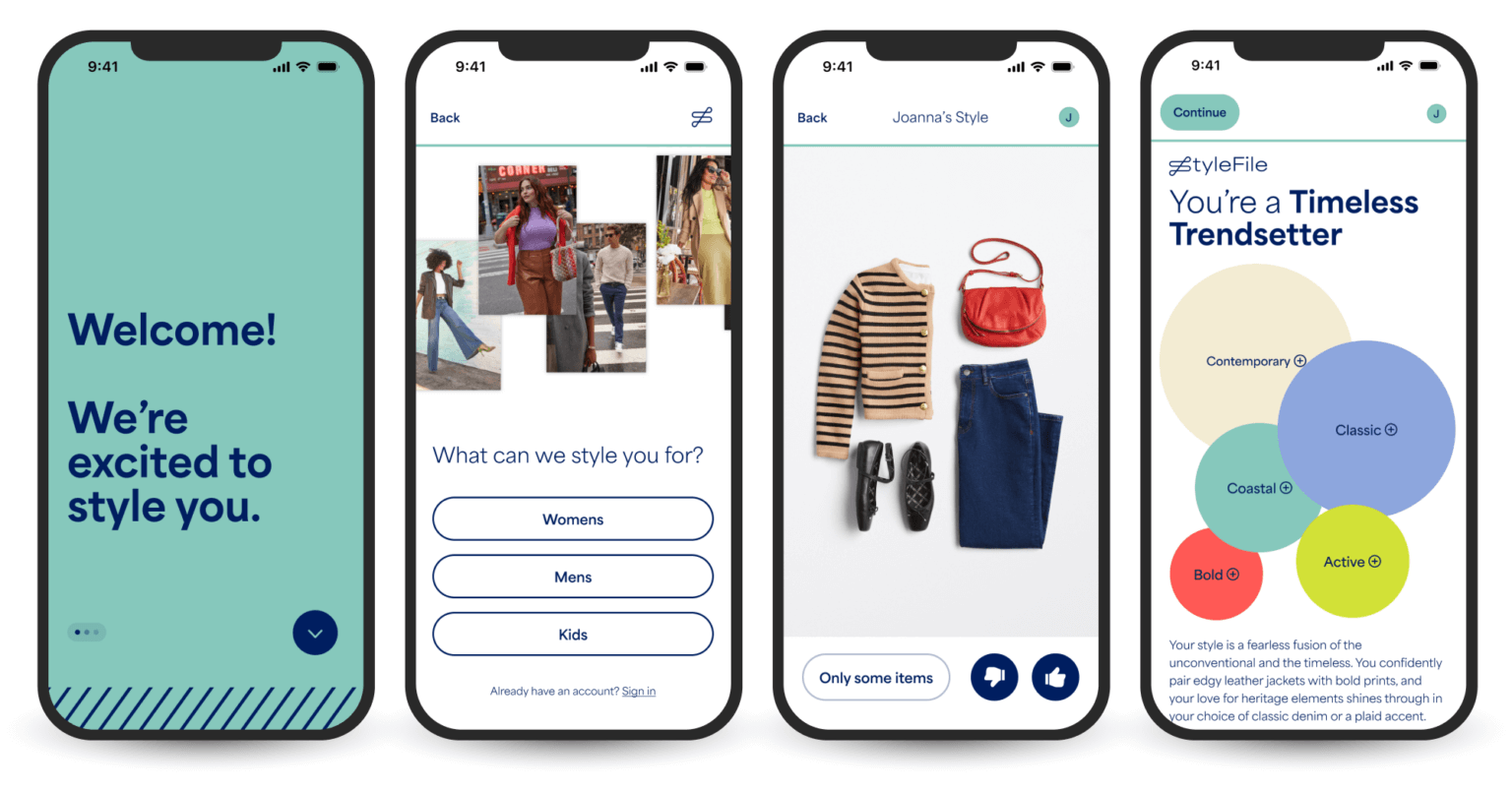
Image source: Retail Touchpoints
Finally, you receive a “Fix” with five curated items, and you pay a $20 styling fee that’s credited toward anything you keep.
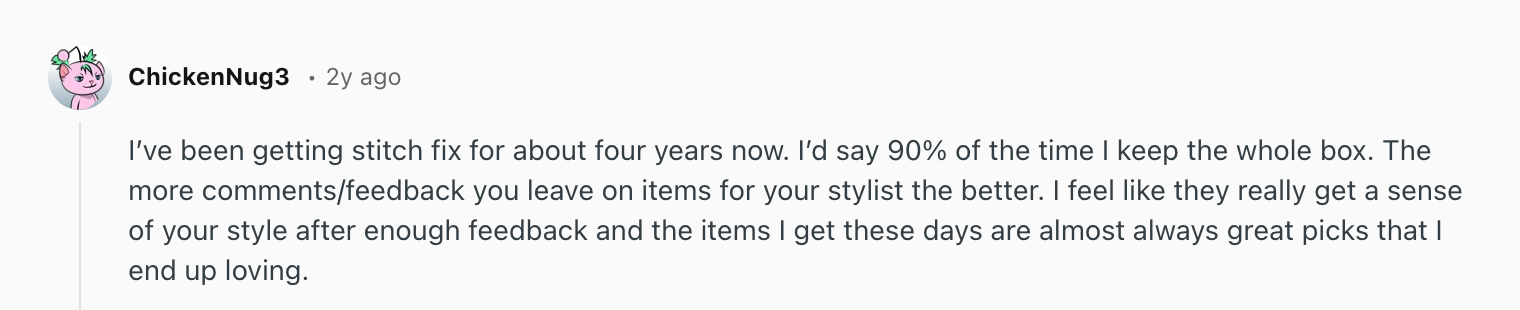
What makes the system even more powerful is the feedback loop. You rate each item, explain why it worked or didn’t, and that input feeds back into both the model and the stylist’s future decisions.
The approach clearly resonates with users. Across customer discussions and reviews, most users who stick with Stitch Fix long-term report dramatically higher satisfaction rates as the system learns their preferences.
I think the key takeaway here is recognizing when your product needs this hybrid approach. For complex, subjective decisions like fashion or design, pure algorithms miss nuance. Meanwhile, pure human curation doesn't scale.
So combining both lets you deliver personalization at scale without losing the judgment that makes recommendations useful.
7. Duolingo: Adaptive learning paths that respond to performance
Duolingo is a strong example of personalization working moment by moment, not just at onboarding. Instead of pushing everyone through the same lessons, the app continuously adapts based on how you perform.
If you struggle with a concept, Duolingo slows things down and brings that topic back more often. If you move quickly and make fewer mistakes, it accelerates your progression so you don’t get bored.
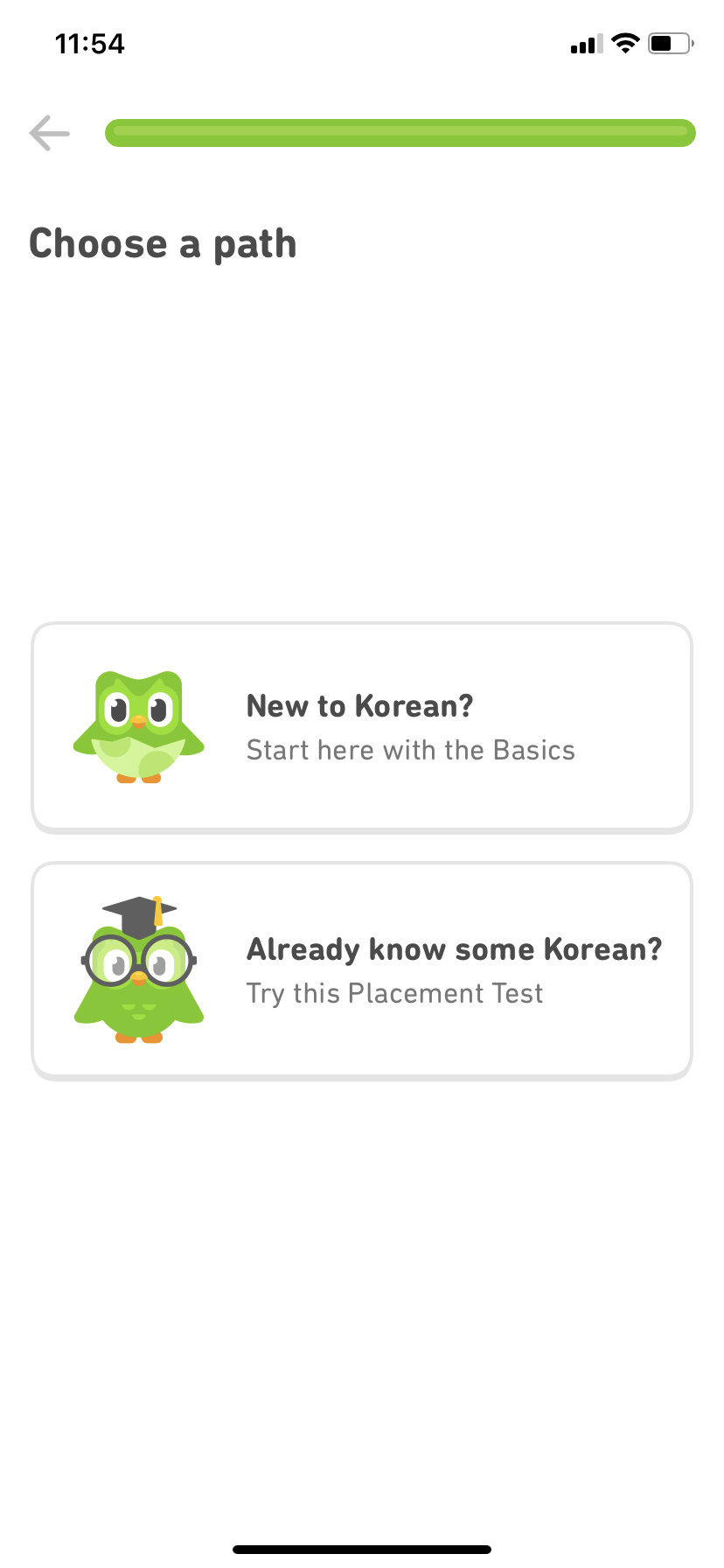
Image source: Good UX by Appcues
I find this effective because the personalization is subtle. You’re not constantly told that the system is adjusting; you just feel appropriately challenged.
That’s reinforced early on when Duolingo asks about your goals, like whether you’re learning casually or aiming for real fluency. Those answers shape daily targets, lesson pacing, and practice intensity.
So the key takeaway here is about flow. Learning products work best when users stay in that narrow band between boredom and frustration. By adapting difficulty in real time, Duolingo keeps you moving forward without overwhelming you.
Build personalization for effective UX!
If there’s one thing I’ve learned from these examples, it’s that personalization works best when you don’t try to do everything at once.
Start with one tactic that makes sense for your product and get that right first. Study the companies above and focus on the patterns. What fits your users, your data, and your industry?
Personalization is iterative by nature. You start simple, measure how users feel, and refine based on real behavior, not assumptions.
And while personalization is no longer optional, it doesn’t have to be overwhelming. Build it step by step, and you’ll create experiences that feel genuinely helpful rather than forced.
When should you use personalization in UX (and when should you avoid it?)
Personalization is most effective when it improves clarity and reduces friction without making the experience feel unpredictable. It works well for repeat usage patterns, role-based dashboards, and content discovery, where relevance directly improves engagement.
You should avoid personalization when it hides core navigation, removes user control, or relies on weak data signals. If the experience becomes confusing or feels intrusive, personalization can hurt trust and retention instead of improving it.
Why is personalized user experience important for retention and conversion?
Personalized user experience is important because it reduces friction and helps users reach value faster. When users don’t have to filter irrelevant content or figure out what matters, the product feels smoother, more intuitive, and easier to stick with.
When experiences feel generic, users often abandon the product—even if it’s good—because competitors deliver a more relevant experience by default.
What are the main types of personalized user experience?
The three main types of personalized user experience are explicit personalization, implicit personalization, and contextual personalization. Each type uses different signals to adapt the experience and works best in different situations.
What data do you need to build a personalized user experience?
To build a personalized user experience, you need signals like behavioral data, transactional data, and contextual data.
Behavioral data includes clicks, views, and feature usage. Transactional data reflects intent through purchases or cart activity. Contextual data includes device type, location, and timing.
What makes personalization feel helpful instead of creepy?
Personalization feels helpful when users understand the benefit and the experience stays relevant without crossing privacy boundaries. When personalization is accurate and timely, it feels like the product is removing effort rather than watching the user.
Users are more willing to share data when the value exchange is clear, but trust collapses quickly when personalization feels intrusive, unexplained, or based on signals users didn’t knowingly share.
What are examples of personalized user experience done well?
Good personalized user experience shows up in recommendations, adaptive interfaces, and contextual triggers that match user intent. Strong examples include Spotify’s Discover Weekly, Netflix’s recommendation-driven browsing, and Amazon’s personalized homepage and search.
These products personalize not just what users see, but when they see it and how it’s presented. For example, Netflix can even personalize thumbnails based on what different users tend to click, which helps reduce browsing time and increase engagement.
How do you implement personalized user experience without overdoing it?
To implement personalized user experience well, start with one personalization tactic and improve it before expanding. Personalization works best when it’s selective, iterative, and based on real behavior rather than assumptions.
Start simple, measure how users respond, and refine the experience over time. When done step by step, personalization feels genuinely helpful instead of forced or confusing.
